Chaotic inventory management costs trade businesses real money every day: employees spend up to 45 minutes per shift searching for materials, capital tied up in stock sits idle, and projects get delayed because parts are missing. Businesses that solve this with a lean inventory solution can quickly recover several thousand euros per employee per year, without ERP, without an IT project.
Introduction to Inventory Management in Trades
The Importance of Efficient Inventory Processes in Daily Operations
The best inventory management in trades without ERP is far more than just an administrative tool for small and medium-sized businesses. It is the difference between profitable and loss-making projects. Every day, trade businesses lose valuable time and money through inefficient inventory processes. An electrician who discovers on the construction site that important cables are missing. A plumbing business that orders expensive fixtures twice because no one knew they were already in stock. A carpentry shop that cannot accept a lucrative project immediately because it's unclear whether enough wood is available.
These scenarios repeat daily in German trade businesses. The cause is rarely a lack of willingness to organize, but rather missing practical tools that fit the reality of trades. While large industrial companies work with complex ERP systems, trade businesses need solutions that work quickly without requiring an IT expert in-house.
Well-functioning inventory processes mean concretely: Technicians know immediately on the construction site which materials are available. Reorders happen automatically before materials run out. Tools are no longer bought twice because no one knows where they are. Projects can be planned reliably because material inventory is transparent. These advantages sound self-evident, but in practice, they are still wishful thinking for many businesses.
Why Many Trade Businesses Don't Use ERP
The decision against an ERP system is usually a conscious and understandable choice for trade businesses. ERP systems were originally developed for large manufacturing companies and bring complexity that simply isn't needed in trades. A plumbing business with ten employees doesn't need production planning across multiple plants, no complex cost center accounting, and no multi-stage approval processes.
Investment costs for ERP systems often start at several thousand euros for licenses and weeks of training. Many master craftsmen report failed ERP projects where, after months of implementation, the system was so complicated that employees switched back to Excel lists. Implementation ties up valuable working time that is missing in day-to-day operations.
Particularly critical is the fact that classic ERP systems were not designed for mobile use. But tradespeople work largely outside the workshop, on construction sites, in stock rooms, or on the road between customer appointments. A system that only works on the office PC simply doesn't fit the reality of modern trade work. The best inventory management in trades without ERP, on the other hand, must work exactly where the work happens: mobile, fast, and uncomplicated, often as a specialized Sortly alternative or a modern Excel alternative. The range of inventory management apps for the trades is now so broad that there is a suitable solution for every business.
Challenges in Inventory Management Without ERP Systems
Error-Prone Paper-Based Processes
The classic paper-based process is still surprisingly widespread in German trade businesses. At first glance, it seems practical: A technician takes material from stock and notes it on a piece of paper. At the end of the week, these notes should be transferred to the system. In reality, however, something else happens. Notes get lost, become illegible, or end up crumpled in a pocket and accidentally go through the washing machine. The result: No one knows exactly which material was actually consumed.
These seemingly small information losses add up to significant economic damage. Material is consumed but not invoiced to the customer because proof is missing. Inventory in accounting doesn't match reality, leading to nasty surprises during inventories. It becomes particularly problematic when multiple employees have simultaneous access to stock, but each maintains their own system of note papers.
A painting business from Cologne reported a typical case: Over several months, high-quality paints worth several thousand euros were regularly missing during inventory. Suspicion initially fell on theft. The resolution was more mundane: Employees had taken material for projects but noted it on papers that never made it to accounting. The material was consumed and charged to the customer but never deducted from inventory. The difference between target and actual grew larger over months.
Lack of Transparency in Inventory
Without digital inventory management, many businesses have permanent uncertainty about actual inventory levels. The question "Do we still have enough material for next week's project?" can often only be answered by checking stock. This not only costs time but leads to reactive rather than proactive work. Instead of planning projects securely, businesses work in "let's see what's still there" mode.
It becomes particularly critical for businesses with multiple inventory locations. An electrical business might have a main stock room in the workshop, material depots in company vehicles, and possibly an external storage location for large projects. Without a central digital overview, no one knows where which material is located. The consequence: Expensive material is reordered even though it's three streets away in the van.
The lack of transparency affects not only management but especially employees who work with it daily. Technicians spend valuable time on phone calls to the workshop to clarify whether material is available. Dispatchers cannot plan projects reliably because they don't have an overview of the material situation. These information gaps lead to frustration in the team and missed business opportunities when orders must be declined even though sufficient material would be available.
Time Loss Through Manual Processes
The biggest hidden cost factor in manual inventory management is time. Every manual inventory recording, every Excel list that must be maintained, every reorder that is triggered manually costs valuable minutes. These minutes add up to hours, the hours to days. A realistic calculation for a medium-sized trade business looks like this: If three employees each spend twenty minutes daily on inventory organization, that's five hours per week, about twenty hours per month, and 240 hours per year of pure organizational effort.
At an average hourly rate of fifty euros for skilled workers in trades, this corresponds to an annual loss of 12,000 euros! Money that could have been earned with productive work. Added to this are the costs of errors: Incorrectly recorded inventory leads to wrong orders, urgent reorders to higher procurement costs, missing parts to project delays and dissatisfied customers.
Manual inventory management has another disadvantage: It only works as well as the discipline of those who maintain it. In stressful phases, when there's especially much to do, inventory maintenance becomes a bothersome side task that gets postponed. But exactly then, when many projects run in parallel, precise inventory knowledge would be most important. The best inventory management in trades without ERP breaks this vicious cycle by making processes so simple that they work even under stress.
The Best Inventory Management in Trades Without ERP, What Does That Mean?
Criteria for an Optimal Solution
The best inventory management in trades without ERP is characterized by one fundamental property: It adapts to the way trades work, not the other way around. While ERP systems demand that businesses adapt their processes to the software, a good inventory solution should digitize and improve existing practice without turning everything upside down.
The first criterion is speed. In trades, every minute counts. An inventory solution must be so fast that recording a withdrawn material takes less time than writing a note. If the system is slower than the previous method, it won't be accepted, no matter how many features it offers. The reality on the construction site doesn't allow cumbersome input forms with twenty required fields.
The second criterion is reliability. Trade businesses need systems that work even when the workshop manager is on vacation for two weeks or when a new apprentice starts. The software must be so robust that even under difficult conditions like poor internet connection, dusty environment, hectic on the construction site, the basic functions remain available. A system that fails at the smallest disruption is useless in trades.
The third criterion is cost-effectiveness. The total costs of an inventory solution must be in a reasonable ratio to the benefit. This isn't just about license costs, but the total calculation: acquisition, training, ongoing costs, and time spent on maintenance. The best inventory management in trades (without ERP) pays for itself within a few months through saved time, reduced material losses, and better project planning.
Practicality, Mobility, Automation
Practicality means concretely that an electrician who just took a NYM 3x1.5 mm cable from stock for the construction site can document this with just three taps on their smartphone. No login to a separate system, no complicated menu structures, no forms with dozens of fields. The software ideally recognizes who is taking material and to which construction site it must be assigned.
Mobility in trades is not a nice additional feature but an absolute basic requirement. Work happens everywhere, just not at the desk. Technicians work at the customer's, technicians on changing construction sites, material is brought directly from the supplier to the construction site. An inventory solution that only works on the PC in the workshop ignores the reality of modern trade work. Every employee must have access to current inventory information on their smartphone and be able to record movements.
Automation is finally the key to time savings. The best inventory management in trades independently recognizes when inventory is running low and triggers ordering processes before material runs out. It learns from past projects which materials are typically needed together and makes intelligent suggestions. It recognizes patterns in consumption and warns in time when unusually high material consumption occurs. This automation frees tradespeople from constantly checking stock and from the mental burden of always having to think about reorders. Autonomous software can even completely free from manual reorders.
Important Features of Modern Inventory Management Without ERP
Mobile App Usage
The mobile app is the heart of every modern inventory management in trades. It transforms every employee's smartphone into a mobile inventory terminal. A plumbing installer who is currently loading their van with material opens the app, scans the barcode of the material used, and confirms the withdrawal with a tap. The information is immediately in the system, inventory is updated, and if the material falls below minimum stock, a reorder is automatically triggered.
The real strength of mobile inventory management shows in everyday situations that previously led to problems. A project manager stands at the customer's and is asked if an additional order next week would be possible. Previously, they would have had to say: "I need to check in the workshop first if we have the material." Today they open the app, see availability within seconds, and can commit directly. This not only makes a professional impression but also secures spontaneous orders that would otherwise be lost.
Modern mobile inventory solutions also offer offline functionality. On construction sites in basements or rural areas without mobile reception, material withdrawals can be recorded. As soon as an internet connection is available again, the app synchronizes automatically. This robustness is crucial because tradespeople can't wait until they're in an area with good reception again. Work must continue, and inventory management must keep up.
Barcode Scanning
Barcode scanning eliminates the biggest weakness of manual recording: human errors in input. An electrician who has twenty different cable types in stock no longer needs to think about whether the correct article name is "NYM-J 3x1,5" or "NYM 3x1,5mm²". They simply scan the code, and the system knows exactly which material it is. This not only reduces errors but also speeds up the process enormously. Erfahre mehr über die Vorteile der barcode inventory management in the trades.
The technology is so mature today that scanning works with any standard smartphone. Dedicated barcode scanners are not strictly necessary, even if they're more practical in some environments. The smartphone camera is completely sufficient to reliably capture codes. Many materials already come from the manufacturer with barcodes, so no additional labeling is needed. For own products or loose materials, simple label printers can be used that cost less than an average cordless drill.
Barcode systems also enable precise traceability. When a customer complains months later that an installed part is defective, it can be exactly traced when which batch of which material was used. This protects against unjustified complaints and helps in justified warranty cases to quickly find the origin of the problem. In industries with strict documentation requirements like electrical engineering or in the medical field, this traceability is not only practical but legally required.
User-Friendly Inventory Management
User-friendliness decides whether a system is used in daily operations or disappears in a drawer. The best inventory management is so intuitively designed that a new employee can work productively with it after a five-minute introduction. Complicated menu structures, cryptic technical terms, or nested settings have no place in a tradesperson's inventory solution.
Good inventory management shows the most important information at a glance. Which materials are critically low? Which articles are used most frequently? Where are the largest inventories currently located? These questions must be answerable within seconds, not after browsing through several submenus. Visual elements like traffic light colors help: Green for sufficient inventory, yellow for materials that should soon be reordered, red for acute shortages.
Inventory management must also be able to represent different inventory locations. An electrical business might have a main stock room, three service vans, and a parts storage for larger projects. The software must transparently show where which material is located and enable transfers between inventory locations with minimal effort. When a technician brings material from their vehicle back to the main stock room, that should be a matter of ten seconds, not ten minutes. A modern team inventory management ensures that all employees are on the same page.
Automatic Alerts & Minimum Stock Levels
Automatic alerts are the key to ensuring trade businesses never again stand in the middle of a project without material. The system continuously monitors all inventory and compares it with defined minimum quantities. As soon as a critical value is undershot, responsible persons receive a notification, via app, email, or SMS, depending on urgency.
The intelligence lies in the intelligent setting of minimum stock levels. These should not be static but oriented to actual consumption patterns. A material used every day needs higher minimum stock levels than specialty parts only needed for specific projects. Modern systems analyze historical consumption and automatically suggest sensible minimum stock levels. A painting business that regularly needs facade paint in spring and summer but hardly in winter should have season-dependent minimum stock levels.
This function becomes particularly valuable in combination with automated ordering processes. When a minimum stock level is undershot, the system can not only warn but directly trigger an order with the preferred supplier. Typical order quantities are considered so that unnecessarily small or large quantities aren't ordered. A plumbing business that normally always orders ten pieces of a certain valve will also receive this quantity in automatic ordering, even if technically three pieces would suffice. This optimizes procurement costs and utilizes volume discounts.
Advantages of Specialized Inventory Solutions Over ERP Systems
Low Costs
The cost difference between specialized inventory solutions and ERP systems is dramatic. While ERP implementations quickly reach five-figure amounts, modern inventory management apps start at monthly costs of fifty euros. Selbst wenn man Barcode-Scanner und eventuell zusätzliche Smartphones für Mitarbeiter einrechnet, liegt die Gesamtinvestition im niedrigen vierstelligen Bereich. Costs that typically pay for themselves within three to six months.
The low costs arise from the lean feature profile. Während ERP-Systeme versuchen, alle Unternehmensprozesse abzubilden, konzentrieren sich spezialisierte Lagerlösungen ausschließlich auf das, was wirklich benötigt wird: Bestandsverwaltung, Materialentnahmen, Nachbestellungen und Inventur. No overloaded modules for personnel planning, financial accounting, or production control that no one uses anyway. This focus makes the software not only cheaper but also better at what it does.
Also important is the aspect of hidden costs. With ERP systems, high consulting costs, individual adaptations, and expensive training often come on top of license fees. Specialized inventory solutions, on the other hand, are designed so they can be implemented without external consultants. Most providers offer video tutorials, online support, and a smooth onboarding process. A trade business can thus introduce the solution internally without causing external costs.
Quick Implementation
While ERP implementations take weeks or months, specialized inventory solutions are often operational within a day. The process is typically simple: Download software or open in browser, enter master data of the most important materials, define minimum stock levels, create employees, and get started. Many systems offer import functions for Excel lists, so existing article lists don't need to be laboriously re-entered.
Quick implementation has a psychological advantage: The team sees results immediately. Anstatt wochenlang in ein abstraktes System zu investieren, das vielleicht irgendwann funktioniert, erleben Mitarbeiter bereits am ersten Tag konkrete Verbesserungen. A technician scans their first material, inventory is updated, and at the next look into the system, everyone sees the current situation. This quick success motivates further use and overcomes natural skepticism toward new systems.
Quick implementation also means businesses stay flexible. If it turns out that a solution doesn't fit after all, only a few days have been invested, not several months. This low entry barrier makes it easier to take the step toward digitalization at all. Many businesses have avoided software projects in the past because they had bad experiences with lengthy implementations. Specialized inventory solutions break through this threshold.
No Training Barriers
A central advantage of lean tools is minimal training necessity. The systems are designed to be self-explanatory. A smartphone can be operated by practically anyone today, and modern inventory solutions use exactly this familiarity. The gestures and operation concepts correspond to what people know from other apps: Swiping, tapping, scanning. There are no proprietary user interfaces that must be laboriously learned.
This is particularly important for businesses with employees of different generations. Während jüngere Mitarbeiter mit Apps groß geworden sind, haben erfahrene Handwerksmeister manchmal Berührungsängste mit Technik. Eine intuitive Lagerlösung überbrückt diese Kluft. Wenn ein sechzigjähriger Werkstattleiter sieht, dass er mit seinem Smartphone einfach einen Code scannen kann, anstatt umständlich am PC eine Excel-Liste zu pflegen, ist der Nutzen sofort erkennbar. Acceptance increases dramatically when the new system is simpler than the old method.
Training is usually limited to a short introduction of thirty minutes in which the basic functions are shown. Record material withdrawal, check inventory, trigger reorders, these are the core functions everyone must master. Advanced functions like inventories or reports can then be learned by individual persons as needed. This graduated complexity prevents employees from being overwhelmed by too many functions.
Flexibility for Small Businesses
Small trade businesses have special requirements for flexibility. Business models change, specializations are adjusted, the team grows or shrinks. Software must be able to keep up with this dynamic without expensive adaptations being necessary each time. Specialized inventory solutions are typically modular: A business starts with basic functions and can book additional modules as needed. What matters when choosing inventory software for small businesses is covered in the linked overview.
A painting business that initially only wants to digitize its paint inventory can do exactly that. If the decision is later made to also record tools and machines, that can be easily expanded. When the business grows from three employees to ten, the software simply scales with it. This flexibility is rarely given with ERP systems, where licenses are often tied to user numbers and expansions trigger complex adaptation projects.
Flexibility is particularly valuable for seasonal fluctuations. A landscaping business might have only two employees in winter but ten seasonal workers in summer. With a flexible inventory solution, users can be activated and deactivated as needed without the entire license structure having to be adjusted. This adaptability saves the budget and avoids unnecessary complexity.
Step-by-Step: How Businesses Choose the Best Inventory Management in Trades Without ERP
Needs Analysis
The first step to a successful inventory solution is an honest needs analysis. Trade businesses should ask themselves concrete questions: Which materials are used most frequently? How many different inventory locations are there? How mobile do employees work? How urgent is the problem of missing materials? From these answers, a clear requirement profile emerges.
A practical method is to note all situations over two weeks where current inventory management leads to problems. When was material searched for in vain? How often did an urgent reorder have to be made? How much time was spent on inventories or stock checks? Diese Dokumentation zeigt nicht nur die Schwachstellen, sondern liefert später auch Kennzahlen, an denen der Erfolg der neuen Lösung gemessen werden kann.
Also important is involving all stakeholders. The workshop manager has different requirements than the technician on the construction site, and accounting needs different information again. A needs analysis should consider all these perspectives. Only when the solution offers real added value for all user groups will it be accepted and used.
It can also be useful to ask your suppliers for a list of the most ordered materials (top sellers) within the last 12 or 24 months. Start your digitalization with these top sellers to generate maximum benefit.
Feature Comparison
After the need is clear, follows the systematic comparison of available solutions. Dabei sollten Handwerksbetriebe nicht den Fehler machen, sich von umfangreichen Funktionslisten blenden zu lassen. Entscheidend ist nicht, wie viele Features eine Software theoretisch hat, sondern ob sie die wirklich benötigten Funktionen gut erfüllt. Eine App mit zwanzig Funktionen, von denen fünfzehn nie gebraucht werden, ist schlechter als eine Lösung, die fünf essentielle Funktionen perfekt beherrscht.
Critical functions that practically every trade business needs are: mobile recording of material withdrawals, real-time inventory overview, automatic warning or automatic reorder at minimum stock levels, simple inventory function, and export for accounting. Darüber hinausgehende Funktionen sind nice-to-have, aber kein Muss. A transparent display of which materials are in which vehicle is valuable for purely mobile trades without stock rooms. Barcode scanning significantly speeds up work.
When comparing, the provider's business model should also be considered. Is it an established solution with long-term perspective or a startup that might not exist in a year? Are there regular updates and further development? How is support organized? Ein deutscher Anbieter mit deutschsprachigem Support, der die Besonderheiten des Handwerks versteht, ist oft wertvoller als eine internationale Standardlösung.
Pilot Program & Employee Feedback
The selection process is best validated through real-world usage. Serious providers of inventory solutions offer guided Pilot Programs. This time should be used intensively. Idealerweise werden in der Testphase nicht nur ein paar Musterartikel angelegt, sondern ein realistischer Ausschnitt des tatsächlichen Lagers digital abgebildet.
The test phase should cover all relevant scenarios. Ein Monteur sollte die App auf einer echten Baustelle nutzen und Material erfassen. Der Lagerverantwortliche sollte eine Inventur durchführen. Die Buchhaltung sollte die Exportfunktion testen. Only if the system works in the rough reality of daily trade operations is it a viable solution. A system that works wonderfully in the quiet office but isn't operable on the dusty construction site with gloves fails.
Employee feedback is crucial. Die beste technische Lösung ist wertlos, wenn das Team sie nicht akzeptiert. Regelmäßige kurze Runden während der Testphase helfen, Probleme früh zu erkennen. Vielleicht ist die App zu langsam auf älteren Smartphones, oder die Menüführung ist nicht intuitiv. Viele dieser Probleme lassen sich durch Konfiguration oder durch Wahl einer anderen Lösung beheben. Important is that feedback is taken seriously and flows into the decision.
Comparison: Typical Inventory Solutions Without ERP
Mobile apps have established themselves as the best inventory management in trades because they perfectly fit the mobile way of working. These solutions are designed from the ground up for smartphones and tablets. Die Benutzeroberfläche ist auf Touchscreens optimiert, die Funktionen sind für schnelle Zugriffe ausgelegt, und die gesamte Architektur berücksichtigt, dass Nutzer oft offline oder mit schlechter Verbindung arbeiten.
The great advantage of mobile tools lies in their ubiquity. Jeder Mitarbeiter hat sein Smartphone dabei. Auf der Baustelle, im Lager, im Fahrzeug. Es ist kein zusätzliches Gerät nötig, keine spezielle Hardware, die angeschafft werden muss. The threshold to use is minimal. A quick glance at the phone shows if material is available. A quick scan records the withdrawal. This simplicity is the key to success.
Modern mobile inventory solutions like repleno go one step further. Sie automatisieren nicht nur die Bestandsführung, sondern auch die Nachbestellung. When a material falls below minimum stock, an order is automatically triggered with the supplier. The tradesperson no longer needs to remember to order in time. Das System übernimmt diese mentale Last und sorgt dafür, dass Material immer verfügbar ist, wenn es gebraucht wird. Diese Automatisierung befreit Handwerksbetriebe vom ständigen Bestellstress und von der gefürchteten Zettelwirtschaft.
Cloud-Based Apps
Cloud-based inventory solutions offer the crucial advantage of central data storage. Alle Informationen liegen auf Servern des Anbieters, nicht auf einzelnen Geräten. Das bedeutet: Jeder Mitarbeiter sieht immer den aktuellen Stand. Wenn ein Monteur in Köln Material entnimmt, sieht ein Kollege in Bonn drei Sekunden später den aktualisierten Bestand. Diese Echtzeit-Synchronisation ist mit lokalen Lösungen nicht möglich.
Die Cloud-Architektur hat auch praktische Vorteile bei Updates und Wartung. Verbesserungen und neue Funktionen werden zentral eingespielt und stehen allen Nutzern sofort zur Verfügung. Software doesn't need to be updated on thirty different devices. Der Anbieter kümmert sich um Backups, Sicherheit und Performance. Für einen Handwerksbetrieb bedeutet das: keine IT-Abteilung nötig, kein eigener Server, keine Sorgen um Datensicherung.
Concerns about data security are unfounded with serious providers. Moderne Cloud-Lösungen nutzen Verschlüsselung auf Bankniveau und erfüllen strenge deutsche Datenschutzstandards. Die Daten sind in Cloud-Rechenzentren oft sicherer als auf einem lokalen Server in der Werkstatt, der nicht gegen Feuer, Diebstahl oder Wasserschäden geschützt ist. Viele Anbieter speichern Daten ausschließlich in deutschen Rechenzentren, ensuring GDPR compliance.
Excel/Google Sheets (Pros & Cons)
Excel or Google Sheets as inventory management are a common entry into digital inventory management. Die Vorteile liegen auf der Hand: keine zusätzlichen Kosten, da die Software meist schon vorhanden ist, hohe Flexibilität bei der Gestaltung und Vertrautheit vieler Mitarbeiter mit dem Werkzeug. For very small businesses with few materials and a single inventory location, a well-maintained Excel spreadsheet can certainly work.
However, disadvantages quickly outweigh as complexity increases. Excel ist nicht für mobile Nutzung konzipiert. Zwar gibt es mobile Apps, aber das Bearbeiten von Tabellen auf kleinen Smartphone-Bildschirmen ist mühsam. Supporting multiple users simultaneously is problematic. Versionskonflikte entstehen, wenn zwei Mitarbeiter die Datei parallel bearbeiten. Die Fehleranfälligkeit ist hoch, weil jede Zelle manuell bearbeitet werden muss.
Particularly critical is the lack of automation. Excel doesn't remind that material must be reordered. It doesn't warn when inventory is critically low. It doesn't trigger orders. All of this must be kept in mind by a person, which exactly creates the mental burden that a good inventory solution should actually eliminate. Excel can be a starting point, but growing businesses quickly hit limits. Switching to a lean solution is then the logical next step.
How Digital Inventory Management Increases Productivity in Trades
Fewer Material Losses
Material losses are an underestimated problem in many trade businesses. Sie entstehen nicht durch Diebstahl, sondern durch Unordnung, fehlende Übersicht und mangelnde Dokumentation. Ein typisches Szenario: Ein Elektriker kauft für ein Projekt hundert Meter 5mm² Kabel. Sie verbrauchen 75 Meter, die restlichen fünfundzwanzig landen irgendwo im Lager oder im Fahrzeug. On the next project, a hundred meters are bought again because no one knows that twenty meters are still available. These overstocks tie up capital and clog storage space.
Digital inventory management makes these losses transparent. Jede Materialentnahme wird erfasst, jeder Rückfluss dokumentiert. Das System zeigt genau, welche Restmengen wo liegen. A project manager can check before ordering whether material is available. This not only prevents double purchases but also enables targeted use of remaining stock. Material, das jahrelang ungenutzt im Lager lag, wird plötzlich wieder sichtbar und kann verbraucht werden.
Studies on digital inventory systems prove that digital inventory management primarily achieves one thing: fewer material losses, less overstocking, and a significantly more efficient flow between consumption and reordering. Businesses benefit economically from this, as studies on inventory digitization in SME environments confirm.
Better Project Planning
Precise project planning requires reliable information about material availability. Mit digitaler Lagerverwaltung kann ein Projektleiter innerhalb von Minuten klären, ob alle benötigten Materialien für ein Projekt vorhanden sind. No more guesswork, no vague estimates, but hard facts. This security allows committing to projects at fixed dates and optimally planning capacities.
Die Verbesserung geht über reine Verfügbarkeitsprüfung hinaus. Intelligente Systeme können auf Basis historischer Daten voraussagen, welche Materialien für typische Projekte benötigt werden. Ein Sanitärbetrieb, der eine Badsanierung plant, bekommt automatisch eine Materialliste vorgeschlagen, die auf früheren ähnlichen Projekten basiert. This speeds up planning and reduces the risk of forgetting something.
Better planning also leads to more satisfied customers. Projekte, die pünktlich abgeschlossen werden, weil alle Materialien verfügbar waren, hinterlassen einen professionellen Eindruck. Kunden schätzen Verlässlichkeit. A tradesperson who can say "The project takes three days, and we start next Monday" and keeps this promise stands out from competitors who must postpone dates because material is missing.
Shorter Routes & Smarter Processes
Digital inventory management optimizes not only what is ordered but also how materials are moved in the business. Ein System, das genau verzeichnet, wo sich welches Material befindet, spart unzählige Suchminuten. Statt das gesamte Lager zu durchforsten, zeigt die App: "Artikel XY befindet sich in Regal 3, Fach 2". Der Mitarbeiter geht direkt dorthin, nimmt das Material und kann weiterarbeiten.
For businesses with multiple inventory locations, this advantage becomes even clearer. Wenn Material in verschiedenen Fahrzeugen, in der Werkstatt und auf Baustellen gelagert wird, ist Transparenz Gold wert. Ein Monteur, der für ein Projekt dringend ein bestimmtes Teil braucht, sieht in der App, dass es sich im Fahrzeug eines Kollegen befindet, der gerade fünf Kilometer entfernt arbeitet. Anstatt zum Großhändler zu fahren, wird kurz koordiniert und das Teil übergeben. This saves driving time, costs, and CO2.
Smarter processes also arise through integration of various processes. Wenn die Lagerverwaltung mit der Projektverwaltung verbunden ist, können Materialien direkt Projekten zugeordnet werden. Bei der Abrechnung ist dann sofort klar, welche Materialkosten welchem Kunden in Rechnung gestellt werden müssen. Diese durchgängige Dokumentation spart Zeit in der Buchhaltung und stellt sicher, dass keine Materialkosten verloren gehen.
Implementation in Practice
Introduction in Small Steps
Successful introduction of inventory management follows the principle "start small, think big". Handwerksbetriebe sollten nicht versuchen, von heute auf morgen ihr gesamtes Lager digital zu erfassen. Ein bewährter Ansatz ist es, mit den zwanzig Prozent der Materialien zu starten, die für achtzig Prozent der Projekte benötigt werden. These core articles are first taken into the system, labeled with barcodes, and actively used.
After the team has developed routine with these main articles, further materials are gradually added. Diese schrittweise Erweiterung hat mehrere Vorteile: Die Überforderung bleibt gering, schnelle Erfolge motivieren zur Weiterarbeit, und das System kann organisch wachsen. An electrical business might start with cables and wires, then add switches and sockets, and only later record small materials like screws and dowels.
Important is that clear responsibilities are defined from the start. Eine Person sollte für die Datenpflege verantwortlich sein, auch wenn viele Mitarbeiter das System nutzen. Diese Person kümmert sich darum, dass neue Materialien korrekt angelegt werden, dass Stammdaten aktuell bleiben und dass das System insgesamt gepflegt wird. Without this clear responsibility, the system threatens to deteriorate.
Employee Training
Even though modern inventory solutions are very intuitive, minimal training is needed. Diese sollte praktisch und praxisnah sein. Statt langer theoretischer Vorträge über alle möglichen Funktionen, ist es effektiver, die drei wichtigsten Anwendungsfälle zu zeigen:
- Withdraw and record material
- Check inventory
- Return material
These basic functions cover ninety percent of daily use.
Training should if possible take place directly at the workplace. Ein Monteur lernt die App am besten, indem er sie beim tatsächlichen Materialabholen im Lager nutzt, nicht in einem Meetingraum vor einem Beamer. Diese praktische Herangehensweise schafft Vertrauen und zeigt sofort den Nutzen. When an employee experiences how they save time through a simple scan, they're more willing to use the new system.
Short tutorial videos or cheat sheets showing the most important steps are also helpful. Diese können jederzeit nachgeschlagen werden, wenn Unsicherheit entsteht. Viele Anbieter stellen solche Materialien bereits bereit. Ein laminiertes A4-Blatt mit den fünf wichtigsten Funktionen, das im Lager aushängt, ist oft wertvoller als ein hundert Seiten dickes Handbuch, das niemand liest.
Control & Optimization
After introduction, it should be regularly checked whether inventory management works as desired. Eine monatliche kurze Besprechung, in der Probleme, Wünsche und Verbesserungsideen gesammelt werden, hält das System lebendig. Vielleicht zeigt sich, dass bestimmte Materialien falsch kategorisiert sind oder dass Mindestbestände angepasst werden müssen. This continuous optimization prevents the system from becoming rigid.
Important metrics should be regularly reviewed: How many materials are below minimum stock? How many reorders were automatically triggered? How often were there material shortages? Diese Zahlen zeigen, ob das System den gewünschten Nutzen bringt. If it turns out that despite inventory management, material is frequently missing, processes or settings must be adjusted.
Optimization also concerns the physical organization of stock. Digitale Systeme funktionieren am besten, wenn auch das Lager selbst gut organisiert ist. Klare Lagerplätze, sinnvolle Kategorisierung und übersichtliche Beschriftung ergänzen die digitale Lösung. A chaotic stock room will remain chaotic even with the best software. The combination of digital intelligence and physical order is the key to maximum efficiency.
Unclear Responsibilities
The most common reason inventory management systems fail is unclear responsibilities. Wenn jeder denkt, dass sich schon irgendwer darum kümmert, kümmert sich am Ende niemand. Materialentnahmen werden nicht erfasst, neue Artikel nicht angelegt, Mindestbestände nicht aktualisiert. The system deteriorates into an empty shell without real benefit.
The solution is simple but crucial:
- For every process, it must be clear who is responsible.
- Who creates new materials in the system?
- Who regularly checks minimum stock levels?
- Who takes care of reorders?
- These responsibilities don't necessarily have to lie with a single person, but they must be clearly assigned.
A RACI scheme (Responsible, Accountable, Consulted, Informed) helps create clarity.
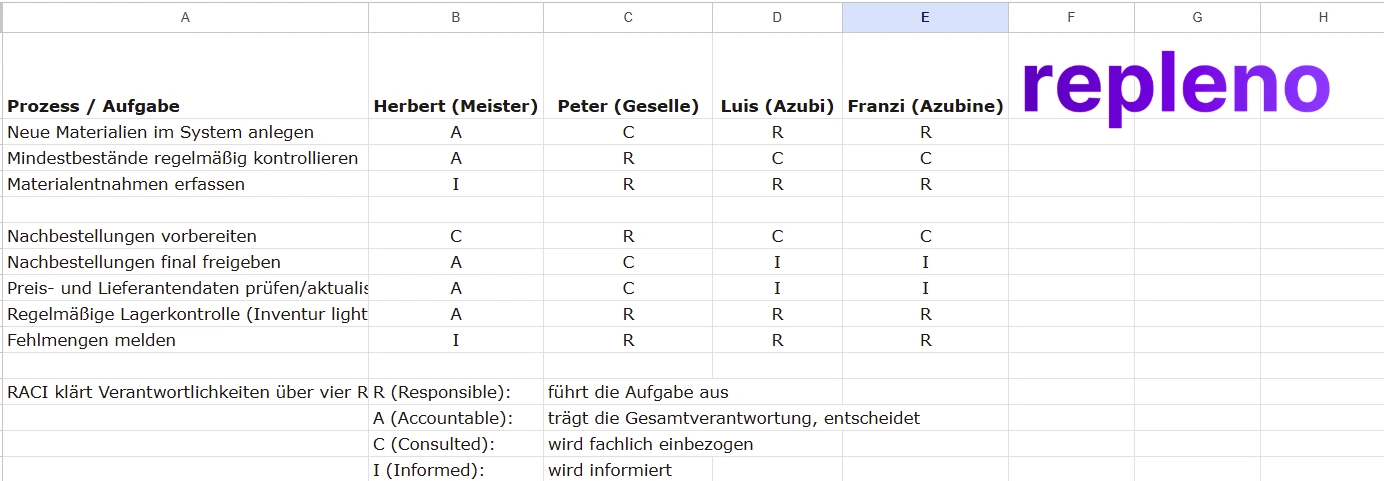
Particularly important is the regulation for exceptional situations. Was passiert, wenn der Lagerverantwortliche im Urlaub ist? Wer springt ein, wenn jemand krank wird? Diese Vertretungsregelungen sollten dokumentiert sein, damit das System auch in unvorhergesehenen Situationen weiterläuft. The best inventory management in trades without ERP is robust enough to withstand personnel fluctuations.
Missing Inventories
Many businesses treat digital inventory management as a perfect system that needs no control. Reality looks different: Even the best system can only be as good as the data it contains. Wenn Materialentnahmen nicht konsequent erfasst werden, wenn Lieferungen falsch verbucht werden oder wenn Material beschädigt wird und entsorgt werden muss, weicht der digitale Bestand vom realen Bestand ab.
Regular inventories balance these deviations. Für Handwerksbetriebe sind jährliche Vollinventuren meist ausreichend, ergänzt durch stichprobenartige Zählungen bei wichtigen Materialien. Modern inventory solutions make inventories easy: With the smartphone, shelves are walked through, every article is scanned, and the actually counted quantity is entered. The system automatically compares with target inventory and shows deviations.
These inventories should not be seen as a bothersome duty but as quality control of the entire system. Große Abweichungen zeigen, dass Prozesse nicht funktionieren. Vielleicht erfassen Mitarbeiter ihre Entnahmen nicht konsequent, vielleicht gibt es Schwund durch Diebstahl oder Beschädigung. The inventory makes these problems visible so countermeasures can be taken.
Incorrect Inventory Location Labeling
A digital inventory system is only efficient when physical reality reflects the digital information. Wenn im System steht, dass ein Material in Regal 3 liegt, es tatsächlich aber in Regal 7 ist, wird das System zur Quelle der Frustration statt der Effizienz. Mitarbeiter verlieren das Vertrauen und greifen wieder auf alte Methoden zurück.
The solution begins with clear, logical inventory location labeling. Regale sollten durchnummeriert sein, Fächer eindeutig bezeichnet. A system like "R3-F2" for Shelf 3, Compartment 2 is simple and works. Diese Kennzeichnung sollte sowohl physisch am Regal angebracht als auch im digitalen System hinterlegt sein. Wenn Material umgelagert wird, muss sowohl die physische Position als auch die digitale Erfassung aktualisiert werden.
It's helpful to assign materials fixed standard locations. Kabel liegen immer in einem bestimmten Bereich, Werkzeuge in einem anderen, Kleinmaterial in einem dritten. Diese Konsistenz erleichtert nicht nur das Finden, sondern auch das Aufräumen und die Inventur. New employees or temporary workers can orient themselves faster when a clear system is recognizable.
You can read about how to organize inventory in another article: How to Organize Your Inventory in the Trades: Efficient Storage + Digital Tools [2025]
Costs of Modern Inventory Management Without ERP Systems
Monthly License Costs
License costs of modern inventory management solutions are surprisingly low. Einfache Systeme für kleine Betriebe beginnen bei etwa zehn Euro pro User Monat. Umfangreichere Lösungen mit erweiterten Funktionen wie automatischen Bestellungen, Multi-Standort-Verwaltung und ausführlichen Auswertungen liegen typischerweise zwischen dreißig und fünfzig Euro monatlich. Selbst in dieser Preisklasse bleiben die Jahreskosten deutlich unter sechshundert Euro, a fraction of what an ERP system costs.
Many providers scale their prices by number of users or scope of managed articles. Ein kleiner Betrieb mit drei Mitarbeitern und zweihundert Artikeln zahlt weniger als ein mittlerer Betrieb mit zehn Mitarbeitern und tausend Artikeln. Diese Skalierung ist fair und stellt sicher, dass jeder Betrieb nur für das zahlt, was er wirklich braucht. Wichtig ist, auf versteckte Kosten zu achten: Fallen Gebühren für Updates an? Kostet der Support extra? Gibt es Mindestvertragslaufzeiten? Flat Fee oder Seat-Basiert (pro User)?
The low costs should not obscure the value of the solution. Auch eine günstige Lagerverwaltung kann erhebliche Einsparungen bringen, wenn sie konsequent genutzt wird. The investment of fifty euros per month often pays for itself when a single material shortage on a construction site is prevented. Die Kosten für eine Notfall-Bestellung beim Großhändler, die Fahrzeit und die Verzögerung des Projekts übersteigen die Monatsgebühr meist deutlich.
Hardware Costs (Scanners, Smartphones)
In addition to software costs, hardware costs may arise. Die gute Nachricht: In vielen Fällen ist keine zusätzliche Hardware nötig. Wenn Mitarbeiter ohnehin Firmen-Smartphones haben, können diese zur Lagerverwaltung genutzt werden. Die Kamera des Smartphones ist vollkommen ausreichend zum Scannen von Barcodes. No additional costs arise.
For businesses that don't yet have smartphones in use, an investment makes sense. Ein solides Mittelklasse-Smartphone kostet etwa dreihundert Euro und kann viele Jahre genutzt werden. Für Umgebungen mit hoher Beanspruchung, Staub, Feuchtigkeit, Stürze, gibt es robuste Outdoor-Smartphones ab etwa vierhundert Euro. Diese Investition zahlt sich schnell aus, denn die Geräte können nicht nur für die Lagerverwaltung genutzt werden, sondern auch für Kommunikation, Projektdokumentation oder digitale Zeiterfassung.
Dedicated barcode scanners are optional. Sie beschleunigen das Scannen und sind in staubigen Umgebungen manchmal praktischer als Smartphones. Einfache Scanner gibt es ab etwa hundert Euro, professionelle Industriescanner kosten bis zu dreihundert Euro. For most trade businesses, this investment is not strictly necessary. Smartphones are completely sufficient for the start. Scanners can be added later when daily practice shows they would further improve the workflow.
Time Savings as ROI
The return on investment of an inventory management solution can be concretely calculated. Nehmen wir einen durchschnittlichen Handwerksbetrieb mit fünf Mitarbeitern. Vor der Digitalisierung verbrachte jeder Mitarbeiter täglich etwa fünfzehn Minuten mit Lagersuche, Bestandsprüfung und manueller Dokumentation. Das sind pro Mitarbeiter etwa sechs Stunden im Monat, bei fünf Mitarbeitern dreißig Stunden monatlich.
With digital inventory management, this effort reduces to about five minutes per employee per day, so about two hours monthly per person or ten hours total. Die Zeitersparnis beträgt zwanzig Stunden pro Monat. Bei einem durchschnittlichen Vollkostensatz von fünfzig Euro pro Stunde entspricht das einer Einsparung von tausend Euro monatlich. Dem stehen Softwarekosten von vielleicht vierzig Euro gegenüber, ein ROI von 2400 Prozent.
Added to this are indirect savings: fewer material losses, fewer emergency orders at inflated prices, fewer project delays, better customer satisfaction. Diese Faktoren lassen sich schwerer quantifizieren, tragen aber erheblich zum wirtschaftlichen Erfolg bei. Betriebe, die eine Lagerverwaltung eingeführt haben, berichten regelmäßig, dass sich die Investition innerhalb der ersten drei bis sechs Monate vollständig amortisiert hat.
If you want to know how high your savings potential is, it's worth trying our simple calculator: Savings Calculator
Key Metrics for Inventory Management in Trades
Once you've introduced inventory management, you need to measure whether it's actually working. Five metrics are enough to start:
Inventory turnover rate. How often is the entire stock consumed and replenished over the course of a year? Formula: annual material consumption ÷ average inventory value. A figure below 4 means capital is being tied up in stock unnecessarily.
Stockout rate. The share of cases where material was unavailable and had to be reordered or substituted. Every stockout is a preventable delay. Target: below 2%.
Days of supply. How many days does current stock last at normal consumption? Formula: inventory quantity ÷ daily consumption. Values that are too high tie up capital; values that are too low increase the risk of stockouts.
Search time per employee. How many minutes per day are lost looking for materials? This is hard to measure before digitalization, but a short informal survey is enough as a baseline. Re-measure after three months.
Inventory discrepancy. The gap between digital stock levels and quantities actually counted during a physical inventory. Large discrepancies point to process gaps: material is being withdrawn without being booked, or deliveries are being recorded incorrectly.
These figures don't need to be reviewed every day. A monthly check is enough to spot trends early and adjust reorder rules accordingly.
Future Trends in Digital Inventory Management
AI-Supported Inventory Optimization
Artificial intelligence will revolutionize inventory management in trades. Erste Systeme nutzen bereits Machine Learning, um Verbrauchsmuster zu erkennen und Bestellmengen zu optimieren. Ein Malerbetrieb, der im Frühjahr regelmäßig mehr Fassadenfarbe verbraucht, bekommt vom System automatisch angepasste Mindestbestände vorgeschlagen. Die KI lernt aus historischen Daten und passt sich saisonalen Schwankungen an.
AI becomes particularly exciting in predicting material needs for specific projects. Statt dass ein Projektleiter manuell schätzen muss, welche Materialien benötigt werden, analysiert die KI ähnliche vergangene Projekte und erstellt eine präzise Materialliste. Ein Sanitärbetrieb, der eine Badsanierung plant, bekommt vom System eine Liste, die auf Dutzenden früheren Badsanierungen basiert, inklusive der Abweichungen und Sonderfälle, die damals auftraten.
Future systems will also incorporate external data. Wetterprognosen könnten die Bestellmengen für Außenarbeiten beeinflussen. Wirtschaftsdaten könnten vor Lieferengpässen warnen und zu präventiven Bestellungen raten. Die Integration verschiedener Datenquellen wird Lagerverwaltung von einer reaktiven zu einer proaktiven, vorausschauenden Disziplin machen.
Automatic Material Quantity Calculation
The future lies in direct linking of projects and inventory management. Ein Elektriker plant eine Installation und gibt die Parameter ein: Raumgröße, Anzahl Steckdosen, Lichtpunkte. Das System berechnet automatisch, wie viel Kabel, wie viele Dosen, wie viele Schalter benötigt werden. Es prüft die Verfügbarkeit im Lager und schlägt vor, fehlende Materialien nachzubestellen.
Diese Automatisierung spart nicht nur Zeit, sondern reduziert auch Fehler. Manuelle Berechnungen übersehen leicht Kleinmaterial oder unterschätzen Verschnitt. Intelligente Systeme berücksichtigen Erfahrungswerte aus früheren Projekten und kalkulieren realistische Puffer ein. Sie wissen, dass bei Kabelverlegung typischerweise zehn Prozent Verschnitt anfallen und berechnen entsprechend mehr Material ein.
Material quantity calculation will also be integrated with BIM (Building Information Modeling) and digital plans. Ein Architekt liefert einen digitalen Bauplan, und die Lagerverwaltung extrahiert automatisch die benötigten Materialien. Diese nahtlose Integration zwischen Planung und Ausführung wird die Effizienz im Handwerk weiter steigern.
IoT Sensors for Real-Time Data
The Internet of Things will elevate inventory management to a new level. Intelligente Regale mit Gewichtssensoren erkennen automatisch, wenn Material entnommen wird. Kein Scannen mehr nötig, das System registriert die Entnahme und aktualisiert den Bestand in Echtzeit. Air tags on tools and machines show at any time where which device is located.
Temperature and humidity sensors monitor storage conditions for sensitive materials. Farben, Lacke oder Klebstoffe, die bei falscher Lagerung ihre Eigenschaften verlieren, werden optimal gelagert. Bei Abweichungen von den idealen Bedingungen warnt das System automatisch. Das verhindert Qualitätsprobleme und schützt wertvolle Materialien.
Particularly interesting for mobile trades are GPS-based systems. Werkzeuge und Materialien in Fahrzeugen werden in Echtzeit getrackt. Ein Monteur sieht auf seinem Smartphone nicht nur, dass ein bestimmtes Teil verfügbar ist, sondern auch, dass es sich im Fahrzeug von Kollege Schmidt befindet, der gerade fünf Kilometer entfernt arbeitet. Diese Transparenz ermöglicht spontane Koordination und vermeidet unnötige Fahrten.
The question is not if, but when these technologies will be introduced. However, the cost question is still a major obstacle to date.
Conclusion
The best inventory management in trades is not a distant future vision but available reality today. Spezialisierte Lösungen haben bewiesen, dass effiziente Lagerverwaltung nicht komplexe ERP-Systemerfordert, sondern mit schlanken, mobilen Tools erreicht werden kann, die zur Arbeitsweise im Handwerk passen.
The advantages are overwhelming:
- drastic reduction of material losses
- time savings through automated processes
- better project planning through transparent inventory and freedom from constant ordering stress.
Trade businesses that take the step toward digital inventory management regularly report quick payback and noticeable relief in day-to-day operations.
Getting started is easier than many think. With minimal costs, fast implementation, and intuitive operation, the barriers are low. The technology is mature, providers understand the demands of the trades, and the success stories speak for themselves. For trade businesses that want to work more efficiently, operate more profitably, and relieve their employees, there is no way around digital inventory management. Which hidden costs an unorganized warehouse causes is covered in the guide to reducing warehouse costs in the trades.
The best time to start was yesterday. The second best time is today. Mit digitalen Lösungen, die Handwerker von Zettelwirtschaft befreien und Nachbestellungen automatisieren, wird die Lagerverwaltung vom Problembereich zum Wettbewerbsvorteil. Trade businesses that digitize now secure a clear lead over competitors still struggling with manual processes.
If you want to know how to automate your material management and which exact tools come into question, feel free to check here: Digital Procurement in Trades: 12 Strategies for Automated Material Management