Goods Receipt in a Trades Business: Process, Checklist, and Common Mistakes
Goods receipt in trades businesses: 5-step process, practical checklist, and the 3 most costly mistakes in delivery acceptance and incoming goods inspection.
Monday morning, 7:30 am. The delivery for the job site on Main Street arrives on time. The journeyman quickly signs the delivery note, the driver moves on. Three hours later it becomes clear: the cable duct fittings and OBO quick-release clamps are missing entirely, and the delivery note has already disappeared in the van. Filing a complaint: virtually impossible.
Scenarios like this happen every day in trades businesses. Not through carelessness, but because goods receipt in small businesses rarely has a clear process.
Why Goods Receipt in Trades Businesses So Often Goes Wrong
Goods receipt has been standardized in the logistics industry for decades. Large businesses with dedicated warehouses, warehouse staff, and inventory management systems have clear procedures for it.
In a trades business with five to fifteen employees, reality looks different. In practice, it is evident that many trades businesses still rely on manual processes for material management. The rest work with stacks of delivery notes, memory lists, or no process at all.
Three structural problems cause most of the mistakes:
No fixed point of contact. Whoever happens to be around accepts the delivery. Sometimes the master craftsman, sometimes a journeyman, sometimes an apprentice. Without clear responsibility, there is no continuity, and no one feels accountable for mistakes.
Time pressure as the norm. The supplier rings, the job site is waiting, the phone rings at the same time. In this situation, the delivery note gets signed without being read. This is not a mistake on the part of the employee; it is a systems failure.
Delivery location and storage are physically separate. The material arrives at the workshop but is needed for a job site twenty kilometers away. Or it arrives directly at the job site, gets unloaded, and no one books it back into the system.
According to the dissertation by Andreas Pescholl(Otto-von-Guericke University Magdeburg, 2010), goods receipt explicitly encompasses inspection/checking as well as goods receipt recording (bookings). Defects must be reported immediately. This chain explains exactly why incorrect or missing entries lead to stock problems almost instantly.
A good goods receipt process must work under the real conditions of a trades business: with few staff, without an IT specialist, and even when the phone is ringing at the same time.
Step 1: Accept and check the delivery note
Before the driver leaves, compare the delivery note with the order confirmation. Do article numbers, quantities, and the supplier match? If no order confirmation is available, at least check whether the listed items were actually ordered.
Step 2: Count quantities
Count the packages, open cartons when the piece count matters. A quick visual check is not enough. Especially with small parts such as connectors, screws, or switch covers, this is where most shortfalls occur.
Step 3: Document condition
Note any visible damage on the delivery note before you sign, and take a photo. A supplier can only accept a complaint if the damage was demonstrably documented at the point of acceptance. A signature without any notation is treated as confirmation that the delivery arrived in perfect condition.
Step 4: Assign to a job
Which project or job site is this material intended for? The delivery note often contains a reference. This assignment is an essential part of the booking. It prevents material delivered for job site A from ending up at job site B or disappearing into general stock.
Step 5: Book in and file
File the delivery note (physically or digitally), update the stock level, mark the delivery as received, and book it in the inventory software or ERP. Only once this step is done is the goods receipt complete. Everything that happened before does not count as long as the stock figure is wrong.
Goods Receipt at the Job Site vs. at the Workshop
The biggest difference between trades businesses and classic warehouse operations: deliveries rarely arrive exclusively at the storeroom. They also arrive at the job site, unloaded directly from the delivery van wherever there happens to be space, while the master craftsman is up a ladder wiring a distribution box and does not notice.
For job site deliveries, you need a separate rule, distinct from the workshop process:
A responsible person on site, ideally the site supervisor or foreman, checks the delivery note and condition.
A photo of the delivery note and a photo of the delivered material as evidence.
Forwarded to the office by app, WhatsApp, or email, on the same day.
Booking is done at the office, not on site.
This division of responsibilities is critical. Someone standing on a job site cannot simultaneously update the stock in the system. Someone in the office cannot inspect the delivery on site. Both roles are necessary, and both need to know what is expected of them.
For workshop deliveries, a simpler rule applies:
A fixed goods receipt area
A fixed filing spot for delivery notes
A fixed responsible person.
When all three points are defined, nine out of ten discussions about what happened to a delivery become unnecessary.
The Most Common Mistakes and How to Avoid Them
Mistake 1: Signing without counting
The most common mistake of all. The delivery note is not proof that everything was delivered. It is a document that confirms what the supplier claims to have delivered. Anyone who signs without counting confirms receipt of complete goods.
Solution: Write on the delivery note what you actually counted, before you sign. With 200 connector pieces, note "200 pcs counted, date, initials." This takes thirty seconds and fully preserves your right to file a complaint. Alternatively, add a small checkmark.
Mistake 2: Losing the delivery note
No delivery note, no evidence. No evidence, no complaint. No complaint, no replacement. In practice this means: the business pays for material that never arrived, or accepts damage it did not cause.
Solution: A fixed filing spot in the goods receipt area immediately after acceptance. Alternatively, a smartphone photo that automatically syncs to a shared team folder. The process must happen immediately. "I'll put it away later" reliably leads to it getting lost.
Mistake 3: Assigning material to the wrong job
Material is booked in but assigned to general stock, even though it was intended directly for an active customer job. The stock figure is correct on paper, but in reality the material is already used up. Or the reverse: material taken from the storeroom continues to be shown as stock.
Solution: Every booking needs an assignment. No project, no booking. This sounds strict, but it is the only method that permanently prevents phantom stock (Phantombestand). Experienced inventory managers recommend integrating job assignment as a mandatory field in every goods receipt process, even in paper-based systems.
Incoming Goods Inspection: What Is Actually Checked
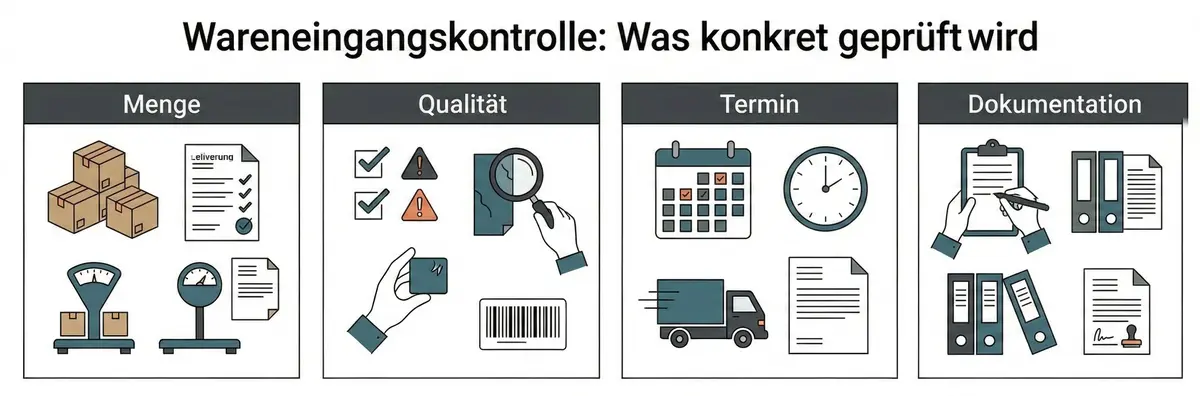
The incoming goods inspection covers four checking levels, all of which can be applied without a digital system:
Quantity check: Does the delivered quantity match the delivery note? Does it match the order quantity? Discrepancies in either direction are relevant.
Quality check: Are the packages undamaged? Does the article description match what was ordered? For technical articles, installation materials, or standard parts: does the exact product number or standard match?
Delivery date check: Was the delivery on time? If there are delays: which active jobs are affected, and who needs to be informed?
Documentation: Is the delivery note complete and legible? Are complaints noted in writing? Is the job assignment unambiguous?
These four levels can be condensed into a simple checklist that gets ticked off with every delivery. A handwritten list on a clipboard in the goods receipt area is better than no process at all. Anyone working with digital tools can run the same checklist on a smartphone or tablet.
Goods receipt checklist download
We packed the 5 steps and all 4 inspection levels into a printable checklist. Includes fields for date, supplier and job assignment, a tip box, and a signature line. Print it, clip it to your board, and check off each delivery.
Goods receipt is not just the conclusion of a delivery. It is the prerequisite for the next reorder being triggered correctly in the first place.
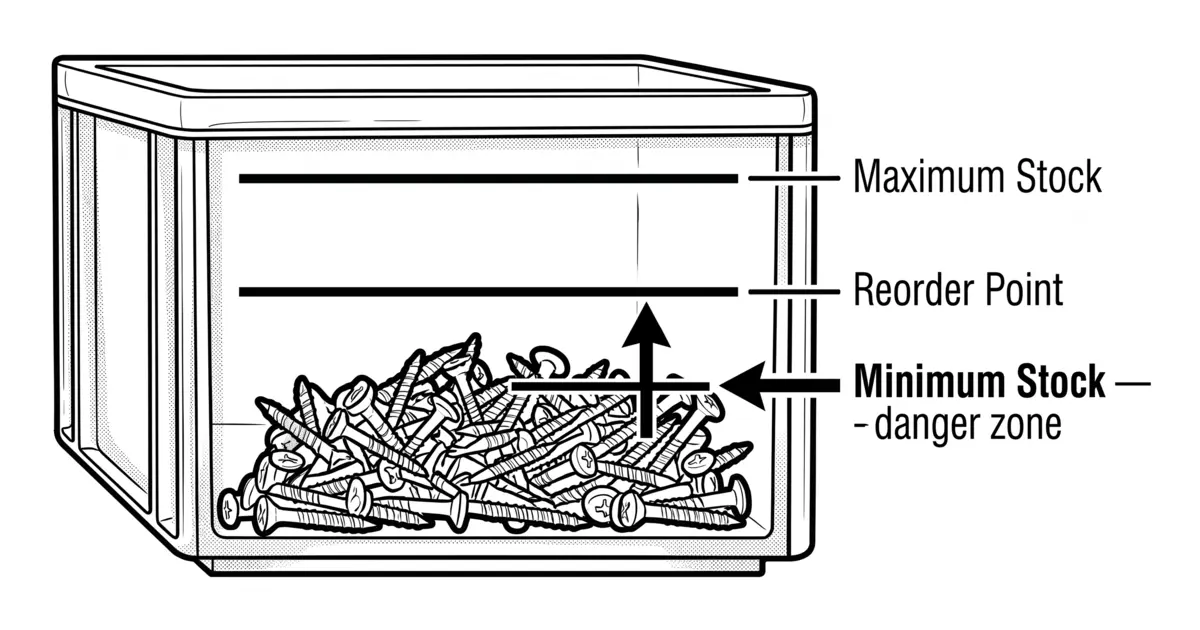
As soon as a delivery is booked in, the stock level rises. The system knows the material has arrived. This step is the foundation for every rule-based reorder, whether min-max, a fixed reorder point (Meldebestand), or an automatic order trigger. If goods receipt is not booked or is booked incorrectly, the system does not know the real stock level.
The result is phantom stock: materials that according to the system are available but are actually missing. Reorder points trigger too late, orders are placed too early or not at all. The problem does not lie in the reorder logic itself, but in the data foundation beneath it.
With the Kanban method in the trades stockroom, the trigger for reordering is not goods receipt but consumption. As soon as a bin empties, the Kanban signal is triggered. With replenishment through goods receipt, the cycle closes. This cycle only stays stable if goods receipt is recorded consistently and correctly.
A cleanly structured goods receipt process is therefore not a formality. It is the condition for stock management and procurement to work reliably over the long term. Businesses that invest in this step save at every downstream point: fewer emergency orders, fewer duplicate stock holdings, fewer job site delays caused by missing material.
Frequently Asked Questions About Goods Receipt in Trades Businesses
During the incoming goods inspection in a trades business, you check four points: completeness (does the quantity match the delivery note?), condition (is there any visible damage?), match with the order (does the delivery correspond to what was ordered?), and job assignment (which job site or project is the material for?). Damage and shortfalls must be noted on the delivery note immediately, before you sign.