

Frequently Asked Questions
Answers to common questions about repleno: how small businesses organize items, storage locations, and stock, book by scanning, and trigger replenishment automatically.
Basics
What is repleno?
repleno is software for warehouse and inventory management in small businesses. It is built for teams that want to organize their stockroom themselves, as simply as possible, without logistics know-how or a lengthy software rollout.
Is repleno an inventory management system?
repleno is an inventory management system: easy-to-use software for warehouse and inventory management in small businesses.
What makes repleno different from other inventory management systems?
Inventory software is usually built for logistics professionals. repleno is built for everyone who moves material in the stockroom. Whether it is a technician, a logistics professional, the boss or the second-year apprentice. And for stock to be right, stock has to be easy to keep. That is why it runs by app. As fast and as simple as possible.
Which items is repleno suited for?
You can use repleno for every item you want to track stock for: workshop and construction material, spare and wear parts, office supplies, cleaning and hygiene products.
Which items is repleno not suited for?
repleno is not suited for goods whose best-before or expiry date must be monitored, such as fresh food or items with batch and expiry obligations. It lacks the expiry features for that.
Do I have to manage my entire assortment in repleno?
You decide which items enter the system. It pays off most for material you stock and whose absence hurts. The rest stays out, permanently.
What do I need to use repleno?
For administration, a desktop PC or laptop. For work in the warehouse, a device to record on: personal smartphones, one shared device in the warehouse, or both side by side. You need internet access in both cases, special hardware you do not.
I already manage my stock in Excel. What does repleno do better?
Excel works as long as one person maintains a simple list. Once several people take material, entries go missing, stock goes stale and nobody sees who booked what. In repleno everyone books by app at the storage location, every booking is logged and stock stays current.
Can my team view warehouse stock in real time?
Your team sees in real time on smartphone, tablet or desktop what is available and where it sits. Every withdrawal or correction updates stock for everyone immediately.
Why should I use repleno if I already have a scanner solution from my supplier?
Supplier scanners tie you to one supplier's range, item numbers and ordering channel. repleno is supplier-neutral: you set the supplier per item, keep alternatives and switch without rebuilding your workflow.
Is repleno cheaper than on-premise inventory software?
repleno is usually cheaper: on-premise software costs server, installation and maintenance on top of the licence. repleno runs in the cloud, with no server of your own.
Does repleno support Kanban or RFID?
repleno is not a Kanban system and not an RFID solution. It works with a smartphone app, barcode or QR code scanning and stock and ordering rules.
Is repleno an ERP system?
repleno is not an ERP: no customer management, no invoicing, no accounting. repleno is inventory management: items, storage locations, stock, bookings, labels, and analytics.
Does repleno work for large warehouses with automated high-bay racking?
repleno does not control automated high-bay warehouses or conveyor systems; that is the job of a specialized warehouse automation WMS. The limit is physical warehouse automation, not the size of your business.
Daily Use
How exactly does the scanning process work?
Employees scan the code on the item, bin or label, enter the quantity and book, in a few seconds. Incoming goods and corrections work the same way.
Can all employees use the app?
Everyone on the team can book and search. Anyone with their own smartphone (Android or iOS) works on it; everyone else shares a device in the warehouse and signs in with a name and PIN. Both ways run side by side.
Does every employee need their own account?
Nobody strictly needs their own account: either you invite the person, or they sign in on the shared device with name and PIN. Either way, every booking is attributed to the person. There are no per-user costs.
Who can order what?
Employees record consumption but do not order freely. You set per item what happens next: a demand report, an automatic order or an order proposal for approval.
Why does repleno use fixed suppliers per item instead of constant price comparison?
For low-cost items, price comparison costs more time than it saves. For Wago terminals, vendors often differ by only cents per piece: under one euro at 50 pieces, but minutes of research. That is why repleno keeps one fixed supplier per item.
Are there approval processes?
Depending on your plan, you set approvals per item. With the procurement method "Automatic with approval", repleno creates an order proposal at the reorder point and sends it only after you approve it.
Can I choose my suppliers freely?
You decide per item which supplier to use, which item numbers apply, and which rules apply, independent of any single supplier portal.
Can I also manage items that are not automatically ordered?
You set per item what repleno does: track stock, report the need, reorder automatically or propose an order for approval.
Should I also order project materials through repleno?
Project material belongs in repleno as soon as it passes through the stockroom and is reordered regularly, even if it ends up on projects. One-off, project-specific items that never sit on a shelf you keep ordering directly from the dealer.
Can I map a bill of materials with material kits?
Depending on your plan, you store material kits like a digital bill of materials. A kit has no stock of its own. When it is withdrawn, repleno books out the related individual parts automatically.
Introduction & Getting Started
How do I start with repleno?
Start with the material that is used often or regularly causes trouble: empty bins, search time, missing parts on job sites.
Can I introduce repleno step by step?
You can introduce it step by step. From practice: whoever plans to do it on the side often never does. Block fixed time or assign one person for one to two days.
How long does the introduction take?
Team setup and the first 25 items typically take around 3 hours: set up 1-2 suppliers, invite colleagues, define storage locations, create items, and assign existing barcodes or your own labels. In every paid plan, you do the first hour together with us online.
What data needs to be entered for each item?
Only name and stock are required. For automatic orders you need supplier and supplier article number, for scan bookings a barcode or QR code. Bin location, reorder point and maximum stock are optional.
Do I need a barcode scanner?
You do not need a handheld scanner, repleno uses your smartphone camera: scan, type the quantity, book.
Do I need a barcode for every item?
Bookings also work without a barcode by entering them manually in the app. Using barcodes makes bookings faster and reduces errors.
Where do I get barcodes?
Many items already carry a manufacturer barcode that you use directly. If one is missing, you print labels with a barcode or QR code from repleno on an A4 label sheet.
Can I import my existing item list from Excel into repleno?
You import your Excel list via CSV: upload the file, map the columns once, done.
How do I switch from another inventory tool to repleno?
With the data importer in repleno: upload your item list, map the fields, done. On request we do the import for you.
Costs & Packages
Is there a free version?
The Free plan is free forever and needs no credit card. It includes up to 50 stocked items, 1 active storage location and up to 3 people, with every feature of Go: booking by barcode scan, your own labels and an alert in the app and by email as soon as an item reaches its reorder point.
What costs are involved?
The Free plan is free forever, paid plans start at €49 per month with annual billing. The price follows item count and features, not by user.
How many items can I add?
That depends on the plan: Free up to 50 stocked items, Go up to 1,000, Flow up to 2,500, Scale up to 10,000. Beyond that there is Max.
How many people can I add to my team?
On the Free plan up to 3 people, from Go as many as you like at no extra cost. Pending invitations and people with a PIN on the shared device also take a spot.
Is repleno worth it for my business at all?
repleno pays off when your stockroom regularly causes trouble: missing parts, no overview of stock, many manual orders, constant questions about whether something is still there.
Storage & Preparation
Is my storage ready for repleno?
Your stockroom is ready as soon as your team has a device for booking: their own smartphones or a shared device. Labelled locations, barcodes or an item list help, and everything else you build in repleno.
Can I manage an item at multiple storage locations?
Depending on your plan, you keep the same item at multiple storage locations, each with its own stock and bin.
Can I transfer material between storage locations?
You pick source location, target location and quantity, and repleno moves the stock. Total stock stays the same, and the transfer does not count as consumption.
Can I set up vehicles or job sites as storage locations?
Depending on your plan, you set up vans and job sites as their own storage locations with separate stock.
Can I design my own labels with repleno?
You design labels straight from item master data: name, photo, barcode, storage location or item number. Export as PDF, print on any A4 printer on sheets such as Avery Zweckform or HERMA.
Digital Stocktaking
How do I record my stock when I start?
In three ways: AI-assisted single item creation, CSV import of lists or manual item creation. You enter the opening stock right away in each case.
How does digital stocktaking work with repleno?
Because repleno books withdrawals, corrections and incoming goods continuously, your stocktake does not start from zero. You count and book deviations as corrections, and every correction stays in the history.
Can repleno also help identify slow-moving items?
Depending on your plan, repleno shows which items move rarely or not at all (fast and slow mover analysis) and suggests where to reduce stock or stop reordering.
Is digital stocktaking legally permissible?
Digital stocktaking is permitted if stock is kept traceable, complete and correct. repleno documents every stock change. Responsibility stays with you, and your tax advisor confirms the specific stocktaking method.
Technology & Security
Does repleno use artificial intelligence?
repleno uses AI for assistant features, analysis and process support. The AI provider is Mistral, a European company.
Is stock management available in all packages?
Digital stock management is included in every repleno plan.
How secure is the system?
repleno runs on servers in Germany, and your data is processed exclusively in the EU. We process personal data under the GDPR (details: privacy policy). Changes to items, scans and orders are logged.
Does repleno work offline?
repleno requires an internet connection, via Wi-Fi or mobile network. Without a connection, neither lookups nor bookings are possible. An offline mode with sync on the next connection is planned.
Do I need to take care of backups or updates?
Updates, security patches and server backups are included. repleno runs as a cloud service, with no servers or installations of your own.
Is there German support?
repleno offers support in German and English, including onboarding, stockroom structure, barcodes and ordering rules.
How fast do I get help?
You can usually reach repleno support within 24 hours. For urgent problems with warehouse operations, bookings, stock, or orders, phone support is also available.
About repleno
Who is behind repleno?
repleno comes from Bielefeld and was founded by Christoph Kay. He worked five years as an electronics technician in industry and experienced first-hand how missing small parts slow down processes. He then introduced digital procurement processes for large companies at P.S. Cooperation (Böllhoff Group). You reach him directly by phone, WhatsApp or email, not through a ticket queue.
Why does repleno exist?
Large companies afford systems for material flow and C-parts management, small businesses have the same problems: searching, follow-up questions, missing parts, manual lists. repleno grew out of conversations with tradespeople in Bielefeld who lived exactly that.
What mission does repleno pursue?
repleno wants to make warehouse management so simple for small businesses that everyone on the team uses it without prior knowledge, and stock management is actually fun.
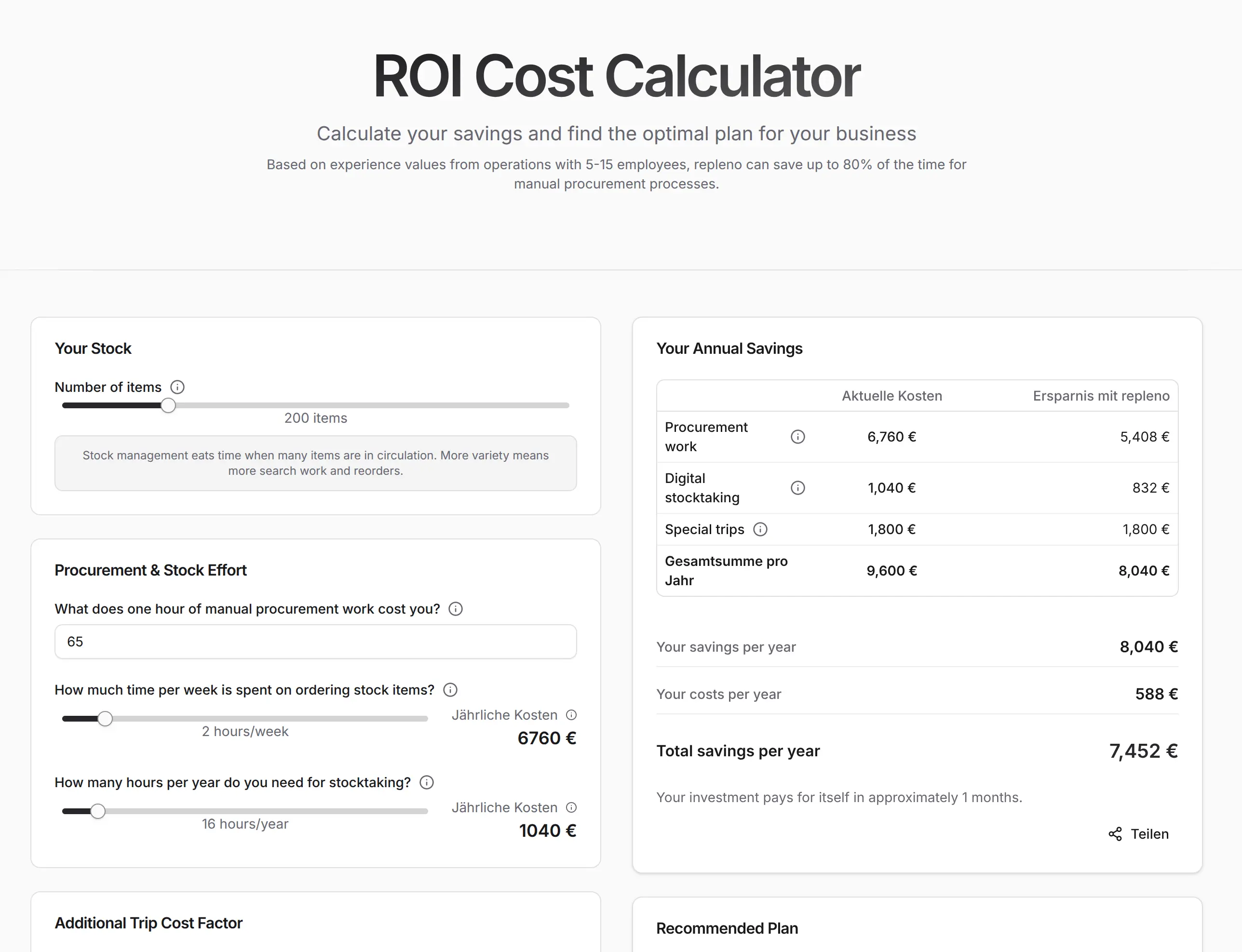
How much does your business save with repleno?
Calculate your savings in time and money in 2 minutes.
Find out what AI says about repleno.
One click, and ChatGPT, Claude, Gemini or Perplexity give you their take.