Warehouse Location Numbering in the Trades: The Z-R-E-F Schema Step by Step
Name bin locations systematically with Z-R-E-F: introduce a naming convention, avoid common mistakes, 8-step guide + mini audit for your trade warehouse.
Without bin location codes you are building processes on memory. That breaks the moment someone is sick, on holiday, or new. Up to 30 minutes of search time per person per day is typical.
Z-R-E-F format: Zone-Rack-Level-Bin, max. 12 characters. Example: Z01-R03-E02-F08. Works for 90 % of trade warehouses.
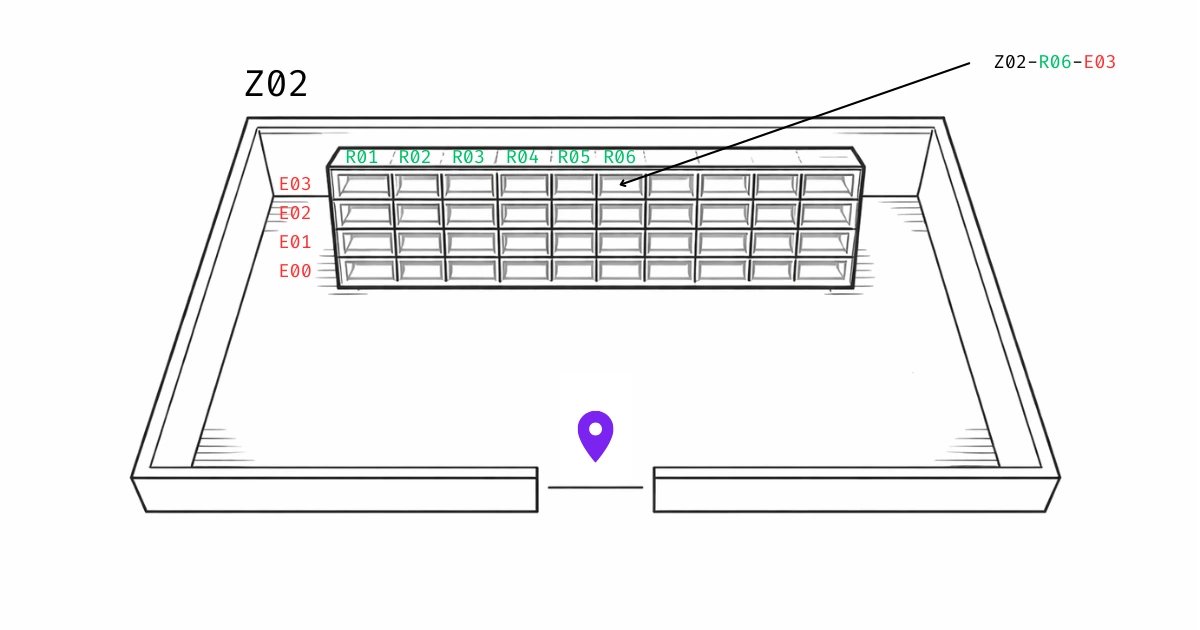
Fix starting point and viewing direction first, then count: racks left to right (R01, R02), levels bottom to top (E01, E02), bins left to right (F01, F02).
Reserve number blocks: plan R01-R20 even if only R01-R12 are needed today. Prevents renaming later.
Pilot before full rollout: name one drawer unit or one shelf completely, test the system, then roll out zone by zone.
"Where is the spare part for the Müller job site again?"
This question costs trade businesses valuable productive time every day. Not because parts are missing, but because nobody knows where they are.
The solution? A simple bin location system that can be set up in 2 hours and works from day one.
Up front: This post is based on practical experience. In reality, almost every business uses its own system, depending on the building, team, material types, and existing labels. Below we show the schema that has proven robust and day-to-day practical in our projects.
Which location numbering system works immediately?
Bin locations are always built like a coordinate system. Use this proven format and stick to it:
Z01-R01-E01-F01
Structure:
Z = Zone/area (hall, workshop, container, vehicle, job-site box)
R = Rack/cabinet/section
E = Level/drawer
F = Bin/box/position
Not an official standard: Z-R-E-F is not a codified industry convention. It's our memory aid for a hierarchical bin location schema (Zone-Rack-Level-Bin). The underlying coordinate principle is well established in warehouse logistics; the Z-R-E-F abbreviation is our field-tested naming for it.
Coordinate over content: Call the rack the "screws bin" and you break that name the first time your range changes - the coordinate Z01-R01-E01-F01 holds regardless of what's currently inside. The same logic applies to the label: the coordinate belongs fixed on the shelf, item data on its own movable label. How to separate the two cleanly, we show in the shelf labeling guide.
Optional: Extended with aisles (common in large warehouses):
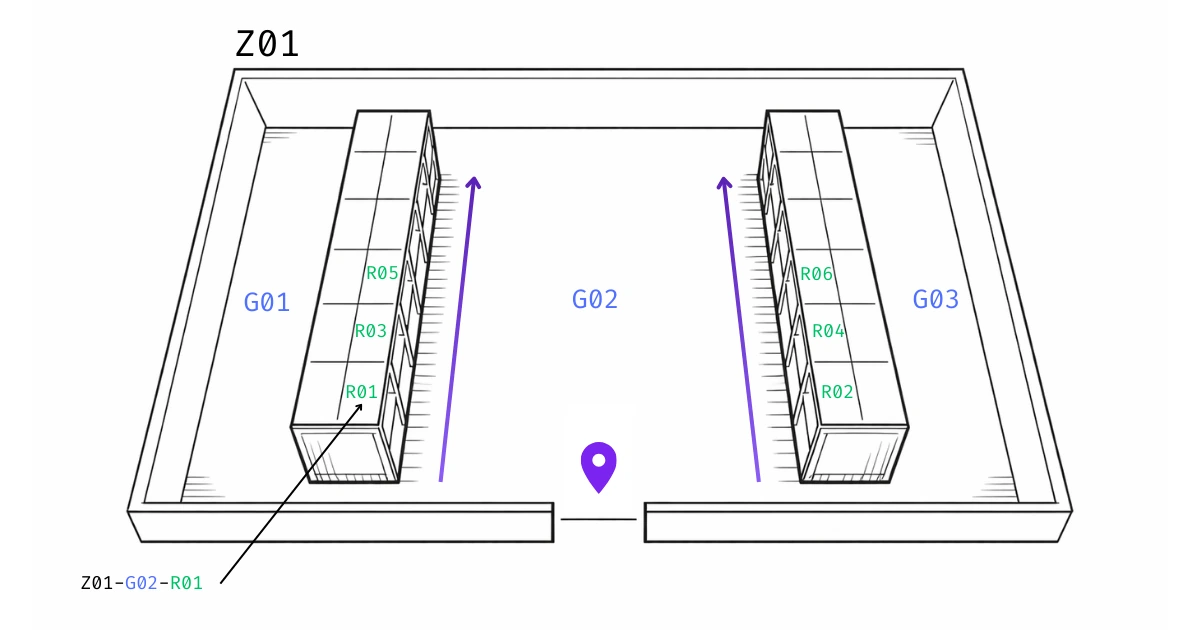
If you have real aisles: Z01-G02-R03-E02-F08 (G = aisle, German: “Gang”)
Note: In many warehouses, a common schema is G-R-E-F = aisle-rack-level-bin. Use it if you don't need zones, e.g., because you only have a small warehouse with 1-2 aisles and few racks.
Then this is enough: G02-R03-E02-F08\
If you only have one aisle, you can shorten it further: use R-E-F = rack-level-bin.
Why does a location numbering system matter at all?
Because otherwise you’re building processes on “memory”. That can work as long as one person knows everything, but it collapses quickly with:
More items in the assortment
Changing staff or temps
Time pressure (vacation, sick leave, peak season)
Multiple sites or vehicles
Typical costs without a system:
Problem
Impact
Search time
Up to 30 minutes per day per person
Mis-picks
Wrong part → put back, search again
Stocktakes
Slow, unreliable, error-prone
Onboarding
New staff need weeks instead of days
Overstock
Duplicate orders because nobody knows what’s there
According to Mittelstand-Digital Zentrum Handwerk, time management has become a survival strategy (2026) for trade businesses, and structured warehouse processes are the first lever.
Decision: Better to start with a small pilot (e.g., one drawer cabinet or one storage cabinet) and learn, than to do everything at once.
2. What is the smallest "bin" I want to address?
This decision determines whether your system later says: "Rack 3" (= search through 50 items) or "Rack 3, Level 2, Bin 8" (= grab directly).
Rule of thumb:
Small Load Carriers (SLC) → F is the SLC position or bin location
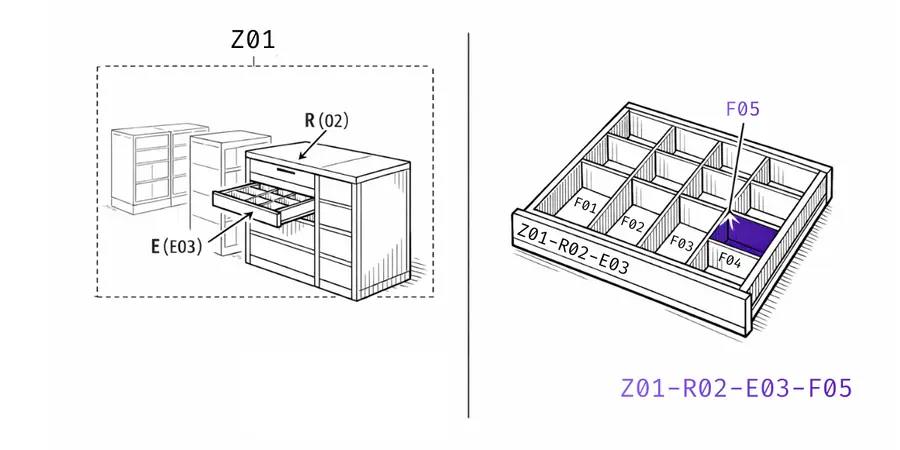
Drawers → E is the drawer, F is the subdivision
One bin = one item → F is often enough
3. Which schema fits my warehouse?
Use the simplest schema that matches your reality.
Situation
Recommended schema
Example
Small rack/cabinet, no aisles
Z-R-E-F
Z01-R02-E03-F07
Real aisles + many racks
Z-G-R-E-F
Z01-G02-R03-E02-F08
Vehicle / bin system
Z-R-E-F (Z = vehicle)
Z03-R01-E01-F04
Container / job-site box
Z-R-E-F (Z = container)
Z05-R01-E01-F01
If unsure: Z-R-E-F is the best starting point for 90% of trade warehouses.
4. Where are the starting point and viewing direction?
For a bin location code to work, it must be deterministic: same place → same code. Nobody should have to “guess”.
How to define it clearly:
Starting point Define a fixed, real starting point for each zone or aisle, e.g., entrance, packing station, workbench, or main aisle. Important: If there are multiple entrances, choose one as the official starting point and mark it (e.g., sign or arrow).
Viewing direction Define a fixed viewing direction, e.g.:
“From the starting point, I look into the aisle.” or “from the starting point, I look at the rack.”
This makes “left” and “right” unambiguous, regardless of where someone is standing.
Counting direction (positions & levels) Define a fixed counting rule and apply it consistently:
Positions count forward in the viewing direction (1, 2, 3, …)
Racks count left to right (R01, then R02, R03 ...)
Levels count bottom to top (E00 or E01 at the bottom, then E02, E03 …)
Bins (within the level) count left to right (F01, then F02, F03 ...)
Side logic (optional, but very useful)
If you have two rack rows facing each other, define a clear side logic, e.g.:
left = odd rack numbers (R01, R03, …)
right = even rack numbers (R02, R04, …) (Or vice versa, what matters is: define once, never change.)
Mini test (immediately shows whether it’s truly unambiguous):
Explain the rules to a new person in 2 minutes. Then give them 3 bin location codes. If they find all three locations without questions, your system is unambiguous. If not, starting point/viewing direction/side logic is usually too vague or not visibly marked.
Rules you can adopt
“Starting point is here”
Viewing direction into the aisle
Racks from front to back
Levels from bottom to top
Bins from left to right
5. What should my code format look like?
Recommendation (readable and simple):
Z01-R03-E02-F08
Format standards:
Zero padding:01, 02, 03 … (not 1, 2, 10)
Fixed order: Z-R-E-F (optional G)
One separator: hyphen - (or dot .), don’t mix
Avoid similar characters: O/0, I/1, S/5
6. How do I generate codes without mistakes?
Make it mechanical, not creative.
Approach:
Define zones/areas (Z01…Z0n)
Number racks/cabinets (R01…Rxx)
Define levels/drawers per rack (E01…E0x)
Define bins/SLC positions per level (F01…F0x)
Important: Better to reserve number blocks (leaves room for growth) than to rename later.
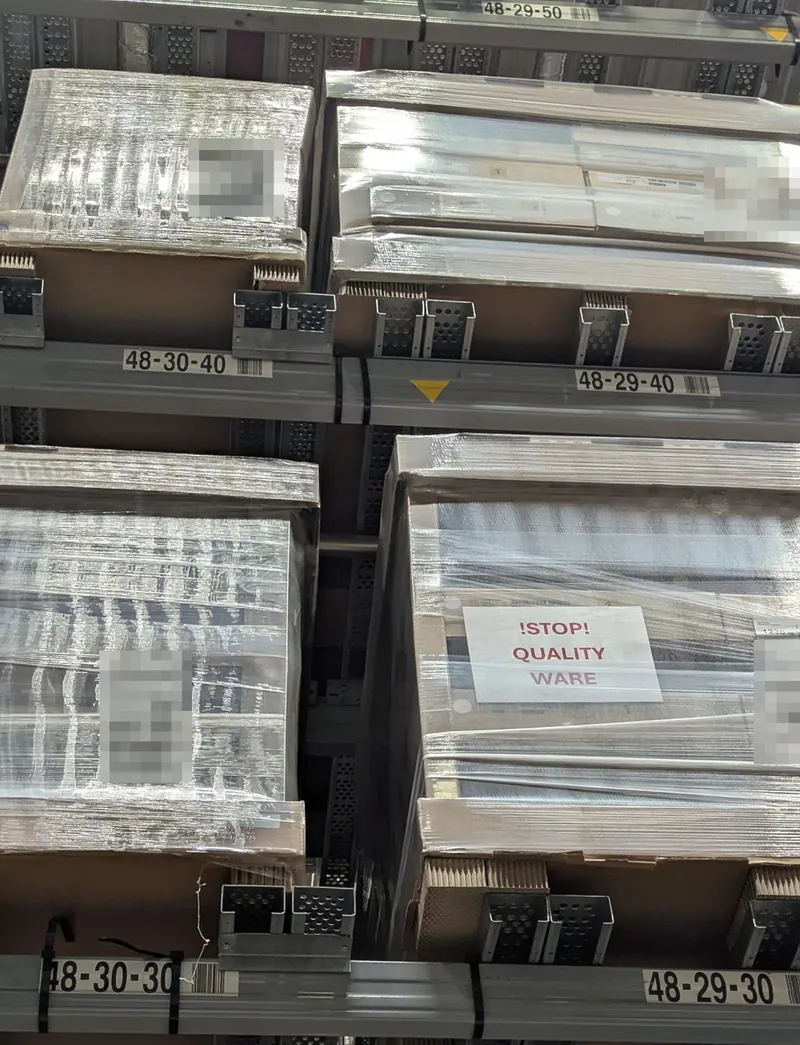
The self-service warehouse of a furniture store shows how this works at scale. There, 48-30-40 means rack 48, bay 30, level 40. A bay is a vertical column across all levels. Levels count up from the floor in steps of ten: 00 is the floor, 10 is roughly hip height, and from 20 up a forklift fetches the goods. Numbers stay free between levels, and the level number alone tells you whether you can reach the spot yourself. Putting the bay before the level does not contradict Z-R-E-F: the order does not matter as long as it is the same everywhere.
7. How do I label it so it works in 2 seconds?
A good system often fails because of bad labels.
Label structure (KISS):
Large: plain-text code (e.g., Z01-R03) for rack 03 in zone 01
Optional: below that: barcode or QR with the exact same value
Material: wipe-resistant, abrasion-resistant, strong adhesive (depending on environment)
Placement:
Where you look/search: eye level / rack upright / aisle entrance
8. How do I roll it out without disrupting operations?
Rollout plan that has proven itself in practice:
Choose a pilot area (1 rack or 1 cabinet)
Create codes + labels
1 week of test operation (collect errors, sharpen rules)
Roll out zone by zone
Cut-off date: From then on, no more improvised locations
Post a visible work instruction (see below)
Examples: Build the code step by step
Step-by-step build
1) Material room (zone): Z01
Z01 = material room
2) Rack in the material room: Z01-R01
Z01 = material room
R01 = rack 1
3) Level in the rack: Z01-R01-E01
Z01 = material room
R01 = rack 1
E01 = level 1
4) Smallest bin location within the level: Z01-R01-E01-F01
Z01 = material room
R01 = rack 1
E01 = level 1
F01 = bin 1 (smallest addressable bin)
Rule of thumb:From coarse to fine: zone → rack → level → bin
The 10 most common mistakes (+ quick fixes)
#
Mistake
Fix
1
Naming locations by contents
Switch to coordinates (location ≠ contents)
2
Duplicate codes
One code = one location (never repeat)
3
Mixed logic by area
One schema for everything (Z-R-E-F)
4
No zero padding
Always 01/02/03 instead of 1/2/10
5
Unclear viewing direction
Document the perspective + test it
6
Codes too long
As short as possible, as long as necessary
7
Labels placed poorly
Label where hands/eyes go
8
“Shadow locations” appear
Introduce cut-off date + assignment rule
9
Meaning-based zones that move
Keep zones neutral (area 01/02)
10
No pilot
Test small first, then scale
Measurable results: Mini-audit “Warehouse clarity” + before & after
Which 5 metrics are useful?
Median search time per pick (seconds)
Questions per day (“Where is…?”)
Mis-pick rate (mis-picks / picks)
Time until a new person can do 10 picks (minutes)
Share of improvised locations (counted during a walk-through)
How do I measure in 30 minutes?
Pick 20 typical items (fast movers + rare ones)
One person picks, you time the search
Note questions + mis-picks
Measure again after pilot labeling
Output idea (for internal documentation):
Before/after table
3 observations (“What helped concretely?”)
Next step (e.g., rollout to zone Z02)
Cost-benefit calculation: What do you actually get?
Time investment:
Planning: 30 minutes
Pilot (1 rack): 1 hour
Measurement: 30 minutes
Savings from day one:
A structured bin location system measurably reduces search time. With 30 minutes of daily searching per person, recovering 10 to 20 minutes per day is a realistic outcome.
With a team of 3:
0.9 hours per day
4.5 hours per week
225 hours per year
Monetary value (at €50/hour):
225 hours × €50 = €11,250 saved per year
ROI calculation:
Investment: 2 hours of work = €100
Savings in year 1: €11,250
ROI: 11,150%
Integration with digital tools
A good bin location system is the foundation for digital inventory management. Without clear location logic, even the best apps won’t work.
How do I name bin locations correctly in the trades?+−
Use a simple schema like Z-R-E-F (Zone-Rack-Level-Bin): define a starting point and viewing direction, number all racks/levels/bins consistently (with zero padding!), and test the system first in a pilot area. Once it works there, roll it out zone by zone.
How long should a bin location code be?+−
As short as possible, as long as necessary. What matters is: unique, readable, scalable. The Z-R-E-F schema strikes the right balance for most trade warehouses.
Do I really need aisles (G) in the naming system?+−
Only if you actually use aisles as your orientation logic. For most trade warehouses, Z-R-E-F is sufficient; otherwise the system becomes unnecessarily complex.
What's better: letters or numbers for bin locations?+−
Both work. A proven approach is: letters as building-block abbreviations (Z/R/E/F), numbers for the actual indices (01, 02, 03).
How do I plan for growth with the bin location system?+−
Reserve number blocks (e.g., R01-R20) even if you only need R01-R12 today. This prevents renaming later.
How do I prevent "shadow locations" without a system?+−
Set a cut-off date and a clear rule: new locations only via an assignment process, and label them before they're used.
Barcode or QR code for bin locations?+−
Only if it adds value to your processes. More important than the code type are consistency, good labels, and a clean location logic.
What do I do with different storage areas (workshop, vehicle, container)?+−
Use the same Z-R-E-F schema everywhere. Zone (Z) defines the area (Z01 = workshop, Z03 = vehicle 1, Z05 = container). This keeps the logic consistent.
Can I also use the system for small-parts drawers?+−
Yes. For drawer cabinets, E is the drawer and F is the compartment within the drawer. Example: Z01-R05-E08-F03 = drawer 8, compartment 3.
What should I do if I need to expand the system?+−
If you reserved number blocks from the beginning, you can simply add new codes. Avoid renaming existing locations, extend instead.
How do I measure whether the system works?+−
Track five metrics: median search time per pick, questions per day, mis-pick rate, onboarding time for new staff, and the share of improvised locations. Compare before/after.
Christoph worked as an electronics technician in industry for five years and saw how missing small parts slow down operations. Later, as a project manager at P.S. Cooperation GmbH (Böllhoff Group), he led system-supported C-parts logistics projects for mid-sized industrial and machine-building companies. Today, he is building repleno full-time, inventory management that helps small businesses detect demand early and automate reordering.