

Create Warehouse Labels
The label generator turns a CSV list into a print-ready PDF: item name, storage location and barcode land on the label sheet of your choice. Then print, stick on, done.
- runs entirely in your browser
- no sign-up, no login required
- your data never leaves your machine
- save your layout locally and load it again for the next print run
Design your label
Choose a CSV to see your real items in the preview.
Create warehouse labels without a design program
Most businesses build their warehouse labels with a Word mail merge or type them one by one into a template. That holds up until the first new item arrives, then you start over. The label generator flips the order: you supply the list, it lays out the sheet.
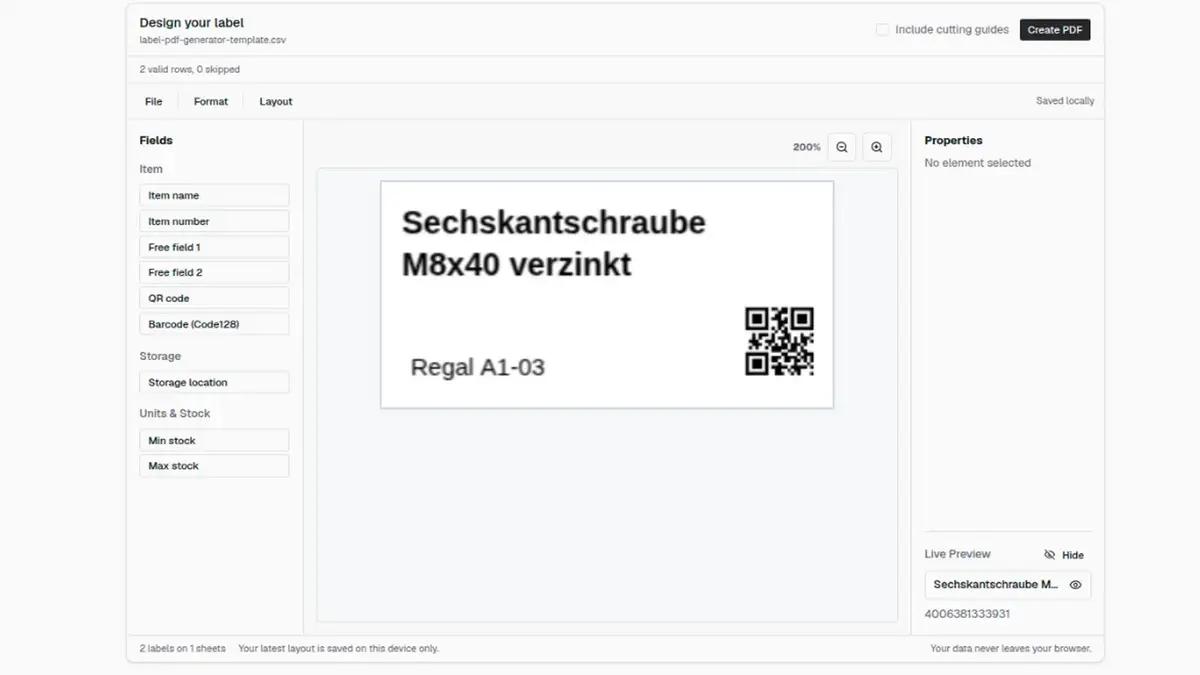
Download a template instead of hunting for one
You don't need to track down a label template somewhere online. The CSV template on this page already carries every column that belongs on a warehouse label: item name, item number, storage location, min and max stock, barcode, plus two free fields for whatever else you print. Only the item name is required.
Which sheets this works with
The generator knows Avery Zweckform 3422 and 3657 as well as the full-page A4 label. If different sheets are sitting in your cupboard, you enter the dimensions, columns, rows and margins once yourself, the grid just has to stay within DIN A4. It prints on any ordinary laser printer, no label printer needed.
Save your layout and pick it up next time
Once you've set up your label, the browser remembers the layout for your next visit on this device. The export is the more reliable route: "Download layout" gives you a small JSON file holding just the structure: which field sits where, at what font size, with which barcode type. Keep it with your records, and on your next print run you upload it again via "Upload layout" instead of rebuilding everything. Your item data is never part of that file; it still comes fresh from your CSV.
When you reprint regularly
As soon as your item list keeps changing, building the CSV becomes a job of its own. That's the point where the label designer in repleno pays off: it pulls item name, number, storage location and stock limits straight from your master data, knows 68 sheet formats, and prints EAN-13 and the product image along with them.
Sheet formats in detail
Which sheet fits is decided before printing: label size and grid determine how many fields stay legible at all. The formats in the generator and their limits.
Avery Zweckform 3422
- Paper size
- DIN A4 · 210 × 297 mm
- Label size
- 70 × 35 mm
- Layout
- 3 × 8 · 24 labels per sheet
- Fields
- Name, storage bin, barcode
The shelf-bin format. 70 × 35 mm are enough for item name, storage bin and a QR code at a legible size. The starter template leaves out item number, minimum and maximum stock, because at this size they would only fit as tiny print.
Avery Zweckform 3657
- Paper size
- DIN A4 · 210 × 297 mm
- Label size
- 48.5 × 25.4 mm
- Layout
- 4 × 10 · 40 labels per sheet
- Fields
- Name, storage bin, barcode
For open-front bins and small-parts containers the 3422 overhangs. 48.5 × 25.4 mm is tight: a long item name next to a code only works if you adjust font size or wrapping in the editor. In return you get 40 labels per sheet.
A4 Full-Sheet Label
- Paper size
- DIN A4 · 210 × 297 mm
- Label size
- 210 × 297 mm
- Layout
- 1 × 1 · 1 labels per sheet
- Fields
- All eight fields
One label across the whole sheet — for pallet positions, shelf rows and zone signs that have to be readable from the aisle. The only format with room for all eight fields at once.
Custom A4 format …
- Paper size
- DIN A4 · 210 × 297 mm
- Label size
- Freely definable
- Layout
- Columns, rows, margins and gaps are yours to set
- Fields
- All eight fields
If your sheet is none of the three: enter label size, columns, rows, margins and gaps yourself. The generator checks that the grid fits inside A4 before it lays out the PDF.
Missing a sheet for good? Send us the brand and part number and we'll add it permanently.
Frequently asked questions
Which label formats are supported?
Do I need an account?
Where does my data go?
What happens if a row has no barcode?
Can I print the PDF on other label sheets?
Can I print custom text per label from the CSV?
Can I save my label layout?
Format details & limits
Underlying specifications
- Avery Zweckform 3422: 70 × 35 mm, 24 Etiketten je Bogen (Herstellerangabe)
- Avery Zweckform 3657: 48,5 × 25,4 mm, 40 Etiketten je Bogen (Herstellerangabe)
- ISO 216: DIN A4 = 210 × 297 mm
- ISO/IEC 15417 (Code 128) und ISO/IEC 18004 (QR-Code)
Labels straight from your item data
If you reprint regularly, the label designer in repleno saves you the CSV work: item name, number and storage location are already there, you just pick a sheet format and print.