Excel alternative for your warehouse: repleno
Your stock still lives in a spreadsheet. When does Excel stop keeping up, and when is inventory software worth it?
Which one fits when?
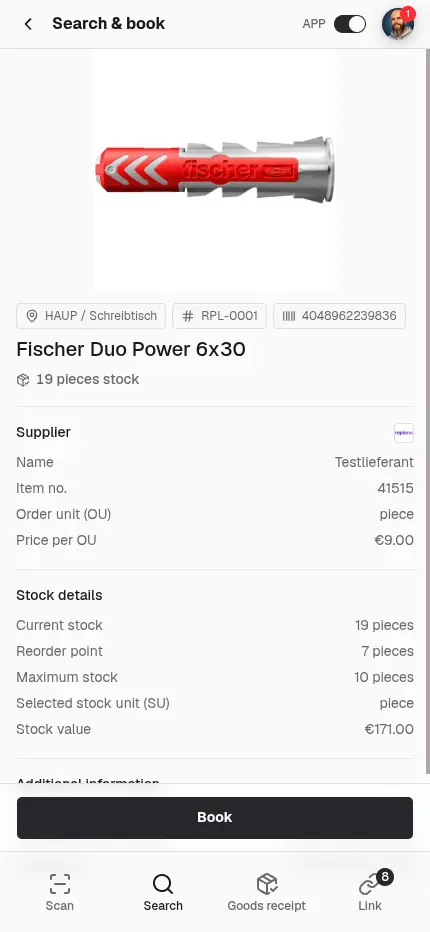
The difference is how stock is maintained and managed. In Excel, someone maintains stock fields in a spreadsheet. In repleno, you run your warehouses and stock operationally in an app, and a booking takes seconds. Excel brings only the spreadsheet; repleno, as inventory software, also brings suppliers, labels, stock alerts and, from the Flow plan, multiple storage locations and automatic reordering.


Choose repleno when several people book stock, low levels should be flagged in time, and you need an auditable history.
Stick with Excel for a one-off list or a handful of items, when nothing has to trigger automatically and you want full freedom over the layout.
Excel spreadsheet or inventory software, what decides it?
Focus
replenoDedicated inventory software
ExcelSpreadsheet repurposed for stock
Barcode and QR scanning
replenoNative, by smartphone
ExcelOnly with VBA or add-ons
Booking at the same time
replenoSeveral users at once, in real time
ExcelOnly with Microsoft 365 and cloud storage
Reaction at the reorder point
replenoWarning per item, automatic ordering from Flow
ExcelCheck manually, no alert
Data safety
replenoValidated bookings, no silent error
ExcelFormulas and references can break when edited
Audit trail and history
replenoMovement history, GoBD-compliant
ExcelNo trail, edits overwrite
Access on the floor
replenoCloud web app right at the shelf
ExcelFile on the PC, limited on mobile
Cost
replenoBy item count and features, free to start
ExcelIncluded in Microsoft 365
Getting started
replenoEasy to use, import via CSV
ExcelReady instantly, freely shaped
When is an Excel spreadsheet enough for stock?
For a one-off stocktake, a handful of items or a quick list, Excel is plenty. Free inventory and stock-list templates are everywhere, and if you only need to record what sits on the shelf, you don't need software. Once several people book, low levels should trigger reorders or a gap-free record over months matters, the Excel stock list has to carry an ongoing process. Then even careful upkeep becomes work: every withdrawal, every reorder point and every change depends on someone updating the file in time.
What happens at the reorder point, in Excel and in repleno?
In Excel a low level only shows up when someone looks. You can colour-code a minimum level, but nobody is reminded and no order comes of it. In repleno you decide per item what happens at the reorder point: nothing, a stock alert, from Flow an automatic order with the supplier, from Scale a draft order for approval. That pays off for items that run down constantly and where the ordering step would otherwise get left undone.
Define what happens when the reorder point is reached.
How error-prone is running stock in Excel?
Excel is only as reliable as its formulas. A deleted row, a shifted reference or an overwritten field skews the count, often unnoticed, because a wrong total or a #REF! is easy to miss day to day. When several people work on the same file, version conflicts and locked workbooks come on top. repleno validates every booking and logs the movement. The stock stays traceable and can't quietly drift.
repleno's full feature set
Scan a barcode, paste a product link or text: the AI creates the item with name and data. Import entire stock lists via CSV.
Maintain all item master data in one central place.
Extend items with your own fields like manufacturer, serial number, or sales price.
Manage suppliers centrally and assign several per item. The demand report shows you right away where to order.
Manage the same item across multiple storage locations, with its own stock level and bin at each one, and transfer stock between them.
Create and print labels with barcode or QR code for fast scanning in the warehouse.
Learn moreLet repleno find matching product images for you, without having to upload them yourself.
Create assemblies and kits. Production increases the stock of the finished item, and kit withdrawals book the components directly.
Manage access and roles so everyone on the team sees exactly what they should.
Learn moreA device in the warehouse that the team shares without personal logins: unlocked with a name and PIN and straight into stock management.
Book consumption, receipts and stock corrections in seconds. By barcode or QR scan, or simply through search, no barcode needed.
Learn moreBook goods receipts directly against open orders and keep stock up to date immediately.
Book material directly to projects or customers and track clearly where it was installed.
Staff request missing material in the app, with quantity and a note. The admin sees the request right away and takes care of it.
Book material consumption to cost centers and export the report for accounting, DATEV or SAP.
Keep an eye on your material: everyone sees on their phone or PC what's in stock, what's on the way and what needs reordering soon, in real time.
Learn moreGet notified the moment an item drops below its reorder point, in the app and by email.
Learn moreWhen an item drops below its reorder point, repleno emails the order to the supplier, bundled and with minimum order value. Optionally only after your approval.
Learn morerepleno prepares orders, and you approve them before they go to the supplier.
Find slow movers, optimize stock value and spot dependencies on individual suppliers.
Learn moreEvery booking and every change to item data stays traceable, with timestamp and user.
Unmarked features are included in every plan, Free included. See pricing
Common questions about repleno as an Excel alternative
Is an Excel template enough for inventory management?
Can I import my Excel list into repleno?
Is repleno free like Excel?
Excel, inventory software or a warehouse management system?
Can I use a barcode scanner in Excel?
Can several people work in one Excel stock list at the same time?
Is an Excel spreadsheet enough for stocktaking and GoBD?
Sources and further reading
Try repleno for your business
Organize your warehouse, keep stock current, on mobile and for the whole team.
Start for free