



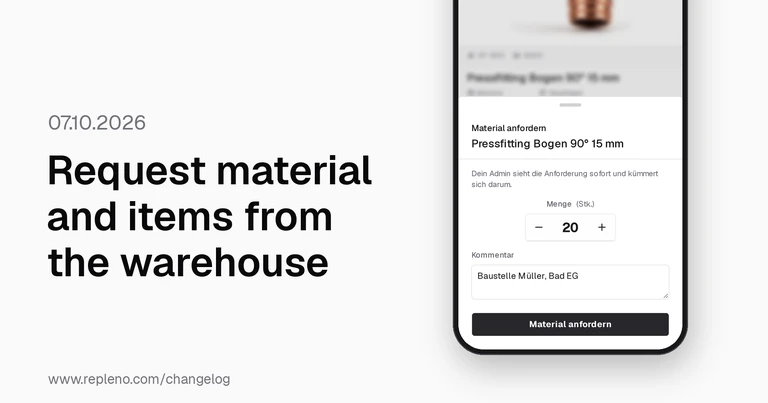
Report to the warehouse straight from the app
Anyone on a job site who needs 20 sockets now requests them from the warehouse in the app instead of calling. Anyone who scans an item that isn't in repleno yet asks your admin team to add it with one tap. Both land on the dashboard under “To-dos”: the warehouse provides or orders the material, and the admin team creates the new item.
New
- (APP) Demand notifications: When an employee on a job site needs material, they request it from the warehouse right in the app with “Request material”, including quantity and comment.
- (APP) Items: When an employee scans the barcode of an item that isn't in repleno yet, they ask the admin team to add it with “Request item”.
- Roles and permissions: Admins and owners now also sign in to the shared warehouse device with their own PIN, without a second account next to their login.
Improved
- Shared warehouse device: A dedicated step with a video guides you through connecting and warns you before connecting a personal device or one already paired elsewhere.
- Roles and permissions: When you add an employee with a PIN under “Add person”, you set “See prices and values” right away.
- (APP) Scanner & search: The item list is always visible, and on the shared warehouse device each employee sees their own recently used items at the top.
- Reorder point: You now see the suggestion based on your consumption right on the item's stock card and apply it with one click.
- Suppliers: A checklist on the supplier and the item shows which detail is still missing for automatic order sending and takes you straight to the field.
- Orders: The list separates open and closed orders, filters by several suppliers and exports every filtered order to CSV, not just the current page.
- Items: Start the image search straight from the empty photo slot, and open the item photo full screen with one tap.
- Items: When you create an item by EAN, repleno now finds the item data faster.
- AI assistant: The help with AI answers in English when you write in English, understands follow-up questions and offers to report unanswered questions to the repleno team.
- Plan: Even on the free plan, you can now add as many custom fields to your items as you need.
Fixed
- Bookings: When the connection drops on a weak network and the booking is sent again, repleno no longer books the stock twice.
- Goods receipt: When a booking fails, repleno shows an error instead of wrongly saying “booked”, also on the task cards on the dashboard.
- General: When an action fails because of the network, repleno now shows an error message instead of silently saving nothing.
- (APP) Shared warehouse device: After the screen was off, repleno reliably signs out the last employee, and wrong PINs lock the sign-in for longer each time.
- Orders: If sending an order keeps failing, repleno alerts you again once a day, even after you closed the first notification.
- Items: Item photos can now be uploaded from Safari and iPhone, including large photos straight from the camera.
- General: On iPhone, the keyboard and status bar no longer cover input fields, whether in forms, when creating an item or in the scan dialog.
Important
- Demand notifications: You enable “Request material” per employee under “Team & Devices”.
*repleno uses Artificial intelligence
Early Access Build: 1.404.1