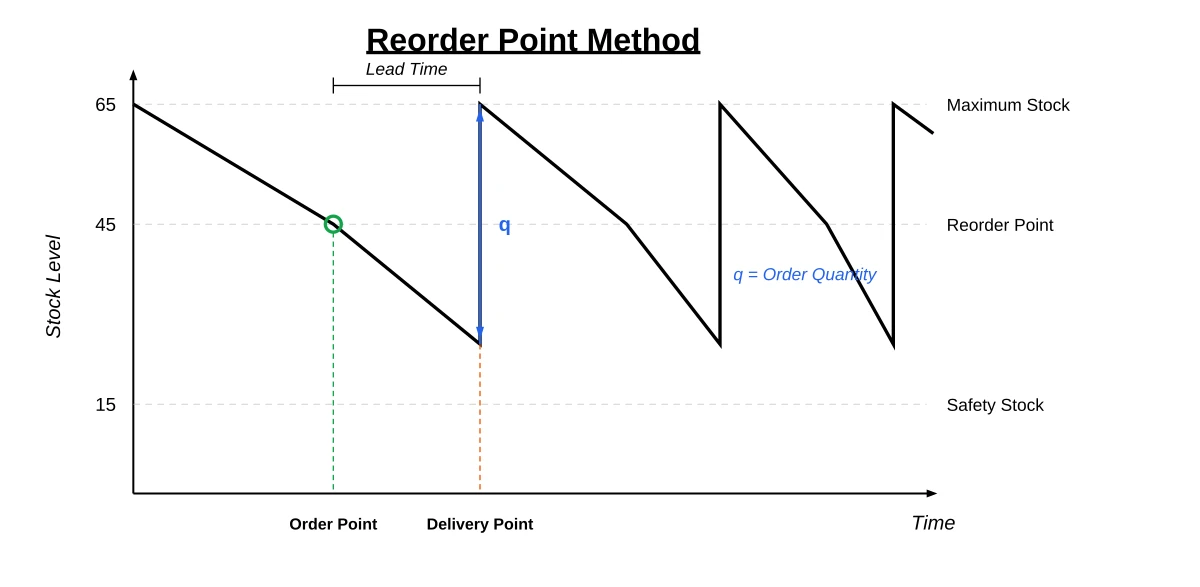
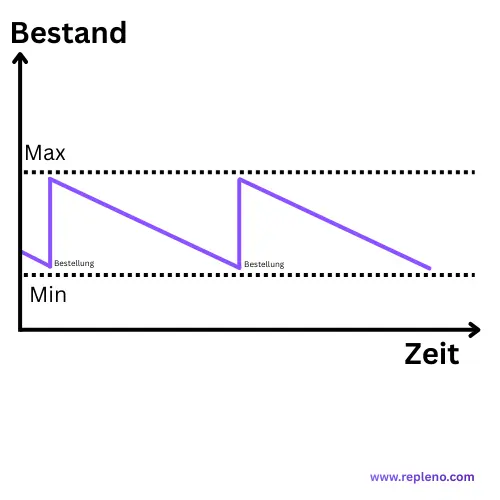
Both trigger at the same point. Only the order quantity differs. Min-Max is not an alternative to the reorder point method, it is one of its two variants. The "Min" is the reorder point.
The trigger in both cases: the reorder point. In the example below it sits at 150 units.
Fixed order quantity (s,Q): order a fixed quantity Q whenever stock hits s. Lower stocks, more upkeep.
Order up to Max (s,S): order Max minus available stock whenever stock hits s. Less upkeep, higher stocks.
Next step: work out the reorder point first, then pick the quantity rule per item.
Min-Max and the reorder point method trigger at exactly the same level. The only difference is how much you order once they do: a fixed quantity, or enough to fill the stock back up to a target. The "Min" in Min-Max is the reorder point, so "which of the two is better?" moves one level down: is the quantity already fixed by a pack size, an MOQ or a staggered price? Then order a fixed quantity. Otherwise order up to Max.
Is Min-Max the same as the reorder point method?
The Gabler Business Dictionary files both under one method and separates them only by quantity: one variant orders a fixed amount, the other fills the stock up to a target level. So the two share a trigger and split on how much you order, which makes Min-Max a form of the method rather than its rival.
So the Min equals the reorder point, not the safety stock: it sits above it by exactly the amount you consume during the lead time. How you calculate it is covered in the guide to the reorder point.
The real counterpart to the reorder point method is the reorder cycle method, which orders on fixed dates instead of at a fixed level.
When do you order, and how much?
Both variants essentially answer two questions: when do I order? And how much?
Fixed order quantity (s, Q): If the stock falls to/below the reorder point s, a fixed quantity Q is ordered.
Order up to Max (s, S): If the stock falls to/below Min = s, enough is ordered so that the stock reaches Max = S again (Order quantity = S − available stock).
Practical Note: Depending on the ERP/WMS, what counts is the available stock: physical stock minus reservations, plus open incoming goods.
How do you calculate the reorder point, and does it apply to both variants?
It applies to both, and you calculate it once. The classic formula, which the Gabler Business Dictionary describes as the safety stock plus the consumption expected during the procurement time:
Reorder Point = Daily Consumption × Lead Time + Safety Stock
Example:
Daily consumption: 20 units
Lead time: 5 days
Safety stock: 50 units
Reorder Point = (20 × 5) + 50 = 150 units
As soon as the inventory reaches 150, an order is placed. Use the free calculator to compute your reorder point instantly.
Note: The reorder point is consumption-oriented: it answers the When, whatever quantity you then order.
How does the fixed order quantity (s,Q) work?
Definition and Functionality
With a fixed order quantity, the same quantity Q is ordered every time stock hits the reorder point. Where that quantity comes from is usually already settled: pack size, the supplier's minimum order quantity, or a calculated lot size.
Advantages of the fixed order quantity
The quantity is settled and does not have to be worked out per order
Pack sizes and MOQs fit without rounding
Lower average stock, because you never order beyond the lot size
It is the right pick whenever the order quantity is dictated from outside: pack size, minimum order quantity, staggered price.
Disadvantages of the fixed order quantity
The quantity does not follow when consumption changes; you recalculate it by hand
A poor fit when shelf space sets the ceiling
If stock drops well below the reorder point between checks, a fixed quantity does not make up for it
How does ordering up to Max (s,S) work?
Definition and Functionality
With order-up-to-Max, two inventory limits are defined:
Min = the reorder point (the trigger)
Max = the order-up-to level (the quantity you refill to)
Once the stock reaches the Min, it is replenished up to the Max. ETH Zurich labels the two values the same way: the min is the order point, the max the order-up-to level.
Watch out, common mix-up: The Min is not the safety stock and not a "minimum stock" that must never be breached. It is the reorder point: it contains the safety stock plus the consumption expected during the lead time. Falling below the safety stock is an alarm; reaching the Min is simply the signal to order.
Note: Min-Max is a "fill-up-to" principle. The order quantity results from Max − available stock (not as a fixed quantity).
Pragmatic: "Optimal Order Quantity" is often simply the sensible lot/pack size in practice (packaging unit, MOQ, pallet layer). If you want to be more precise, you can refine it later with EOQ/Andler.
Example:
Min (reorder point): 100 units
Order quantity: 300 units
Order-up-to level = 400 units
Note: The order-up-to level is not the maximum stock. You configure the order-up-to level, but you never reach it: you keep consuming during the lead time, so the delivery lands on the safety stock rather than on the reorder point. The maximum stock actually attained is safety stock + order quantity, which sits lower by exactly the consumption during the lead time.
Advantages of ordering up to Max
Nobody has to think about the quantity per order; it follows from Max minus stock
The order-up-to level mirrors what actually fits on the shelf
The quantity follows along when consumption fluctuates
Disadvantages of ordering up to Max
Higher inventory levels
The order quantity changes every time, so pack sizes do not always fit it
Risk of overstocking when the order-up-to level is set too high
Lot sizes, MOQs or staggered prices dictate the amount
Shelf space or a target level caps the amount, or consumption fluctuates
Reaction to changes in consumption
Both react equally fast. What differs is how the quantity follows: Max minus stock adjusts on its own, a fixed quantity has to be recalculated by hand.
Inventory Costs and Tied-up Capital
Fixed order quantity: lower tied-up capital
Order up to Max: higher stocks, higher inventory costs
The gap is smaller than those two lines suggest. Set the order-up-to level to reorder point plus order quantity and withdraw unit by unit, and both land at the same average stock: order up to Max simply reorders that fixed quantity. They only diverge once stock has already dropped well below the reorder point when the order fires. Take a whole pack at once and order up to Max refills to Max and sits higher afterwards, while the fixed quantity just adds its Q. How much that weighs depends on your inventory carrying cost from space, tied-up capital and shrinkage per item and year.
Planning and Administrative Effort
Both need the same calculated reorder point. Without a system they differ only in who determines the quantity: ordering up to Max lets the tool compute it from Max minus stock, a fixed quantity you set once. How you get there is the path to ordering automatically, in five steps. What to look for in a tool: it stores both values per item and computes the quantity from Max minus available stock.
Setting Parameters (Without Math Overkill)
If you want to start with a clean setup, these 4 building blocks are often enough. The precondition is an organized stockroom with fixed locations.
Consumption: Ø Consumption per day/week (best from the last 8–12 weeks, seasonally separated if applicable).
Lead Time: Realistic lead time (Average + Buffer) instead of "catalogue value".
Safety Stock: Conscious service level (e.g., 95%) + consider fluctuation.
Lot Size: Packaging unit/MOQ as a start; later refine for cost optimization if necessary.
Calculation Examples from Practice
Mini-Example: Same Item, Both Quantity Rules
Assume:
Ø Consumption: 20 units/day
Lead time: 5 days
Safety stock: 50 units
Lot size/Pack size: 300 units
Then:
Reorder Point s = 20 × 5 + 50 = 150 units
Fixed order quantity (s, Q): If Stock ≤ 150 → order Q = 300
Min-Max (s, S): Min = 150, order-up-to level = 150 + 300 = 450 → if Stock ≤ 150 → order (450 − available stock). After delivery, stock peaks at 50 + 300 = 350 units, because 100 units are consumed during the 5-day lead time.
Use Case 1: the item only ships in packs of 100 Fixed order quantity, because the pack size dictates the amount anyway
Use Case 2: one shelf bin, fluctuating consumption Order up to Max, because the bin caps the quantity and the amount follows consumption
What mistakes do businesses make in practice?
Mistake 1: Safety Stock Set Too Low
Many companies set the safety stock "by gut feeling", picking a number for the very buffer meant to absorb late deliveries and demand spikes. Better: first choose a service level (e.g., 95%) and derive the safety stock from the consumption fluctuation.
Simple Start (if lead time is relatively stable):
Safety Stock = z × σ(Consumption) × √(Lead Time)
Typical z-values: 90% ≈ 1.28, 95% ≈ 1.65, 99% ≈ 2.33. If lead times fluctuate strongly, this variance should also be taken into account (or you calibrate based on real stockouts).
Mistake 2: Lead Times Calculated Incorrectly
Often only the lead times stated by the supplier are used. In reality, you should include the average of the last 12 deliveries plus a buffer time of 10-20%.
Mistake 3: Picking the quantity rule by item value
Whether a fixed quantity or order-up-to-Max fits is decided by the quantity itself: does a pack size dictate it, or should it follow consumption? The purchase price says nothing about that. The ABC analysis measures value share and deliberately does not answer this question.
Mistake 4: Lack of Regular Review
Consumption and lead times change; a reorder point set once does not. Recalculating quarterly is enough in most shops, monthly with seasonal swings or product changes.
Checklist: Which Method Suits Your Company?
Every item needs a reorder point. The checklist only decides the order quantity.
Choose a fixed order quantity if:
Pack size or MOQ dictates the amount anyway
A staggered price kicks in above a certain quantity
The amount rarely changes and setting it once is enough
Choose order-up-to-Max if:
Shelf space or bin size caps the quantity
Consumption fluctuates and the amount should follow it
Nobody should have to decide a quantity per order
Decide per item if:
Your range contains both patterns
Shelf space and tied-up capital differ a lot from item to item
Conclusion: Which Method is Better?
It comes down to what sets the order quantity, not to the value of the item:
Quantity dictated from outside (pack size, MOQ, staggered price): fixed order quantity
Shelf space, an order-up-to level or fluctuating consumption set it: order up to Max
Either way, the work that actually pays off is the same: a reorder point calculated from real consumption and real lead times, reviewed regularly.
FAQs about Reorder Point Method vs. Min-Max
What is the main difference between Reorder Point Method vs. Min-Max?+−
Only the order quantity. Both trigger at the same level: the reorder point. The classic variant then orders a fixed quantity, Min-Max fills the stock back up to Max.
Is Min-Max a reorder point system?+−
Yes, it is the variant with a maximum stock. The min is the order point, the max is the order-up-to level you refill to. The trigger is the same as with a fixed order quantity, only the amount is determined differently.
Is the Min the same as the minimum stock?+−
No. The Min in Min-Max is the reorder point. Minimum stock is another word for safety stock and sits below it, by exactly the consumption during the lead time. Set the two equal and you only order once the buffer is already broken into.
Is a higher or a lower reorder point better?+−
Neither, it has to fit. Too low means stockouts, too high means tied-up capital. The right value follows from daily consumption times lead time plus safety stock, not from a rule of thumb.
Which method is cheaper?+−
A fixed order quantity keeps the average stock lower and therefore ties up less capital. Ordering up to Max costs less attention. Which is cheaper depends on whether your bottleneck is capital or working time.
Is Min-Max outdated?+−
No. It is simple, proven, and the right choice whenever shelf capacity or a target level caps the quantity, or consumption fluctuates and the amount should follow it.
Can both methods be combined?+−
Yes, per item. Use a fixed order quantity where lot sizes or staggered prices dictate the amount, and order up to Max where you simply want the shelf refilled. The trigger stays the same either way.
Which method is suitable for small businesses?+−
Ordering up to Max is easier to run without an ERP, because the system computes the quantity from Max minus available stock. The reorder point still has to be calculated in both cases.
What do (s, Q) and (s, S) mean?+−
Briefly: (s, Q) = at reorder point s, a fixed quantity Q is ordered. (s, S) = when falling below s, stock is replenished to S (Order quantity = S − available stock).
Christoph worked as an electronics technician in industry for five years and saw how missing small parts slow down operations. Later, as a project manager at P.S. Cooperation GmbH (Böllhoff Group), he led system-supported C-parts logistics projects for mid-sized industrial and machine-building companies. Today, he is building repleno full-time, inventory management that helps small businesses detect demand early and automate reordering.