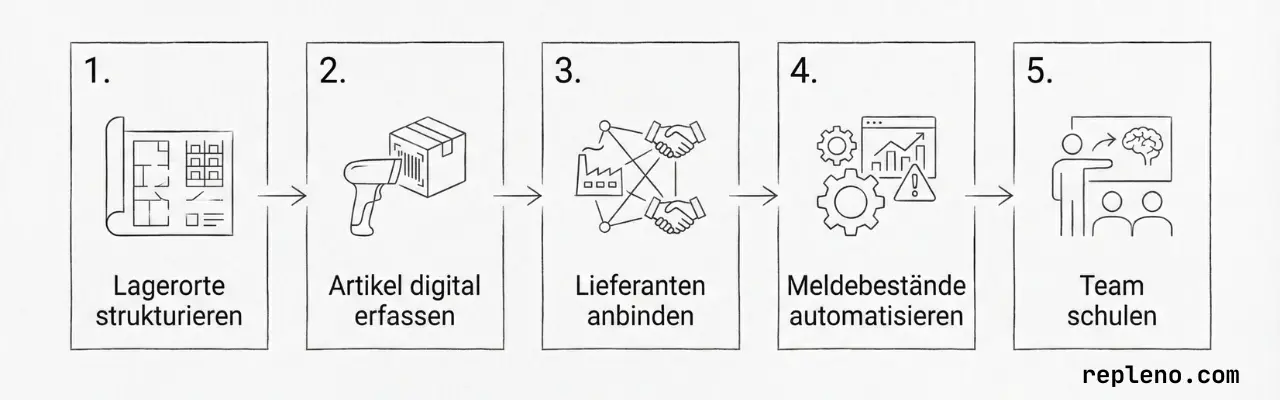
Digitizing your inventory management works in five steps:
- Bring the team along
- Structure the warehouse and processes
- Record items digitally
- Connect suppliers
- Define reorder points and optionally automate replenishment
Digitizing your inventory management is not a self-runner, but it pays off: whoever knows what is where and in what quantity searches less, finds faster, makes fewer spontaneous trips to the wholesaler, and deals with fewer downtimes and missing parts. Above all, it is a competitive edge over the businesses next door that still work with a clipboard and shout-outs. The biggest lever, though, is not in the software but ahead of it. Because the most expensive mistake is an untidy start without structure and processes. And I'm telling you that as a software vendor.
When three people look for the same item in three places, when overstock sits on the shelf, or only one person knows where the three-phase meter DSZ15DE from Eltako is and how many are left, then this is not a problem software can solve on its own. I see this starting point again and again in conversations and on-site visits. What's missing are rules: for goods receipt and issue, returns, stock locations, inventory bookings, and reordering.
So let me be blunt: the fish rots from the head down. If the boss isn't willing to be the first to live, enforce, and delegate fixed workflows, the business doesn't need to start a digitization project. Software won't be able to solve structural problems.
The good news: once that basis is in place, it takes no robotics and no massive ERP project. A clean structure, simple software, and an entry point that deliberately stays small are enough in most businesses. This is exactly how software implementations become resilient; first clarify responsibility, then map it digitally (ZVSHK guide).
It is important to distinguish between the terms: Digitizing means cleanly recording stock locations, items, suppliers, and bookings and mapping them digitally. Automating means monitoring stock levels on this data basis, checking reorder points (Meldebestand), and triggering replenishment needs.
The sequence above is crucial: first bring the team along, then you digitize the inventory and the workflows. After that, you automate the points that repeat themselves, especially stock control and replenishment. In the end, a paperless warehouse runs where every booking lands in the system and you, as a business, work more economically.
Why switch to digital inventory management?
Three problems drive up costs:
- Search times. Without fixed stock locations, every employee looks in a different place. This costs time and leads to inquiries.
- Inventory errors. If goods receipts and issues are not booked directly, the stock level and reality will eventually no longer match. This leads to shortages, double orders, and frustration.
- Reactive ordering. Without a reorder point (Meldebestand), you only order when something is missing.
Digital inventory management doesn't solve these problems at the push of a button. But it forces the process into a simple form and a comfortable routine that works in everyday life.
Step 1: Bring the team along
Before the first stock location is labeled, it's the team that decides whether the project holds. The boss sets the direction, but the crew has to use it, every day. Whoever presents the team with a done deal can save themselves the rest.
The Bitkom study 2025 shows this quite clearly: three in four trades businesses see a greater need for digital skills, yet fewer than half invest specifically in further training, as the study report details. At the same time, implementation projects often get blocked by fear of increased control, unclear day-to-day value, or a change that is too large at once.
What I observe: whoever tries to introduce too many steps at once loses the team halfway through.
What works in practice:
- Make the benefits concrete. Not "we are digitizing now," but "you'll spend less time searching and walk half the warehouse less often."
- Let them decide with you. Whoever helps shape the stock locations and workflows carries them later, instead of experiencing them as control from above.
- Involve multipliers. Every implementation needs people in the team who take the system seriously and can answer questions.
- Start small and refine. First the core assortment, then expansion. After the first few weeks you gather feedback instead of hoping for perfection at the start.
Step 2: Structure stock locations
Every item needs a fixed address. Without an address, there is no system.
You don't need a complicated acronym for this. A simple scheme like Zone-Aisle-Shelf-Level-Compartment is completely sufficient, for example L1-A-03-02-05. The only important thing is that the logic is clear, visibly labeled, and stored identically in the system.
How to proceed:
- Define zones. Separate by material groups or usage, for example, Electrical, HVAC (SHK), Fasteners, Consumables.
- Label locations. Not just shelves, but specific levels and compartments → right down to the bin location.
- Assign stock locations. Every item gets a fixed place. No "there's just some space there right now."
You can find detailed instructions on naming stock locations in the linked article. It doesn't matter if your scheme sounds perfect. What matters is that your team understands it immediately and that it is as simple as possible. Only then will it be used in practice.
What has proven itself is what you can call out easily: Eckard, you'll find the three-phase meter DSZ15DE on shelf 17, level 2, second compartment (possible coordinates: 17-02-02, or R17-E02-F02). Eckard gets that. Even without logistics training.
Step 3: Record items and movements digitally
Every item needs a digital record (master data) with a description, item number, stock location, supplier, and current stock level. Only then can you replace the paperwork and go paperless.
The fastest entry point is often the import of existing master data. In the trades, DATANORM, for example, remains an obvious standard because many wholesalers provide suitable item master data that you can download as an Excel or CSV file. Still, don't load everything at once: start with the material that is already missing or being searched for today; typically 20 to 30 items. Alternatively, just ask your field sales rep for a fast-mover/slow-mover list with items and order frequencies from the last 12 months.
For ongoing operations: every movement of material and stock must be recorded directly. Whether via scanner or smartphone camera is secondary. The decisive factor is that the booking step is not forgotten and the process stays simple. The more complex the process, the more likely the project is to fail.
Step 4: Connect suppliers
Your inventory system must know where an item is procured. In your master data, link every item you want to keep in stock with at least one supplier, ideally with the item number, delivery time, and packaging unit.
There are two clean paths for getting started:
- Digital ordering path. Your software sends finished orders straight to your supplier, so you save the ordering effort over the phone or in the web shop.
- Simple procurement process. Especially with consumables, it is often enough to have the reorder impulse triggered cleanly from the stockroom; which procurement methods fit depends on the material. Ideally automated, since for C-parts the process cost of ordering is often higher than the material value itself.
Step 5: Define reorder points and automate
Now it becomes rule-based. For every item, you set a reorder point (Meldebestand): the quantity of an item still on the shelf at which it should or must be reordered.
What the software does once an item hits its reorder point differs from tool to tool. Most work with an order proposal, some cover all three stages:
- Demand alert. The system reports: "This item needs to be reordered." What, how much, and from whom you order is up to you.
- Order proposal. The system suggests an order quantity and draws on your master data (supplier, quantity, packaging unit). You check it and place the order with one click.
- Automatic ordering. The system orders by fixed rules from the supplier you set, without anyone having to approve.
You don't have to start at stage 3. Most businesses do well to begin with the demand alert and only switch to an automatic reordering process once the reorder points have proven themselves in daily use. How to calculate the right values and what that brings in euros is shown in the practical guide to automatic material ordering.
Choosing the right software
You don't need an ERP. Especially for small businesses, there is lean inventory software that works without an ERP project. Such a solution is enough if it can do five things:
- Barcode or camera scan for fast bookings in everyday life
- Supplier assignment per item
- Reorder point logic with rules per item
- Mobile access from a smartphone or tablet
- EU hosting with roles, backups, and verifiable security certificates such as the BSI C5 criteria catalog
Conclusion: Sequence matters more than software choice
Digitizing inventory management is clean process work. Five steps that build on each other. That's essentially it. As soon as the data basis is established, the next step can be automated: stock monitoring, reorder point checks, and replenishment suggestions.
The most important decision is therefore not the software question, but the sequence. Start small, keep the rules clear, and then improve step by step.
If you want to know in advance what an unstructured warehouse, manual processes, and missing parts cost you, take a look at the guide to reducing warehouse costs.