Chaotic inventory management costs trade businesses real money every day: three employees spending 20 minutes a day each on stock organization add up to 240 hours a year, capital tied up in stock sits idle, and projects get delayed because parts are missing. None of that needs an ERP: a lean inventory solution recovers several thousand euros per employee per year.
Introduction to Inventory Management in Trades
The Importance of Efficient Inventory Processes in Daily Operations
In small and medium-sized trade businesses, inventory management decides whether a project turns a profit. Every day, trade businesses lose valuable time and money through inefficient inventory processes. An electrician who discovers on the construction site that important cables are missing. A plumbing business that orders expensive fixtures twice because no one knew they were already in stock. A carpentry shop that cannot accept a lucrative project immediately because it's unclear whether enough wood is available.
These scenarios repeat daily in German trade businesses. The cause is rarely a lack of willingness to organize, but rather missing practical tools that fit the reality of trades. While large industrial companies work with complex ERP systems, trade businesses need solutions that work quickly without requiring an IT expert in-house.
Well-functioning inventory processes mean concretely: Technicians know immediately on the construction site which materials are available. Reorders happen automatically before materials run out. Tools are no longer bought twice because no one knows where they are. Projects can be planned reliably because material inventory is transparent. These advantages sound self-evident, but in practice, they are still wishful thinking for many businesses.
Why Many Trade Businesses Don't Use ERP
The decision against an ERP system is usually a conscious and understandable choice for trade businesses. ERP systems were originally developed for large manufacturing companies and bring complexity that simply isn't needed in trades. A plumbing business with ten employees doesn't need production planning across multiple plants, no complex cost center accounting, and no multi-stage approval processes.
Investment costs for ERP systems often start at several thousand euros for licenses and weeks of training. Many master craftsmen report failed ERP projects where, after months of implementation, the system was so complicated that employees switched back to Excel lists. Implementation ties up valuable working time that is missing in day-to-day operations.
What is sold to trade businesses as trades software or business software is often a full ERP: it ties together accounting, project planning, HR, purchasing, and inventory management on one shared database. A business that genuinely needs all of those areas is well served by it. For a business that only wants to digitize its inventory, though, an ERP can be oversized. Setup takes longer, the learning curve is steeper, and part of the monthly cost goes to modules that stay unused. And once an ERP is in place it is hard to move off again: data migration, new interfaces, and retraining make the switch costly, whereas a specialized inventory solution touches only the warehouse and keeps its data exportable. Specialized inventory solutions focus on exactly this one use case, which is why they are usually productive sooner.
Challenges in Inventory Management Without ERP Systems
Error-Prone Paper-Based Processes
The classic paper-based process is still surprisingly widespread in German trade businesses. At first glance, it seems practical: A technician takes material from stock and notes it on a piece of paper. At the end of the week, these notes should be transferred to the system. In reality, however, something else happens. Notes get lost, become illegible, or end up crumpled in a pocket and accidentally go through the washing machine. The result: No one knows exactly which material was actually consumed.
These seemingly small information losses add up to significant economic damage. Material is consumed but not invoiced to the customer because proof is missing. Inventory in accounting doesn't match reality, leading to nasty surprises during inventories. It becomes particularly problematic when multiple employees have simultaneous access to stock, but each maintains their own system of note papers.
A painting business from Cologne reported a typical case: Over several months, high-quality paints worth several thousand euros were regularly missing during inventory. Suspicion initially fell on theft. The resolution was more mundane: Employees had taken material for projects but noted it on papers that never made it to accounting. The material was consumed and charged to the customer but never deducted from inventory. The difference between target and actual grew larger over months.
Lack of Transparency in Inventory
Without digital inventory management, many businesses have permanent uncertainty about actual inventory levels. The question "Do we still have enough material for next week's project?" can often only be answered by checking stock. This not only costs time but leads to reactive rather than proactive work. Instead of planning projects securely, businesses work in "let's see what's still there" mode.
It becomes particularly critical for businesses with multiple inventory locations. An electrical business might have a main stock room in the workshop, material depots in company vehicles, and possibly an external storage location for large projects. Without a central digital overview, no one knows where which material is located. The consequence: Expensive material is reordered even though it's three streets away in the van.
The lack of transparency affects not only management but especially employees who work with it daily. Technicians spend valuable time on phone calls to the workshop to clarify whether material is available. Dispatchers cannot plan projects reliably because they don't have an overview of the material situation. These information gaps lead to frustration in the team and missed business opportunities when orders must be declined even though sufficient material would be available.
Time Loss Through Manual Processes
The biggest hidden cost factor in manual inventory management is time. Every manual inventory recording, every Excel list that must be maintained, every reorder that is triggered manually costs valuable minutes. These minutes add up to hours, the hours to days. A realistic calculation for a medium-sized trade business looks like this: If three employees each spend twenty minutes daily on inventory organization, that's five hours per week, about twenty hours per month, and 240 hours per year of pure organizational effort.
At an average hourly rate of 50 euros for skilled workers in trades, this corresponds to an annual loss of 12,000 euros Money that could have been earned with productive work. Added to this are the costs of errors: Incorrectly recorded inventory leads to wrong orders, urgent reorders to higher procurement costs, missing parts to project delays and dissatisfied customers.
Manual inventory management has another disadvantage: It only works as well as the discipline of those who maintain it. In stressful phases, when there's especially much to do, inventory maintenance becomes a bothersome side task that gets postponed. But exactly then, when many projects run in parallel, precise inventory knowledge would be most important. A good inventory solution breaks this vicious cycle by making processes so simple that they work even under stress.
What Makes a Good Inventory Setup Without an ERP?
Criteria for an Optimal Solution
A good inventory setup for the trades has one fundamental property: It adapts to the way trades work, not the other way around. While ERP systems demand that businesses adapt their processes to the software, a good inventory solution should digitize and improve existing practice without turning everything upside down.
The first criterion is speed. In trades, every minute counts. An inventory solution must be so fast that recording a withdrawn material takes less time than writing a note. If the system is slower than the previous method, it won't be accepted, no matter how many features it offers. The reality on the construction site doesn't allow cumbersome input forms with twenty required fields.
The second criterion is reliability. Trade businesses need systems that work even when the workshop manager is on vacation for two weeks or when a new apprentice starts. The software must be so robust that even under difficult conditions like poor internet connection, dusty environment, hectic on the construction site, the basic functions remain available. A system that fails at the smallest disruption is useless in trades.
The third criterion is cost-effectiveness. The total costs of an inventory solution must be in a reasonable ratio to the benefit. This isn't just about license costs, but the total calculation: acquisition, training, ongoing costs, and time spent on maintenance. The full calculation includes purchase, training, running costs and the time spent on upkeep.
Practicality, Mobility, Automation
Practicality means concretely that an electrician who just took a NYM 3x1.5 mm cable from stock for the construction site can document this with just three taps on their smartphone. No login to a separate system, no complicated menu structures, no forms with dozens of fields. The software ideally recognizes who is taking material and to which construction site it must be assigned.
Mobility in trades is not a nice additional feature but an absolute basic requirement. Work happens everywhere, just not at the desk. Technicians work at the customer's, technicians on changing construction sites, material is brought directly from the supplier to the construction site. An inventory solution that only works on the PC in the workshop ignores the reality of modern trade work. Every employee must have access to current inventory information on their smartphone and be able to record movements.
Automation is finally the key to time savings. It learns from past projects which materials are typically needed together and makes intelligent suggestions. It recognizes patterns in consumption and warns in time when unusually high material consumption occurs. This automation frees tradespeople from constantly checking stock and from the mental burden of always having to think about reorders. In repleno, automatic reordering hangs off the reorder point: depending on the setting and plan it only flags it, sends the order straight to the default supplier from Flow, or puts forward an order proposal for approval from Scale.
Important Features of Modern Inventory Management Without ERP
Mobile App Usage
The mobile app is the heart of every modern inventory management in trades. It transforms every employee's smartphone into a mobile inventory terminal. A plumbing installer who is currently loading their van with material opens the app, scans the barcode of the material used, and confirms the withdrawal with a tap. The information is immediately in the system, inventory is updated.
The real strength of mobile inventory management shows in everyday situations that previously led to problems. A project manager stands at the customer's and is asked if an additional order next week would be possible. Previously, they would have had to say: "I need to check in the workshop first if we have the material." Today they open the app, see availability within seconds, and can commit directly. This not only makes a professional impression but also secures spontaneous orders that would otherwise be lost.
Modern mobile inventory solutions also offer offline functionality. On construction sites in basements or rural areas without mobile reception, material withdrawals can be recorded. As soon as an internet connection is available again, the app synchronizes automatically. This robustness is crucial because tradespeople can't wait until they're in an area with good reception again. Work must continue, and inventory management must keep up.
Barcode Scanning
Barcode scanning eliminates the biggest weakness of manual recording: human errors in input. An electrician who has twenty different cable types in stock no longer needs to think about whether the correct article name is "NYM-J 3x1,5" or "NYM 3x1,5mm²". They simply scan the code, and the system knows exactly which material it is. This not only reduces errors but also speeds up the process enormously. Learn more about the benefits of barcode inventory management in the trades.
The technology is so mature today that scanning works with any standard smartphone. Dedicated barcode scanners are not strictly necessary, even if they're more practical in some environments. The smartphone camera is completely sufficient to reliably capture codes. Many materials already come from the manufacturer with barcodes, so no additional labeling is needed. For own products or loose materials, simple label printers can be used that cost less than an average cordless drill.
Barcode systems also enable precise traceability. When a customer complains months later that an installed part is defective, it can be exactly traced when which batch of which material was used. This protects against unjustified complaints and helps in justified warranty cases to quickly find the origin of the problem. For medical devices, batch documentation is required by law; in the electrical trades it decides who pays when a warranty claim lands.
User-Friendly Inventory Management
User-friendliness decides whether a system is used in daily operations or disappears in a drawer. A good inventory solution is designed so plainly that a new employee can work productively with it after a five-minute introduction. Complicated menu structures, cryptic technical terms, or nested settings have no place in a tradesperson's inventory solution.
Good inventory management shows the most important information at a glance. Which materials are critically low? Which articles are used most frequently? Where are the largest inventories currently located? These questions must be answerable within seconds, not after browsing through several submenus. Visual elements like traffic light colors help: Green for sufficient inventory, yellow for materials that should soon be reordered, red for acute shortages.
Inventory management must also be able to represent different inventory locations. An electrical business might have a main stock room, three service vans, and a parts storage for larger projects. The software must transparently show where which material is located and enable transfers between inventory locations with minimal effort. When a technician brings material from their vehicle back to the main stock room, that should be a matter of ten seconds, not ten minutes. A modern team inventory management ensures that all employees are on the same page.
Automatic Alerts & Reorder Points
Automatic alerts are the key to ensuring trade businesses never again stand in the middle of a project without material. The system continuously monitors all inventory and compares it with the defined reorder points. That is the quantity that has to last until resupply arrives, plus a buffer. How to calculate the reorder point is covered in its own article. As soon as a critical value is undershot, responsible persons receive a notification, via app, email, or SMS, depending on urgency.
Daily consumption and lead time decide the value, not gut feeling. Which is why it should not stay static. A material used every day needs higher reorder points than specialty parts only needed for specific projects. Modern systems analyze historical consumption and automatically suggest sensible reorder points. A painting business that regularly needs facade paint in spring and summer but hardly in winter should have season-dependent reorder points.
This function becomes particularly valuable in combination with automated ordering processes. When a reorder point is reached, the system can order from the preferred supplier directly: depending on the integration as an email with a PDF, through the supplier's shop, or via EDI. Typical order quantities are considered so that unnecessarily small or large quantities aren't ordered. A plumbing business that normally always orders ten pieces of a certain valve will also receive this quantity in automatic ordering, even if technically three pieces would suffice. This optimizes procurement costs and utilizes volume discounts.
Advantages of Specialized Inventory Solutions Over ERP Systems
Low Costs
The real cost difference lies in what comes before and around the monthly price. A full ERP starts with an implementation project that quickly reaches five-figure amounts: Odoo prices its implementation packs officially at 2,635 to 16,830 euros, with licenses on top. The suites marketed as trades software add up on subscription too: plancraft, for example, ranges from 59.90 to 199.90 euros per month depending on tier (as of 09.09.2026), each plus VAT and paid add-on modules. A specialized inventory solution has neither the implementation project nor this module surcharge; it costs a single, much lower monthly amount.
The low costs arise from the lean feature profile. While ERP systems try to map every business process, specialized inventory solutions focus exclusively on what is actually needed: stock management, material withdrawals, reorders, and stocktaking. No overloaded modules for personnel planning, financial accounting, or production control that no one uses anyway. This focus makes the software not only cheaper but also better at what it does.
Also important is the aspect of hidden costs. With ERP systems, high consulting costs, individual adaptations, and expensive training often come on top of license fees. Specialized inventory solutions, on the other hand, are designed so they can be implemented without external consultants. Most providers offer video tutorials, online support, and a smooth onboarding process. A trade business can thus introduce the solution internally without causing external costs.
Quick Implementation
An ERP implementation is a structured project of planning, process design, data migration, testing, and training, as the ERP enterprise vendor Sage describes its own rollout. A specialized inventory solution, by contrast, is often technically operational within a day. The process is typically simple: Download software or open in browser, enter master data of the most important materials, define reorder points, create employees, and get started. Many systems offer import functions for Excel lists, so existing article lists don't need to be laboriously re-entered.
Quick implementation has a psychological advantage: The team sees results immediately. Instead of investing weeks into an abstract system that might work eventually, employees see concrete improvements on day one. A technician scans their first material, inventory is updated, and at the next look into the system, everyone sees the current situation. This quick success motivates further use and overcomes natural skepticism toward new systems.
Quick implementation also means businesses stay flexible. If it turns out that a solution doesn't fit after all, only a few days have been invested, not several months. This low entry barrier makes it easier to take the step toward digitalization at all. Many businesses have avoided software projects in the past because they had bad experiences with lengthy implementations. Specialized inventory solutions break through this threshold.
No Training Barriers
A central advantage of lean tools is minimal training necessity. The systems are designed to be self-explanatory. A smartphone can be operated by practically anyone today, and modern inventory solutions use exactly this familiarity. The gestures and operation concepts correspond to what people know from other apps: Swiping, tapping, scanning. There are no proprietary user interfaces that must be laboriously learned.
This is particularly important for businesses with employees of different generations. Younger employees grew up with apps, while experienced master craftspeople are sometimes wary of technology. An intuitive inventory solution bridges that gap. When a sixty-year-old workshop manager sees that they can simply scan a code with their phone instead of maintaining an Excel sheet at the PC, the benefit is immediately obvious. Acceptance increases dramatically when the new system is simpler than the old method.
Training is usually limited to a short introduction of 30 minutes in which the basic functions are shown. Record material withdrawal, check inventory, trigger reorders, these are the core functions everyone must master. Advanced functions like inventories or reports can then be learned by individual persons as needed. This graduated complexity prevents employees from being overwhelmed by too many functions.
Flexibility for Small Businesses
Small trade businesses have special requirements for flexibility. Business models change, specializations are adjusted, the team grows or shrinks. Software must be able to keep up with this dynamic without expensive adaptations being necessary each time. Specialized inventory solutions are typically modular: A business starts with basic functions and can book additional modules as needed. What actually matters when picking software for small businesses is covered in the linked overview.
A painting business that initially only wants to digitize its paint inventory can do exactly that. If the decision is later made to also record tools and machines, that can be easily expanded. When the business grows from three employees to ten, a lot depends on how the software bills. Seat-based trades software ties the price to the number of users: HERO Software, for example, charges 22 euros on top of the base fee for each additional mobile license and a multiple of that for each additional office license (as of 09.09.2026), so going from three to ten employees means seven extra licenses on the invoice. With ERP systems, expansions additionally trigger complex adaptation projects.
Flexibility is particularly valuable for seasonal fluctuations. A landscaping business might have only two employees in winter but ten seasonal workers in summer. When the cost of an inventory solution isn't tied to the number of users, this shift doesn't matter to the software: seasonal workers simply join in, without any licenses having to be adjusted. This adaptability saves the budget and avoids unnecessary complexity.
Step by Step to the Right Solution
Needs Analysis
The first step to a successful inventory solution is an honest needs analysis. Trade businesses should ask themselves concrete questions: Which materials are used most frequently? How many different inventory locations are there? How mobile do employees work? How urgent is the problem of missing materials? From these answers, a clear requirement profile emerges.
A practical method is to note all situations over two weeks where current inventory management leads to problems. When was material searched for in vain? How often did an urgent reorder have to be made? How much time was spent on inventories or stock checks? This documentation not only exposes the weak spots, it also gives you the baseline figures against which the success of the new solution can later be measured.
Also important is involving all stakeholders. The workshop manager has different requirements than the technician on the construction site, and accounting needs different information again. A needs analysis should consider all these perspectives. Only when the solution offers real added value for all user groups will it be accepted and used.
It can also be useful to ask your suppliers for a list of the most ordered materials (top sellers) within the last 12 or 24 months. Start your digitalization with these top sellers to generate maximum benefit.
Feature Comparison
After the need is clear, follows the systematic comparison of available solutions. Trade businesses should not make the mistake of being dazzled by long feature lists. What matters is not how many features a piece of software theoretically has, but whether it handles the functions you actually need well. An app with twenty functions, fifteen of which are never used, is worse than a solution that nails five essential ones. How the actual inventory apps for the trades score on exactly this comparison is covered in the overview.
Critical functions that practically every trade business needs are: mobile recording of material withdrawals, real-time inventory overview, automatic warning or automatic reorder at reorder points, simple inventory function, and export for accounting. Anything beyond that is nice-to-have, not a must. A transparent display of which materials are in which vehicle is valuable for purely mobile trades without stock rooms. Barcode scanning significantly speeds up work.
When comparing, the provider's business model should also be considered. Is it an established solution with long-term perspective or a startup that might not exist in a year? Are there regular updates and further development? How is support organized? A local provider with support in your own language, who understands the specifics of trade work, is often worth more than an international one-size-fits-all solution.
Pilot Program & Employee Feedback
The pilot is the most important step in the selection process. No amount of evaluation on paper replaces it. Serious providers of inventory solutions offer guided Pilot Programs. This time should be used intensively. Ideally the pilot does not just cover a handful of sample articles but maps a realistic slice of your actual stock.
The test phase should cover all relevant scenarios. A fitter should use the app on a real construction site and record material. The person responsible for the stockroom should run a stocktake. Accounting should test the export function. Only if the system works in the rough reality of daily trade operations is it a viable solution. A system that works wonderfully in the quiet office but isn't operable on the dusty construction site with gloves fails.
Employee feedback is crucial. The best technical solution is worthless if the team does not accept it. Short, regular rounds during the pilot help surface problems early. Maybe the app is too slow on older phones, or the menu structure is not intuitive. Many of these issues can be fixed through configuration, or by choosing a different solution. Important is that feedback is taken seriously and flows into the decision.
Comparison: Typical Inventory Solutions Without ERP
Mobile apps have caught on in many trade businesses because they fit the mobile way of working. These solutions are designed from the ground up for smartphones and tablets. The interface is optimized for touchscreens, the functions are built for quick access, and the whole architecture accounts for users who often work offline or on a poor connection.
The great advantage of mobile tools lies in their ubiquity. Every employee already carries their phone. On the site, in the stockroom, in the van. No extra device is needed, no special hardware to purchase. The threshold to use is minimal. A quick glance at the phone shows if material is available. A quick scan records the withdrawal. This simplicity is the key to success.
Some mobile inventory solutions go one step further and automate reordering too. When a material drops below its reorder point, an order is automatically triggered with the supplier. The tradesperson no longer needs to remember to order in time. The system takes over that mental load and makes sure material is available when it is needed.
Cloud-Based Apps
Cloud-based inventory solutions offer the crucial advantage of central data storage. All information sits on the provider's servers, not on individual devices. That means every employee always sees the current state. When a fitter in Cologne takes material out, a colleague in Bonn sees the updated stock three seconds later. Local solutions cannot deliver this kind of real-time sync.
The cloud architecture also brings practical advantages for updates and maintenance. Improvements and new functions are rolled out centrally and are immediately available to everyone. Software doesn't need to be updated on thirty different devices. The provider handles backups, security, and performance. For a trade business that means no IT department, no own server, no worries about data backup.
On data security, the honest comparison is with what you have now: a local server in the workshop is rarely protected against fire, theft or water damage, and a data centre is. Many providers store exclusively in German data centres. That is one factor in data protection, not a guarantee on its own.
Excel/Google Sheets (Pros & Cons)
Excel or Google Sheets as inventory management are a common entry, and the right one for very small businesses. Where the spreadsheet breaks down is worked through in Excel versus app. The advantages are obvious: no extra cost, since the software is usually already there, high flexibility in how you lay it out, and a tool most employees already know. For very small businesses with few materials and a single inventory location, a well-maintained Excel spreadsheet can certainly work.
However, disadvantages quickly outweigh as complexity increases. Excel was not designed for mobile use. Mobile apps exist, but editing tables on a small phone screen is tedious. Supporting multiple users simultaneously is problematic. Version conflicts arise as soon as two employees edit the file in parallel. The error rate is high because every cell has to be edited by hand.
Particularly critical is the lack of automation. Excel doesn't remind that material must be reordered. It doesn't warn when inventory is critically low. It doesn't trigger orders. All of this must be kept in mind by a person, which exactly creates the mental burden that a good inventory solution should actually eliminate. Excel can be a starting point, but growing businesses quickly hit limits. Switching to a lean solution is then the logical next step.
How Digital Inventory Management Increases Productivity in Trades
Fewer Material Losses
Material losses are an underestimated problem in many trade businesses. They do not come from theft but from disorder, missing overview, and poor documentation. A typical scenario: an electrician buys a hundred metres of 5mm² cable for a project. They use 75 metres; the remaining twenty-five end up somewhere in the stockroom or in the van. On the next project, a hundred meters are bought again because no one knows that twenty meters are still available. These overstocks tie up capital and clog storage space.
Digital inventory management makes these losses transparent. Every withdrawal is recorded, every return documented. The system shows exactly which leftover quantities are where. A project manager can check before ordering whether material is available. This not only prevents double purchases but also enables targeted use of remaining stock. Material that sat unused in the stockroom for years suddenly becomes visible again and can be consumed.
A study on inventory digitization in SMEs found exactly this effect: fewer material losses, less overstocking, and a shorter path between consumption and reordering.
Better Project Planning
Precise project planning requires reliable information about material availability. With digital inventory management, a project manager can establish within minutes whether every material a project needs is in stock. No more guesswork, no vague estimates, but hard facts. This security allows committing to projects at fixed dates and optimally planning capacities.
The improvement goes beyond a pure availability check. Intelligent systems can predict from historical data which materials a typical project will need. A plumbing business planning a bathroom renovation is automatically offered a material list based on earlier, similar projects. This speeds up planning and reduces the risk of forgetting something.
Better planning also leads to more satisfied customers. Projects that finish on time because every material was available leave a professional impression. Customers value reliability. A tradesperson who can say "The project takes three days, and we start next Monday" and keeps this promise stands out from competitors who must postpone dates because material is missing.
Shorter Routes & Smarter Processes
Digital inventory management optimizes not only what is ordered but also how materials are moved in the business. A system that records exactly where each material sits saves countless minutes of searching. Instead of combing through the whole stockroom, the app says: "Article XY is in shelf 3, compartment 2." The employee walks straight there, takes the material, and gets back to work.
For businesses with multiple inventory locations, this advantage becomes even clearer. When material is stored across several vans, the workshop, and construction sites, transparency is worth gold. A fitter who urgently needs a specific part sees in the app that it is in the van of a colleague working five kilometres away. Instead of driving to the wholesaler, they coordinate briefly and hand the part over. This saves driving time, costs, and CO2.
Smarter processes also arise through integration of various processes. When inventory management is connected to project management, materials can be assigned to projects directly. At invoicing time it is immediately clear which material costs belong to which customer. This end-to-end documentation saves time in accounting and makes sure no material cost goes missing.
Implementation in Practice
Introduction in Small Steps
Successful introduction of inventory management follows the principle "start small, think big". Trade businesses should not try to digitize their entire stock overnight. A proven approach is to start with the twenty percent of materials needed for eighty percent of projects. These core articles are first taken into the system, labeled with barcodes, and actively used.
After the team has developed routine with these main articles, further materials are gradually added. This step-by-step expansion has several advantages: nobody gets overwhelmed, quick wins keep the motivation up, and the system can grow organically. An electrical business might start with cables and wires, then add switches and sockets, and only later record small materials like screws and dowels.
Important is that clear responsibilities are defined from the start. One person should own data maintenance, even if many employees use the system. That person makes sure new materials are created correctly, master data stays current, and the system as a whole is looked after. Without this clear responsibility, the system threatens to deteriorate.
Employee Training
Even though modern inventory solutions are very intuitive, minimal training is needed. It should be hands-on and close to daily practice. Instead of long theoretical talks covering every possible function, it is more effective to demonstrate the three most important use cases:
- Withdraw and record material
- Check inventory
- Return material
These basic functions cover ninety percent of daily use.
Training should if possible take place directly at the workplace. A fitter learns the app best by using it while actually picking material in the stockroom, not in a meeting room in front of a projector. This practical approach builds trust and shows the benefit right away. When an employee experiences how they save time through a simple scan, they're more willing to use the new system.
Short tutorial videos or cheat sheets showing the most important steps are also helpful. They can be looked up whenever someone is unsure. Many providers already supply such material. A laminated A4 sheet with the five most important functions, pinned up in the stockroom, is often worth more than a hundred-page manual nobody reads.
Control & Optimization
After introduction, it should be regularly checked whether inventory management works as desired. A short monthly meeting that collects problems, wishes, and improvement ideas keeps the system alive. It may turn out that certain materials are categorized wrongly, or that reorder points need adjusting. This continuous optimization prevents the system from becoming rigid.
Important metrics should be regularly reviewed: How many materials are below the reorder point? How many reorders were automatically triggered? How often were there material shortages? These figures show whether the system delivers the benefit you wanted. If it turns out that despite inventory management, material is frequently missing, processes or settings must be adjusted.
Optimization also concerns the physical organization of stock. Digital systems work best when the stockroom itself is well organized. Clear storage locations, sensible categorization, and legible labelling complement the digital solution. A chaotic stock room will remain chaotic even with the best software. The combination of digital intelligence and physical order is the key to maximum efficiency.
Unclear Responsibilities
The most common reason inventory management systems fail is unclear responsibilities. When everyone assumes somebody else is taking care of it, nobody does. Withdrawals go unrecorded, new articles are not created, reorder points are never updated. The system deteriorates into an empty shell without real benefit.
For every process, it must be clear who is responsible. Three questions are enough:
- Who creates new materials in the system?
- Who regularly checks reorder points?
- Who takes care of reorders?
The answers do not have to lie with a single person, but they must be clearly assigned.
A RACI scheme (Responsible, Accountable, Consulted, Informed) helps create clarity.
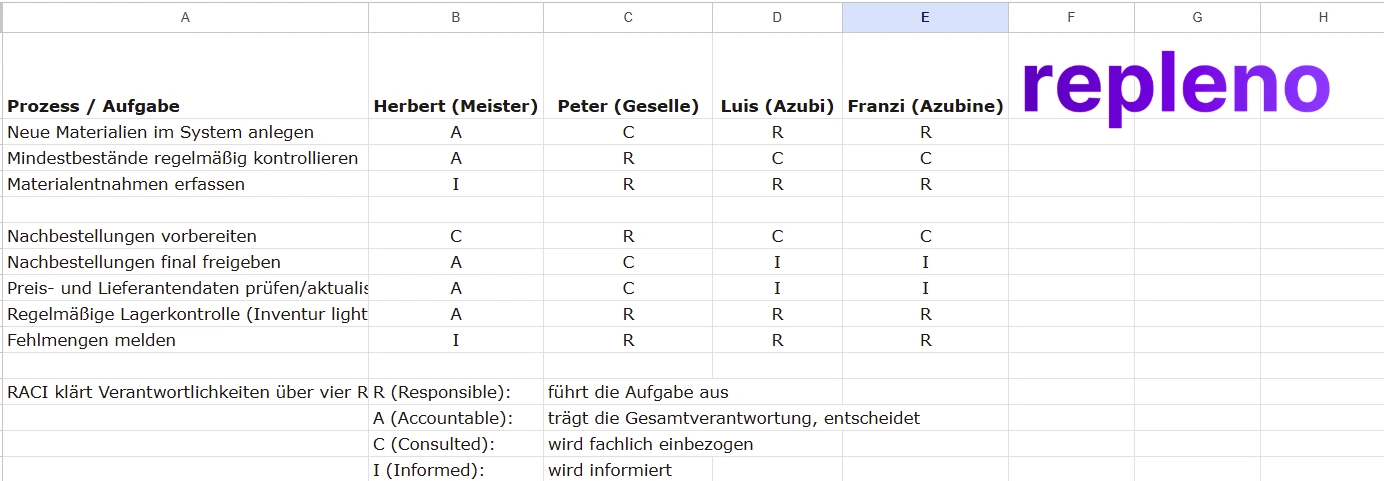
Particularly important is the regulation for exceptional situations. What happens when the person responsible for the stockroom is on holiday? Who steps in when somebody falls ill? These cover arrangements should be documented so the system keeps running in unforeseen situations too. A good system is robust enough to survive staff turnover.
Missing Inventories
Many businesses treat digital inventory management as a perfect system that needs no control. Reality looks different: Even the best system can only be as good as the data it contains. If withdrawals are not recorded consistently, if deliveries are booked incorrectly, or if material is damaged and has to be scrapped, the digital stock drifts away from the real stock.
Regular inventories balance these deviations. How stocktaking in the trades runs is covered in its own article; for most businesses an annual full count is enough, supplemented by spot counts on important materials. Modern inventory solutions make inventories easy: With the smartphone, shelves are walked through, every article is scanned, and the actually counted quantity is entered. The system automatically compares with target inventory and shows deviations.
These inventories should not be seen as a bothersome duty but as quality control of the entire system. Large deviations show that processes are not working. Maybe employees are not recording their withdrawals consistently, maybe there is shrinkage through theft or damage. The inventory makes these problems visible so countermeasures can be taken.
Incorrect Inventory Location Labeling
A digital inventory system is only efficient when physical reality reflects the digital information. If the system says a material is in shelf 3 but it is actually in shelf 7, the system becomes a source of frustration instead of efficiency. Employees lose trust and fall back on the old methods.
The solution begins with clear, logical inventory location labeling. Shelves should be numbered, compartments unambiguously labelled. A system like "R3-F2" for Shelf 3, Compartment 2 is simple and works. More on that in naming bin locations. This label should be attached physically to the shelf and stored in the digital system. When material is moved, both the physical position and the digital record have to be updated.
It's helpful to assign materials fixed standard locations. Cables always live in one area, tools in another, small parts in a third. This consistency makes not only finding easier, but also tidying up and stocktaking. New employees or temporary workers can orient themselves faster when a clear system is recognizable.
Fixed spots are the precondition: how to organize your stockroom.
Costs of Modern Inventory Management Without ERP Systems
Monthly License Costs
License costs of specialized inventory management solutions are comparatively low. Instead of a full suite, you pay only for the one building block you actually need, usually a manageable monthly fee in the double digits. Even at the upper end, annual costs stay a fraction of what an ERP with its implementation project, or a full trades software suite on subscription, costs.
What matters is what a provider ties the price to. Models based on feature scope or the number of managed articles grow with actual demand: simple inventory tracking costs less than a solution with automatic ordering, multi-site management, and detailed reporting. Seat-based models, by contrast, charge per user, so the bill rises with every additional employee, regardless of how intensively they use the software. It's also worth watching for hidden costs: are there fees for updates? Does support cost extra? Are there minimum contract terms?
The low costs should not obscure the value of the solution. Even a cheap inventory solution can produce substantial savings when it is used consistently. The investment of fifty euros per month often pays for itself when a single material shortage on a construction site is prevented. The cost of an emergency order at the wholesaler, the driving time, and the project delay usually exceed the monthly fee by a wide margin.
Hardware Costs (Scanners, Smartphones)
In addition to software costs, hardware costs may arise. The good news: in many cases no additional hardware is needed. If employees already have company phones, those can be used for inventory management. The phone camera is entirely sufficient for scanning barcodes. No additional costs arise.
For businesses that don't yet have smartphones in use, an investment makes sense. A solid mid-range phone costs around three hundred euros and lasts for years. For demanding environments with dust, moisture, and drops, rugged outdoor phones start at about four hundred euros. That investment pays off quickly, because the devices are useful beyond inventory management: communication, project documentation, digital time tracking.
Dedicated barcode scanners are optional. They speed up scanning and are sometimes more practical than phones in dusty environments. Simple scanners start at around a hundred euros, professional industrial ones cost up to three hundred. For most trade businesses, this investment is not strictly necessary. Smartphones are completely sufficient for the start. Scanners can be added later when daily practice shows they would further improve the workflow.
Time Savings as ROI
The return on investment of an inventory management solution can be concretely calculated. Take an average trade business with five employees. Before digitizing, each employee spent about fifteen minutes a day searching the stockroom, checking stock, and documenting by hand. That is roughly six hours per employee per month, or thirty hours monthly across five people.
With digital inventory management, this effort reduces to about five minutes per employee per day, so about two hours monthly per person or ten hours total. The time saved is twenty hours per month. At an average fully loaded rate of fifty euros per hour, that is a saving of a thousand euros monthly, against software costs of maybe forty euros: a multiple of the investment.
Added to this are indirect savings: fewer material losses, fewer emergency orders at inflated prices, fewer project delays, better customer satisfaction. These factors are harder to quantify but contribute substantially to the bottom line. Businesses that have introduced inventory management regularly report that the investment paid for itself entirely within the first three to six months.
A simple ROI calculator puts a number on your savings potential.
Key Metrics for Inventory Management in Trades
Once you've introduced inventory management, you need to measure whether it's actually working. Four figures are enough to start: inventory turnover rate, stockout rate, inventory coverage and inventory discrepancy. Which target values are realistic for which trade is covered in the inventory metrics for the trades.
One more number appears in no formula collection: search time per employee. Hard to measure before digitalization, but a short round with the team is enough as a baseline. Ask again after three months. A monthly check is enough to spot trends early and adjust reorder rules accordingly.
Conclusion: Inventory management needs no ERP
Efficient inventory management does not need a complex ERP. Specialized, mobile tools often deliver better results in practice, because they fit how trade businesses work.
The three effects that matter:
- Fewer material losses through transparent stock
- Time saved through automated processes
- Better project planning through reliable availability data
Businesses that start with their 20 most important items and widen the system step by step typically see measurable improvements within a few months. Which hidden costs an unorganized stockroom causes is covered in the guide to reducing warehouse costs in the trades.
For trade businesses that want to check out repleno as their inventory solution: Inventory management for trades with repleno gives an overview of which company sizes and trades it fits.
The next step is digital procurement.