Best Inventory Management App for Trades 2026: 3 Apps Compared
Top 3 inventory management apps for trades in 2026 compared: repleno, Sortly and Lager im Griff. With criteria, pricing and a GDPR check. Written for a DACH audience.
The best inventory management app is the one your team actually uses in daily work.
This article is written for a DACH audience. Pricing, GDPR/DPA, German support and wholesaler interfaces like IDS or Open Masterdata matter here.
Stock visibility where everyone sees what is there and where it is, plus a heads-up before material runs out: repleno (free up to 50 items, from EUR 49/month above that, users included).
Inventory management with strong wholesaler interfaces (IDS, Open Masterdata): Lager im Griff (from EUR 289 net/year).
Visual inventory lists with photos: Sortly (from US$49).
Most important test: create a few items with stock levels. Then give the app to two people in the business and check whether withdrawal, search and replenishment work without training.
In most small trade businesses, inventory runs on Excel, paper slips or word of mouth. The owner knows what is left. So the technician calls from the jobsite: "Do we still have cable duct?" With one or two people, that works. Once several people draw from the same stockroom, missing parts, extra trips and double orders are built in. The Excel vs. app comparison shows why Excel breaks down at that point.
An inventory app puts stock on the phone: everyone sees for themselves what is in the stockroom or the van, and the call goes away. That only works if every employee has access to the stockroom and stock levels and books for themselves. If not everyone books, stock levels are wrong. This comparison is written for small businesses with several employees, where several people draw from the same stockroom. All three inventory management apps are built for teams; they differ in which problem they solve best. There is no single winner for everyone.
Recommendation: which inventory app fits you?
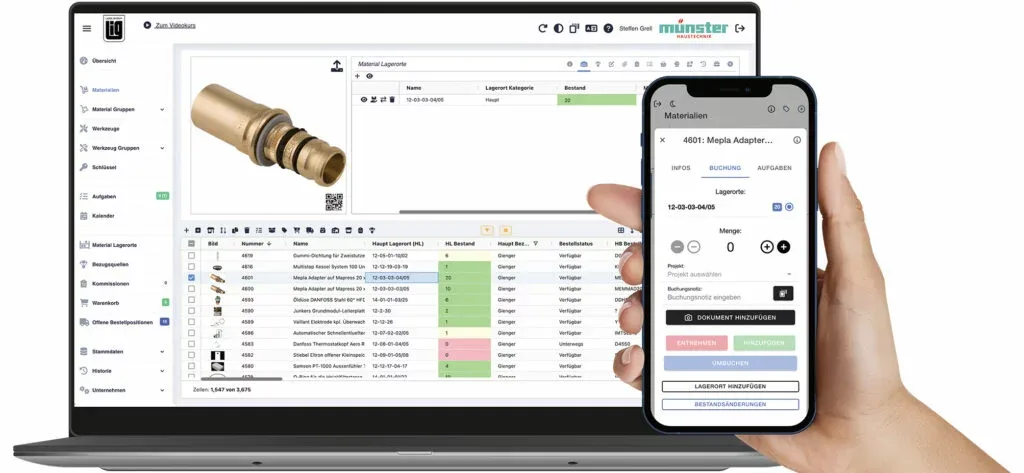
Lager im Griff: order straight from the wholesaler. Orders directly from your wholesaler's catalog, plus tool assignment to employees. Fits if your purchasing runs through a connected wholesaler.
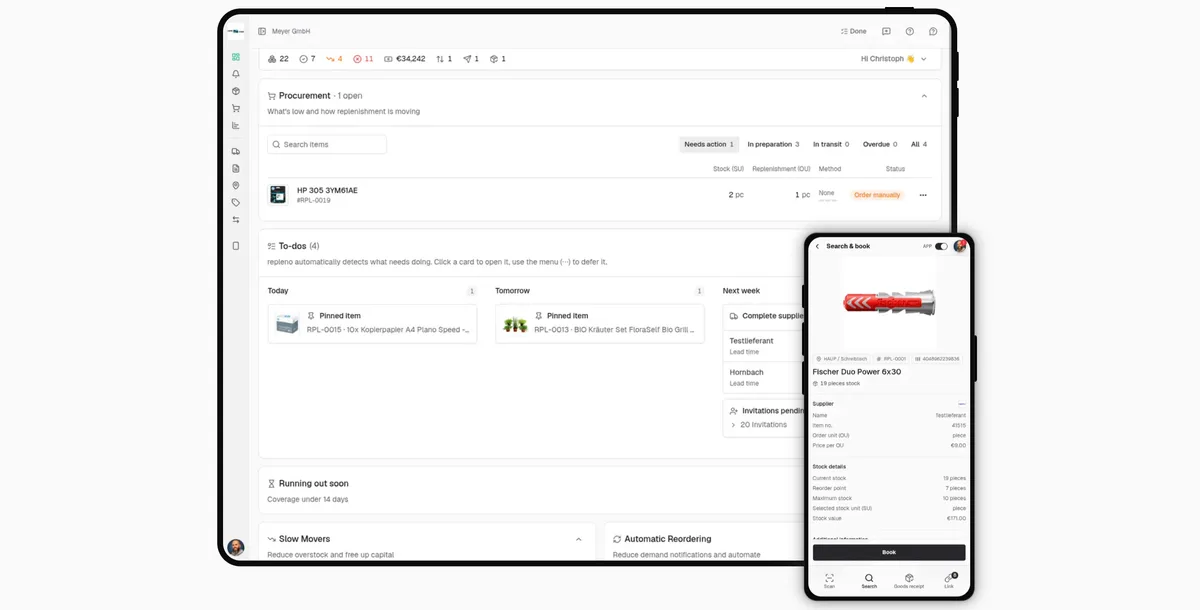
repleno: everyone on the team has the stockroom on their phone and books for themselves. For the call to the owner to go away, every technician needs access. That is why billing is per business, not per user. Personal on-site training can be booked: repleno for trades.
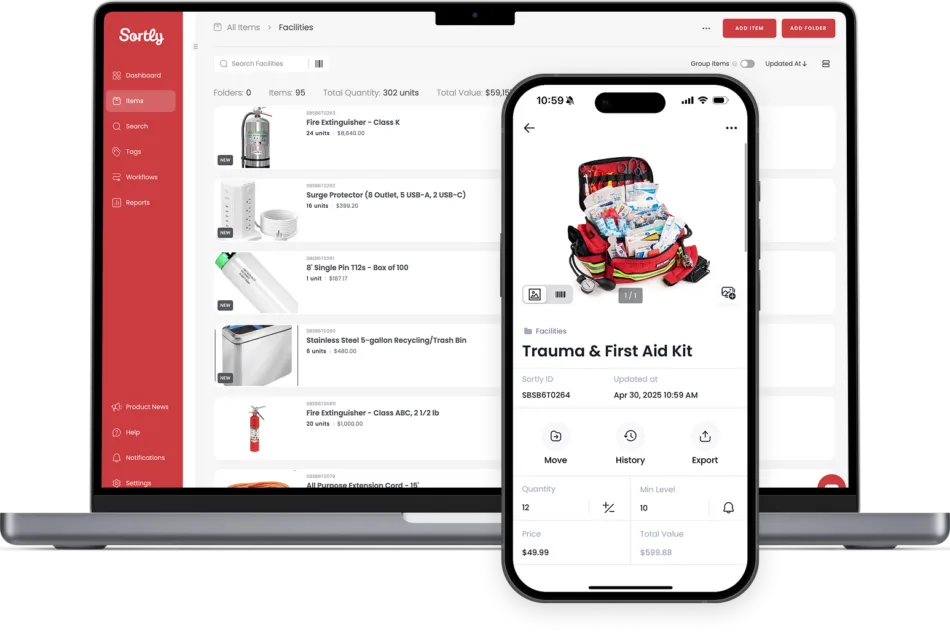
Sortly: inventory with photos. Tools and equipment documented visually, with QR codes. Fits if you want to find tools and equipment quickly.
Transparency note: repleno is our product. There are no paid placements. All information comes from the vendors' public pricing and feature pages (date given) and may change.
How did we evaluate?
Usable without training: Do even the people who dislike software get along with it? Withdrawals by smartphone scan, without extra hardware.
Locations and replenishment: main stockroom, vans, jobsites, and whether the app warns at the minimum stock level or orders by itself.
Cost for the whole team: What does it cost when everyone books, not just the owner? With roles and permissions, so not everyone can do everything.
Onboarding and support: setup help, support language, vendor location and hosting.
The most important test is yours: Give the tool to two people, one who likes apps and one who does not. Both run through a normal day: find an item, book a withdrawal, correct a wrong booking. If only the tech fan manages it, the business will not keep using the tool.
Lager im Griff
Lager im Griff is inventory software from Bonn, Germany, for small businesses.
Fits if: you want to order directly from your wholesaler's catalog and assign tools to employees.
Strengths: Quick setup, simple to use, Excel import. Orders directly with the connected wholesaler. Barcode and QR labels in the software. Weekly office hour and video course.
Multiple warehouses: Yes, centrally managed across several sites.
Limitations: No automatic replenishment; you trigger the order yourself.
Price: EUR 289 (1-3 users) or EUR 789 (4-10 users) net per year, on request above that.
DACH check: German provider, hosting in Germany.
repleno
repleno is inventory software from Bielefeld, Germany, for small businesses.
Fits if: many employees draw from the stockroom and you want to pay per business instead of per user.
Strengths: Simple to use: book by barcode scan on the smartphone in seconds. Labels for items and storage locations in the software. Automatic reordering from the supplier. Guided start online included, on-site training can be booked.
Multiple warehouses: Yes: main stockroom, vans and jobsites.
Limitations: No wholesaler interface.
Price: Free with 50 items and up to 3 users. For one stockroom EUR 588 per year, with multiple locations and automatic ordering EUR 1,188, each regardless of the number of users.
DACH check: German provider, hosting in Germany.
"Our production staff understand right away what to do. Scan the code, enter the quantity, press book. That is all the employee has to do. A booking takes a few seconds." Alexander, plant manager at Horst Filipp GmbH (OMR Reviews, translated from German)
Sortly
Sortly is an inventory app from the USA for small businesses.
Fits if: you want to document and find tools, equipment and accessories with photos.
Strengths: Many photos per item, QR codes, an interface that is quick to understand.
Multiple warehouses: Yes.
Limitations: Focus on documentation, not procurement.
Price: Free with 100 items and one user. US$288 (2 users), US$888 (5 users) or US$1,788 (8 users) per year, on request from 12 users.
Table note: Vendors' list prices for one stockroom, each on the cheapest plan that covers the number of users, with annual billing. Sortly uses an introductory price in the first year. As of 12 Oct 2026.
What matters in the business?
Most businesses do not want a new software landscape. They want to know what is there, where it is and when it needs to be reordered. For an app to deliver that, three things are needed:
One responsible person for storage locations, labels and minimum stock levels.
A small start with the material that runs out most often.
A full trade business suite with merchandise management pays off if you are rebuilding quoting, projects and invoicing anyway. If only the stockroom is the pain, it is usually too big: long rollout, many modules, per-user licenses. Inventory management without ERP works without a complete switch, also in small businesses.
Checklist: questions to ask the vendor
Can I test right away myself, without a demo or sales appointment?
How does my item data get into the system, and can I maintain it on a PC in the browser?
Does scanning work for withdrawals, goods receipt and stocktaking on the smartphone, without extra hardware?
Can I create multiple storage locations and track transfers?
Are there roles and a booking history showing who booked what and when?
Who orders: are there minimum stock levels or automatic orders?
What does it cost if my headcount doubles?
When there is a problem, do I reach a human, in my team's language?
Is it documented where my data is stored and who processes it, and do I get all data as an export on cancellation?
Know a tool that is missing here? Tell us via the contact page. If it fits small businesses, we will add it.
Conclusion: which app fits you in 2026?
Three tools, three promises: Lager im Griff if you order directly from the wholesaler. repleno if your whole team should have the stockroom on their phones and book stock, at one price. Sortly if you want to document and find tools and equipment clearly.
In the end, usage is what counts: if your team books, stock levels are right, and material runs out less often.
Frequently Asked Questions about Inventory Management Apps
What is a simple inventory program?+−
A simple inventory program is lean software focused on managing stock: adding items, tracking quantities and storage locations, booking withdrawals and triggering replenishment. It solves the stockroom problem without forcing you to rebuild the whole business software stack.
What inventory software works when only one person manages the stock?+−
The kind where roles and day-to-day tasks can be cleanly separated: one person (the admin) handles system upkeep (item data, supplier data, goods receipt, material returns and so on). Everyone else only books when they withdraw. Booking a withdrawal, and updating an item's stock with it, takes seconds via a smartphone scan and needs almost no training. One person manages, everyone else just books.
Do I even need an inventory management app as a trade business?+−
With 3-5 employees and more than 50 different items, an app is almost always worth it. The time saved through less searching and automatic stock alerts often exceeds the cost within a few weeks.
What does an inventory management app for tradespeople cost?+−
Specialized inventory management apps typically land between EUR 24 and EUR 50 per month. Check the tariff carefully: users, locations, barcode scanning and replenishment drive the real cost.
Which app is best suited for electrical contractors?+−
Electrical businesses benefit particularly from apps with automatic replenishment or strong wholesaler integrations because they manage many small parts (terminals, cables, fuses).
Can I manage multiple storage locations in one app?+−
In most cases, yes. Make sure you can model main stockroom, vehicle stock and jobsites as separate locations and track transfers.
Is there an inventory management app for both phone and PC?+−
All three apps in this comparison run on the smartphone and in the browser on a PC. You maintain items and master data on the PC with a keyboard and book withdrawals on the phone right at the shelf. With other vendors, check before buying whether there is desktop access besides the phone app.
How important is GDPR compliance for inventory management apps?+−
Important. If you store employee or customer data in the app, you need to ensure it is processed lawfully. For providers outside the EU, review DPA/sub-processors and data locations carefully.
Christoph worked as an electronics technician in industry for five years and saw how missing small parts slow down operations. Later, as a project manager at P.S. Cooperation GmbH (Böllhoff Group), he led system-supported C-parts logistics projects for mid-sized industrial and machine-building companies. Today, he is building repleno full-time, inventory management that helps small businesses detect demand early and automate reordering.
Find out what AI says about repleno.
One click, and ChatGPT, Claude, Gemini or Perplexity give you their take.