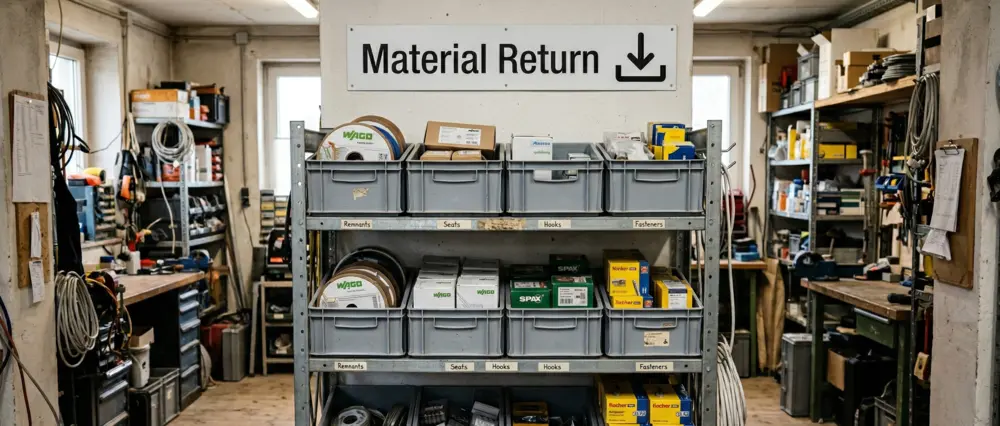
An organized stockroom saves 2-3 hours of search time per week and pays for itself in under 5 months.
Don't treat everything the same: 20% of items cause 80% of the trips. Only those belong at grab height, the rest go up top or to the back.
C-parts need no counting: for loose bulk the empty bin is the reorder signal (Kanban), for whole packs a reorder point.
No ERP project needed: a simple inventory app is enough for small teams, and the full suite is oversized.
First step this week: time your search minutes and flag the 20% fast movers.
Clearing stockroom chaos: the quick guide
Three steps bring any chaotic stockroom under control, whether it's an electrician's workshop, a painter's store, a bakery, or a retail back room.
Declutter and sort. Pick up every item once, throw out anything broken or dead. Split by ABC analysis: fast movers to the front at grab height, slow movers to the back.
Fixed locations and clear labels. Every item gets a unique address (zone, rack, level, bin) and a readable label. No part without a place, no place without a label.
Track stock digitally. Set minimum and reorder points, book withdrawals on mobile. A simple stockroom app is enough for this.
The full guide, with zone plan, methods (Kanban, min-max, Ground Zero), cost breakdown, and 7-phase checklist, follows below.
Giving away 2.5 hours per week?
Monday, 7:15 a.m. A rush job is waiting, but the required circuit breakers are nowhere to be found. 20 minutes of searching, annoyed teammates, deadline pressure. According to the IHK Nord Westfalen, trades businesses lose an average of 2-3 hours per week due to inefficient warehousing. That’s more than 120 hours per year.
According to the German Confederation of Skilled Crafts (ZDH), more than 60% of small trades businesses still operate without structured inventory management. Wrong orders, duplicate orders, and unnecessary trips to the wholesaler cost €3,000 to €8,000 per year on average. The BG BAU also flags the safety risk: chaotic storage areas create trip hazards and blocked escape routes.
How to spot chaos in your stockroom
Before you rebuild, take an honest look: which of these symptoms apply to your stockroom? The more that do, the more urgent the need to act.
Searching instead of working: Team members constantly ask "Where is this?" or call in from the road.
Duplicate orders: Material gets reordered although it is still there, just not findable.
Empty bins without warning: A part runs out and nobody notices until the job is on.
Drop-anywhere clutter: "I'll just put it here for now" has become the permanent solution, everyone has their own logic.
Expired or dead stock: Opened containers, expired sealants, parts for equipment that no longer exists.
Nobody is responsible: When order is "everyone's" job, it is no one's.
Inventory takes forever: The annual count becomes a major operation with scraps of paper and guesswork.
One or two points are normal. From half of them on, your stockroom works against you, not for you.
What is stockroom organization?
Stockroom organization is the physical and procedural structure of a warehouse: fixed locations for each material, clear zones, unambiguous labeling, and defined processes for goods receipt, picking, and returns. It is the foundation of any inventory management, meaning the digital stock tracking in software or lists. Without physical order, every booking fails because the digital state no longer matches the real one.
Stockroom organization or stockroom optimization?
The two terms describe two phases. Stockroom organization is the one-time setup of the structure: defining zones, assigning fixed locations, labeling. Stockroom optimization is the ongoing fine-tuning afterward: shortening walking paths, adjusting stock to real consumption, moving A-items closer to the workbench, and clearing out dead stock. Once you have organized your stockroom, readjust it once per quarter based on your consumption figures.
What types of stockroom organization exist?
In practice, there are three basic forms: fixed-location, free (chaotic), and a mix of the two.
Form
Upside
Downside
When it fits
Fixed-location storage
No software needed, the team memorizes where things go
Floor space used less efficiently, a slot stays reserved even when empty
Small trades warehouse, stable range
Chaotic storage (dynamic, free-slot)
Best use of floor space, software assigns the next free slot
Every movement must be booked digitally, nothing is findable without the system
Many items, high throughput, digital booking already in place
Hybrid model
Fast movers fixed and within reach, the rest flexible
Two sets of rules to maintain in parallel
Growing range with clear fast movers
For most trades businesses, fixed-location storage with ABC zones is the right choice.
Core principles of stockroom organization
A stockroom system that actually works is built on three principles, regardless of trade or company size.
Movement-based ABC: fast movers vs. special items
For bin-location assignment you use a movement-based ABC breakdown by withdrawals or picks. A-items (fast movers) are typically 20% of your items, but account for about 80% of movements. The classic ABC analysis in the warehouse sorts by consumption value instead and supports purchasing and inventory control. An expensive, rarely used spare part is an A-item there, but a C for bin-location assignment.
Category
Share of items
Share of movements
Best location
A-items (fast movers)
approx. 20%
approx. 80%
Grip height (80-160 cm), closest to workshop/exit
B-items (medium movers)
approx. 30%
approx. 15%
Mid shelf levels, central position
C-items (slow movers)
approx. 50%
approx. 5%
Upper/lower levels, peripheral areas
For an electrical business, A-items are often cables, circuit breakers and terminal blocks. For HVAC/plumbing, pipes, fittings and seals.
FIFO principle: first in, first out
With FIFO, older stock always goes out before newer stock. This matters most for items with expiry dates like sealants, adhesives, and silicone. Here's how: store new goods behind existing stock and always pick from the front. Write the receiving date on the packaging.
Fixed locations and clear labeling
Every item needs a defined bin location. The Z-R-E-F schema (Zone, Rack, Level, Compartment) is a pragmatic approach for small stockrooms: a location like “L1-R3-E2-F5” clearly identifies zone L1, rack 3, level 2, compartment 5. We cover how to label your shelves correctly in a separate guide.
Lean management in the warehouse: systematically reduce waste
In the warehouse, only what moves material flow forward counts. Any action that merely ties up time, space, or distance without bringing the job closer to completion is waste in Lean terms, called muda. The principle comes from the Toyota Production System that Taiichi Ohno developed in the 1950s, and it works in a five-person shop just as well as in large-scale logistics.
The point is not to push the team to work faster. It is to spare them unnecessary walking, waiting, and back-and-forth questions. If you already use fixed locations, ABC zones, and reliable replenishment, you are essentially doing Lean without calling it that. The international term for it is lean warehousing, meaning the same idea of a lean, well-organized stockroom.
The eight wastes in the warehouse
Lean recognizes seven classic types of waste plus an eighth: unused employee knowledge. In the warehouse, these are the ones that matter most. Each can be tackled with the same measures this guide already describes.
Waste
Typical sign
Countermeasure in your business
Searching
"Where is it?", constant calls to the stockroom
Fixed locations with clear labeling, A-items at grab height
Long distances
Fast movers sit far from the workspace or exit
ABC zones, fast movers up front
Waiting
Material is missing, the job stalls
Reorder points and min-max replenishment, Kanban
Excess stock
Full shelves, tied-up capital, old opened packages
Set a maximum stock level, measure usage, two-bin system for loose bulk
Extra handling
Goods get moved around multiple times
Put goods straight into their fixed location, picking zone for projects
Defects and rework
Wrong picks, stock doesn't match the system
Book every withdrawal, use unambiguous labels
Unused knowledge
Only the boss knows where things are
Area ownership, documented locations instead of memory
The 5S method in the warehouse
5S is the most practical entry point into Lean. The US Environmental Protection Agency describes it as a way to cut waste and keep work areas stable through order and visible standards. The five steps land in the warehouse exactly where this guide already focuses:
Sort: Remove what isn't needed. This is the first step of any stocktake and the core of the Ground Zero reset below.
Set in order: Give every item a place based on how often it's accessed. That is exactly what ABC zoning does.
Shine: Cleaning makes problems visible. In a tidy stockroom, empty compartments and broken bins stand out immediately.
Standardize: Fixed rules for goods receipt, picking, and replenishment so good routines don't depend on chance.
Sustain: Keep the standards alive over time. That needs clear owners, such as area champions, and a regular quick check.
Structuring storage zones correctly
Zoning decides how fast your team reaches the material. Divide your storage area into clearly separated zones.
Zone A: high-frequency area (fast movers)
Consumables for daily jobs. Place at grip height and near the door. Examples: screws, cables, seals, pipes, connectors.
Zone B: medium-frequency area
Items needed weekly or monthly. Further inside the stockroom but still easy to reach. Examples: special tools, seasonal items, project-specific material.
Zone C: slow movers and special items
Rarely needed spare parts and special items. Can be stored higher or further back. Examples: spare parts for machines, custom-made items, reserve stock.
Additional areas:
Goods receipt zone: receiving and checking deliveries (see goods receipt section)
Picking/kit area: staging materials for jobs and projects
Drop zone: for crew material returns (see drop zone section)
Area X: unsorted material without a defined location yet (introduced during Ground Zero)
These areas also separate two material streams. Standard material is daily-use stock (screws, cables, seals) and lives permanently in the ABC zones. Project material is ordered for one specific job and does not belong on the shelf; it goes into the picking area per project so it never blends into the base stock. Mix the two and you burn project material on everyday work, then come up short when the job starts.
Always store heavy materials at the bottom (below 60 cm). Store hazardous materials separately, lockable, with drip trays/containment.
Organizing the stockroom in retail
In a shop, the same item sits in two places: on the shelf out front and in the stockroom behind it. In the large out-of-stock study of grocery retail (Gruen, Corsten and Bharadwaj, 2002), roughly a quarter of empty shelf spots had the goods already in the store, just not out front. So give every item a fixed spot in the back and sort the stockroom by the same product groups as the sales floor, so even a part-time helper finds the right box. Before you reorder, count the back too, or you reorder goods that are already sitting in the stockroom.
Organizing a small stockroom: what matters on little floor space
The zone setup above assumes space a 20-square-meter stockroom does not have. The logic stays, the scope shrinks. Instead of three separate zones, two are enough: a grip area for the fast movers at eye and hip height, and a remainder for everything rare, higher up and lower down. The drop zone shrinks from its own area to a labeled shelf by the door, the picking area to a single surface you clear between two jobs.
On little floor space, height is what counts. A tight stockroom gains its room upward: tall racks, heavy items at the bottom, light and rarely used ones above. Anything you do not touch at least monthly moves up to the top row or into a box with a contents list on the lid. That keeps the expensive space within reach for the items that actually save you the walk.
Organizing small parts in the stockroom
Screws, wall plugs, clips, fuses: small parts cost time because they are hard to count and easy to misplace. How you store them depends on the unit in which they leave the stockroom. Whatever a technician takes as a whole pack, the box of wall plugs for the van or the site, stays in its packaging and needs no bin of its own. Only what gets withdrawn loose, handful by handful at a fixed location, is decanted into open-front bins. Then it goes: uniform bins, open at the front, fill level visible at a glance, and the label sits on the bin, not the shelf compartment, so it travels along when you rearrange.
Small parts are not counted in either case. Whether the empty bin gives the reorder signal or a reorder point on the whole pack depends on withdrawal unit and consumption. Which method pays off for which item is covered in the Kanban section below.
Min-max stock and reorder point
The reorder point is the quantity at which a replenishment order is triggered, either as an order proposal that someone reviews and approves, or as an automatic order with no further step. Together with minimum and maximum stock, it drives every replenishment.
Term
Definition
Example (circuit breaker B16)
Minimum stock (safety stock)
Buffer for unexpected additional demand
10 pcs
Reorder point
Trigger for reordering = minimum stock + consumption during lead time
25 pcs
Maximum stock
Upper limit (capital and space constraint)
100 pcs
At 5 circuit breakers per day and a 3-day lead time, the reorder point lands at 25 pcs. To derive the value for your own material, the reorder point calculator does it in seconds. When a fixed reorder point is not enough, a min-max system adds an upper bound on top.
Kanban in a trades stockroom
Kanban is a visual replenishment system from the automotive industry: an empty bin or a card triggers the reorder, entirely without software. How to introduce the two-bin system, size the bins, and set up the cards is covered step by step in the Kanban guide for the trades stockroom.
For stockroom organization, what matters most is where the effort pays off. Kanban comes from manufacturing, where single parts are pulled loose from an open bin on the line, piece by piece. In the trades, the choice comes down to two practical questions: in what unit do you withdraw the material, and how is it handled?
At a fixed workbench or in the workshop, where the bin sits within reach, loose withdrawal works: single cable ties, clips, screws, and the empty bin is the signal, with no counting. Once you stock your technicians and their vans from the stockroom, you don't want loose parts flying around the van. Then you reach for the whole pack, a box of cable ties or screws. You can keep those in bins too, as a swap-bin system. The bins just rarely justify their cost when they only hold whole packs. A reorder point is usually enough here: book the quantity out at withdrawal and reorder once it is reached. For expensive A-items or volatile usage, a min-max system sets the upper and lower bounds. A full overview of procurement methods for consumables is in our methods guide.
Goods receipt and picking
Goods receipt is one of the most critical stockroom processes. Errors at intake ripple through the entire system.
Goods receipt in 3 steps
Step 1: Check the delivery. Compare delivery and packing slip: item, quantity, condition. Document damage immediately and file claims.
Step 2: Book the stock. Record delivered items in the system (app, scanner, or document scan). Without booking, your digital stock will never match reality.
Step 3: Put away goods. Every item goes to its defined location. Store new goods behind existing stock (FIFO). Dispose of packaging immediately to avoid clutter.
Picking/staging for projects
For larger jobs, a dedicated picking area helps: stage materials for the next day or project. That saves valuable minutes in the morning and reduces the risk of missing items.
Managing van inventory digitally
For many trades businesses, service vehicles are the “everyday stockroom”. Items are split between the van, the jobsite, and the main stockroom. The challenge: nobody knows what is where.
Treat vehicles as separate locations
Make each service vehicle its own storage location in your system (e.g. “Sprinter-01”, “Caddy-Meier”) and assign its own minimum stock levels. That way you see in real time what is stored in which vehicle.
Practical tips for van inventory:
Define a standard kit per vehicle (assortment + minimum quantities)
Set fixed places inside the vehicle (tool bag, material boxes, rack compartments)
Book withdrawals directly via smartphone app on the jobsite
Plan a weekly restock slot (e.g. Friday noon)
According to estimates from “Mittelstand-Digital Zentrum Handwerk”, service technicians spend 15-20 minutes per day searching for items in vehicles. That’s more than 60 hours per year. A structured van inventory can reduce this to under 5 minutes per day.
Ground Zero: reorganize the stockroom from scratch
If the stockroom has grown organically for years and nobody can keep track anymore, “tidying up” won’t fix it. In that case, experienced storage specialists often recommend a Ground Zero reset: a full restart.
Why Ground Zero works
Half measures fail because old habits stay in place. With Ground Zero, you empty the entire stockroom and rebuild the system from the ground up. It’s radical, but it saves a lot of time long term.
Ground Zero in 3 steps
Step 1: Full reset. Empty the stockroom. Set up a container or staging area for scrap/obsolete items. Handle every item and decide: keep (active need), discard (broken/outdated), or clarify (Area X).
Step 2: Set up the new system. Define zones (A, B, C), set fixed locations, and label each bin location. Use the Z-R-E-F schema for clear location codes.
Step 3: Establish rules. Pick only from defined locations. Return items to the same location. An empty bin triggers replenishment. Resolve Area X weekly (every item gets a location or gets discarded).
Time requirement: for 5-10 employees and ~500 items, plan one weekend (Saturday + Sunday) or two consecutive workdays. Businesses report 40-60% less search time within the first week after the reset.
Team structure and stockroom ownership
Even the best system fails without clear responsibilities. Who triggers replenishment? Who checks goods receipt? Who ensures order is maintained?
Area ownership: the team model (5-15 employees)
In small teams, a single stockroom owner often doesn’t have enough capacity. Area ownership works well: each employee becomes responsible for a zone or item group.
Example: employee A owns electrical items, employee B plumbing items, employee C consumables. Each owner keeps order, triggers replenishment, and performs cycle checks for their area.
A dedicated stockroom person: part-time or mini-job (from 10-15 employees)
Area ownership works as long as the owners are actually in the stockroom. From 10 to 15 employees, that breaks down: the crews are out all day. Material comes back in the evening, picking has to happen in the morning, and a delivery arrives in between. If nobody handles it exclusively, bookings pile up, returns end up unsorted in the corner, and the boss steps in (again).
I’ve seen it in practice: one dedicated stockroom person, even as a mini-jobber, changes the dynamic completely. Checking goods receipt, keeping bookings up to date, returning and sorting crew material, preparing orders. These are not strategic tasks. But without someone who does them reliably, every system drifts back into chaos within a few weeks. Here’s the truth: the most expensive stockroom worker is the one you don’t have.
The biggest lever for a dedicated stockroom person: they can work the drop zone (see next section) continuously and keep the material loop running.
One caveat: the person doesn’t need to be a skilled tradesperson. Every task is clearly structured and easy to learn. Reliability and care beat trade expertise. A part-timer or mini-jobber with a fixed stockroom slot each day is enough.
Drop zone: frictionless material returns
A common problem: crew members return from a job site and put leftover material wherever. The next morning, someone else searches for those exact parts. The solution is a drop zone: a defined area in your stockroom where returns are simply placed. No sorting, no searching for the right bin. Drop, done.
This works at any team size:
Small teams (3-5 employees): The area owner or boss sorts the drop zone once a day or on Fridays. Takes 10-15 minutes.
Medium teams (5-15 employees): Each area owner handles their item group. The electrical owner takes the cables, the plumbing owner the fittings.
10-15+ employees with dedicated help: A part-time stockroom person processes the drop zone continuously. The loop becomes complete: crew picks from stock, goes to the job site, drops returns. The stockroom person sorts back and books inventory.
In the next stage, the stockroom person prepares materials for the following day. In the morning, crew members pick up their pre-assembled kits and head straight to the site. No searching, no assembling, no wasted time.
Dedicated stockroom staff (50+ employees)
From around 50 employees, a dedicated stockroom role can pay off. This person owns the full flow: goods receipt, put-away, picking, stock maintenance, and inventory. The IHK recommends defining the role clearly and allocating time budget.
Enforcing withdrawal rules
Withdrawal rules decide whether stock levels and bin locations still hold up after every pick. Post the key rules visibly in the stockroom:
Pick items only from the defined bin location
Book the quantity in the system (app or scan)
Return the bin/container to the correct location
Mark empty bins or trigger replenishment
Put new deliveries away to their location immediately
For the third rule to hold, movable containers carry their own location ID: a bin put back in the wrong spot then sits visibly out of place and gets noticed right away, not only at the next stock count.
Implementing a labeling system
Which labeling level fits your business?
Level 1: basic (up to ~5 employees)
Simple labels with item description and color coding by trade. Cost: approx. €50-100.
Level 2: advanced
Numbering system with Z-R-E-F location codes (e.g. R3-E2-F15) and printed labels. Cost: approx. €200-400.
Level 3: digital (recommended)
Barcodes or QR codes linked to an inventory app with a built-in barcode scanner, mobile scanning and booking, automatic stock updates. Cost: approx. €500-1,500 including software. A comparison of RFID vs barcode vs QR code is available in our technology guide.
Digital inventory management: choosing the right time
In its materials management guidance, the IHK recommends digital systems for more transparency and traceability. For most businesses, going digital with inventory management is now just a matter of timing.
8 benefits of digital inventory management
Real-time stock visibility: always know what is where
Automatic reorder points: warnings before items run out
Traceable bookings: who took what and when?
Order/project allocation: assign material costs directly
Fewer stockouts: less emergency buying at higher prices
Faster inventory: scanner-based instead of paper lists
Mobile access: stock data available from van/jobsite
Supplier integration: reordering directly from the system
Which system class fits your business?
The right tool depends on company size, budget, and requirements. In practice, three classes matter most:
System class
Best for
Effort
Typical costs
Spreadsheet-based (Excel, Google Sheets)
Getting started, 1-3 employees
Low
Free
Specialized inventory app
Small to mid-sized teams (2-20 employees)
Low to medium
€20-100/month
Full ERP / inventory suite
Larger businesses (10+ employees) with accounting integration
High
€100-500/month
Important: Full ERP suites are often oversized for small trades businesses. They require extensive setup and training and provide dozens of features you won’t use. For most small to mid-sized teams, a simple inventory app is sufficient.
Sample calculation for a trades business with 5 employees:
Item
Cost
Heavy-duty racks (5 units)
€750
Stacking bins and containers (100 pcs)
€400
QR code/barcode labels and printer
€250
Inventory software (annual subscription)
€500
Setup labor (40 hours @ €50)
€2,000
Total initial investment
€3,900
Ongoing costs per year: software subscription from €500, label refill ~€50, maintenance/optimization ~€200. Total: ~€750/year.
Expected savings and ROI
Time saved per week:
Reduced search time: 2.5 hours × €50/hour = €125
Faster job preparation: 1 hour × €50/hour = €50
Weekly savings: €175
Projection per year: €175 × 48 weeks = €8,400
Additional savings: fewer duplicate orders (~€1,500/year), less emergency purchasing (~€800/year), less spoiled/outdated material (~€500/year).
Total savings per year: ~€11,200
Here's the thing: setting up a stockroom system is a one-time effort. The savings run every week after that. At €3,900 upfront and ~€10,450 net savings in year one, payback takes under 5 months. From month 5 on, the system earns money.
The math above only holds if the system survives daily use. These seven mistakes are what most often bring it down.
Mistake 1: unclear or missing labeling
Problem: labels fade, are illegible, or missing. Solution: use durable labels. Add QR codes/barcodes as machine-readable backup. Check labels during quarterly spot inventories.
Mistake 2: systems that are too complex
Problem: nobody understands the system, so it won’t be used. Solution: keep it simple (max. 3-4 zones, intuitive rules). If a new hire can’t learn it in 15 minutes, it’s too complex.
Mistake 3: lack of consistency in the team
Problem: some follow the rules, others don’t. Solution: clear rules, hands-on training, positive reinforcement. Area ownership increases accountability.
Mistake 4: spontaneous “temporary solutions”
Problem: “let’s put it here for now” becomes permanent. Solution: defined goods receipt zone and an Area X for unsorted items. Resolve Area X weekly.
Mistake 5: no regular checks
Problem: the system drifts after a few weeks. Solution: daily 5-minute checks, weekly reorder review, monthly A-item cycle counts.
Mistake 6: wrong bin-location assignments
Problem: heavy items up high, fast movers far away. Solution: apply ABC analysis consistently. Fast movers at grip height, heavy items below 60 cm.
Mistake 7: delaying digitization
Problem: spreadsheets aren’t maintained, paperwork persists. Solution: invest early into a simple mobile inventory app. Setup takes a few hours and pays off immediately.
Checklist: your roadmap to an optimal stockroom
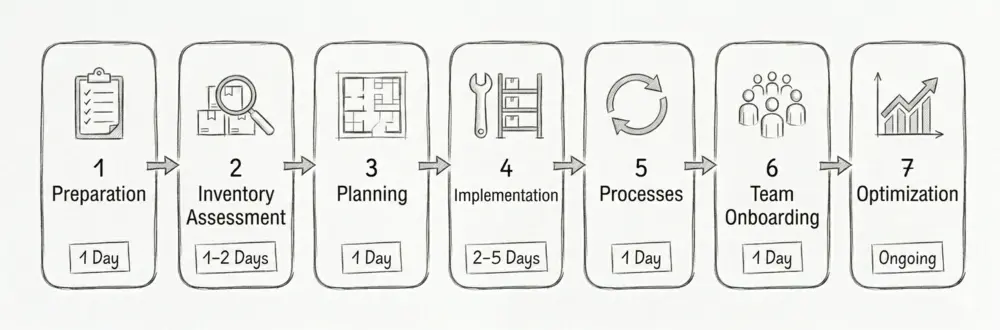
Phase 1: preparation (1 day)
Photograph the current state (before/after proof for the team)
Inform and involve the team
Create a realistic schedule (1-2 weeks)
Set a budget and assign stockroom ownership
Phase 2: inventory (1-2 days)
Record full inventory; discard broken/outdated items
The BG BAU provides clear requirements that every trades business must follow.
Employer obligations:
Keep walkways at least 1 m wide and clear
Install racks stable and load-rated (label maximum load)
Store heavy loads below 60 cm
Inspect racks annually and document the results
Provide sufficient lighting (at least 200 lux)
Keep escape routes clear
Hazardous materials (TRGS 510): store separately and lockable, use drip trays/containment for liquids, keep hazard labeling and safety data sheets accessible, and observe maximum allowable quantities.
Documentation duties: inventory lists for hazardous substances, rack inspection logs, and proof of employee safety instruction must be available.
Conclusion: your path to an efficient stockroom system
Stockroom organization is an investment that typically pays back within a few months. Combining clear spatial structure (zones, ABC logic), consistent labeling (Z-R-E-F, barcodes), proven methods (Kanban, min-max, Ground Zero), and digital stock handling cuts search time significantly and saves thousands per year.
Next steps:
This week: analyze the current state and measure search time
Next week: set a budget and evaluate inventory tools
Within a month: complete inventory and set up the first zone (or start Ground Zero)
After 3 months: system established, measure results and refine
It’s worth it. Trades businesses that implement stockroom organization consistently report less stress, higher productivity, and better planning. The best time to start is now.
What a disorganized stockroom really costs your business, and which hidden cost drivers most trades owners overlook, is covered in our guide to lowering warehouse costs.
FAQ: The most common questions about stockroom organization
How long does it take to set up a new storage system?+−
It depends on stockroom size and item variety. For a business with 5 employees, plan 5-10 working days: 1-2 days inventory, 2-3 days setup, 1-2 days data entry/software, 1 day team training. The time investment typically pays back within a few months through efficiency gains.
Is digital inventory management worthwhile for small businesses?+−
Yes. Even businesses with 2-3 employees benefit from simple mobile solutions. Affordable apps (from a few €/month) already cover the basics: stock overview and reorder points. The time savings often exceed the costs within the first month.
Which materials should I sort first?+−
Start with consumables and fast movers (items you use daily or weekly). They cause the most trips in the stockroom, so the efficiency gain is largest there.
How often should I do inventory?+−
Legally, an annual inventory is required. For efficient inventory management we recommend: full inventory once per year, spot-check inventory quarterly, and monthly cycle checks of A-items. Digital systems make this significantly faster.
What does a complete storage system cost?+−
For a small trades business (3-5 employees), expect €3,000-5,000 initial investment (racks, bins, software, labor). Larger businesses (10+ employees) often invest €8,000-15,000. Payback typically happens within 4-8 months through time and cost savings.
How do I motivate my team for the new organization?+−
Communicate the benefits clearly: less searching means more productive time, less stress, and happier customers. Involve the team in planning. Celebrate small wins and consider incentives (e.g. a team bonus) for successful implementation.
Which software is best for craft businesses?+−
It depends on your needs and how complex your requirements are. In general: the simpler the software, the more likely your team will actually use it. Look for mobile usability, easy setup, and clear stock handling.
Can I organize my storage with Excel?+−
Yes, for a start. But Excel isn’t mobile-friendly, is error-prone with multiple users, has no automatic warnings, and quickly becomes time-consuming. For lasting success, consider switching to a dedicated solution after about 6 months at the latest.
What do I do with materials I only need 1-2× a year?+−
Check whether stocking them makes sense at all. Often it’s more economical to order on demand (just-in-time). If you still store them: keep a separate C-zone, use higher shelves, and review usability once per year.
How do I handle hazardous materials in storage?+−
Hazardous materials (paints, solvents, chemicals) must be stored separately in lockable, labelled cabinets. Follow TRGS 510. Drip trays are mandatory. Keep safety data sheets accessible and ideally documented digitally.
Is a barcode scanner worthwhile or is a smartphone enough?+−
For barcodes and QR codes, a smartphone is usually enough. Modern inventory apps have scanning built in. A dedicated scanner is typically only needed at very high throughput (e.g. 200+ scans/day).
How do I prevent the system from deteriorating again after a few weeks?+−
Define clear responsibilities, run daily 5-minute checks, be consistent, and reinforce good habits. The system has to become routine. A dedicated stockroom owner/champion is key to long-term success.
What is Kanban and how does it work in a trades stockroom?+−
Kanban is a visual replenishment system. In trades it often works as a two-bin setup: when the first bin is empty, you reorder while taking from the second bin. It’s especially suitable for loose bulk like screws, nuts, and small parts that nobody counts individually. Whole packaged units like a pack of plugs are easier to manage with a reorder point.
What does “Ground Zero” mean in stockroom organization?+−
Ground Zero is a complete reset. Instead of “tidying up”, the whole stockroom gets emptied, every item is handled, and everything is put back following a new system. It’s recommended when the stockroom has grown over years and no longer makes sense.
Are there grants for digitization in storage?+−
Yes. Many German federal states offer digitization grants for trades businesses. Ask your Chamber of Crafts about programs such as “Digital Jetzt” (BMWK) or regional funding programs. Often 30-50% of costs are covered.
What is the biggest mistake in storage organization?+−
Starting too complex. Many businesses design overly detailed systems that are then not actually used. Start simple with clear zones and basic processes and improve step by step based on real-world experience.
What are the 4 principles of warehousing?+−
The four classic principles are: cleanliness (no dust or debris), spaciousness (wide enough aisles and staging areas), clarity (clear zones and labeling), and proper storage (each material in a location suited to its properties: hazardous materials separately, heavy loads at the bottom). These principles complement ABC analysis and fixed locations rather than replacing them.
What is lean management in the warehouse?+−
Lean management in the warehouse aligns every step with material flow and reduces anything that only ties up time, space, or distance without moving the job forward. Lean calls such non-value-adding activity waste. Typical levers are fixed locations, short distances through ABC zones, and reliable replenishment via reorder points.
What is the 5S method?+−
5S is a Lean method in five steps: sort, set in order, shine, standardize, and sustain. The goal is a work area that stays stable through order and visible standards. In the warehouse that means removing what isn't needed, giving every item a fixed place based on access frequency, and keeping clear rules in place over time.
Christoph worked as an electronics technician in industry for five years and saw how missing small parts slow down operations. Later, as a project manager at P.S. Cooperation GmbH (Böllhoff Group), he led system-supported C-parts logistics projects for mid-sized industrial and machine-building companies. Today, he is building repleno full-time, inventory management that helps small businesses detect demand early and automate reordering.