

Automatic Ordering
How the four procurement modes in repleno work and what automatic ordering means in practice.
repleno supports four procurement modes per item: manual, demand notification, automatic with approval, and automatic ordering. The mode determines what happens when repleno detects a need.
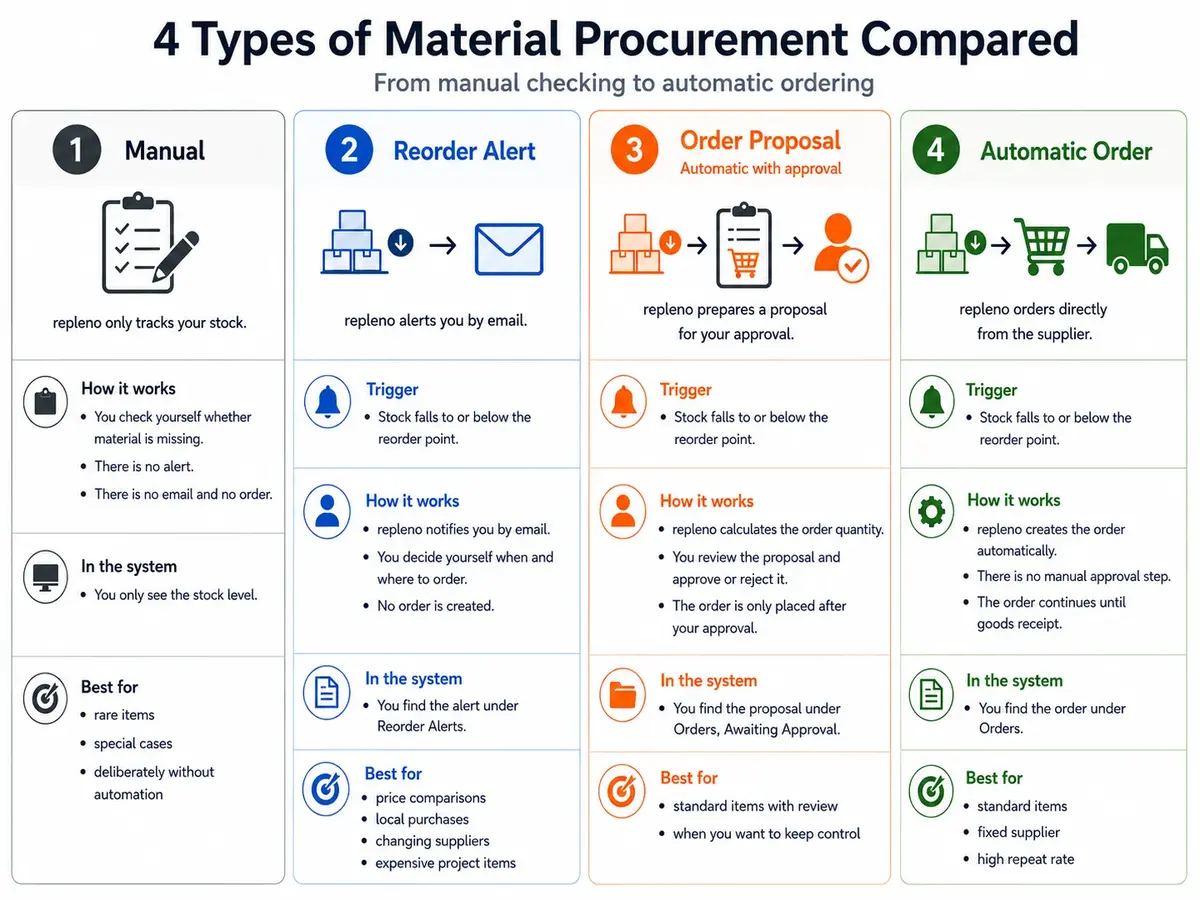
The three procurement levels
| If you want | Use | What happens | Where you find it |
|---|---|---|---|
| repleno only reports demand | Demand notification | You order yourself, whenever and wherever you want. | In Demand Notifications as a DN |
| repleno prepares an order for you | Automatic with approval | repleno creates the order in advance and waits for your approval. | Under Purchase Orders -> Approvals |
| repleno orders by itself | Automatic ordering | repleno bundles the demand and sends the order without manual intervention. | Under Purchase Orders as a PO |
Terminology: The middle mode is conceptually an order proposal. In the UI it is currently labeled Automatic with approval. Functionally it belongs to Purchase Orders, not to Demand Notifications.
The four modes
- Manual: repleno tracks the stock level but does not intervene in procurement.
- Demand notification: repleno reports the need. The employee decides whether, when, and from whom to order.
- Automatic with approval: when a need arises, repleno creates an order proposal and presents it for your approval. The order only goes to the supplier once you have approved it. For items you want to check before they are sent. Until approval, this is not a demand notification but part of the purchase-order flow.
- Automatic ordering: repleno bundles the need per supplier and sends an order at the next dispatch time. No manual intervention required.
Updated: